Written by:


Last Published:
27 June 2026
•
.webp)
Two platforms, almost the same name, and a decision that quietly shapes your next few years of engineering. That is the trap with .NET Core vs .NET Framework. Pick wrong and you either rebuild something that was working fine, or you keep pouring budget into a platform that stopped moving years ago.
Here is the reassuring part. The choice is clearer than the naming makes it look. This guide covers what each platform is, how .NET Framework vs .NET Core actually differ, and when each one earns its place, including the budget and risk side that a non-technical decision-maker has to answer for. Let's compare them.
Quick definitions
Bottom line: use .NET for new server apps, microservices, and cross-platform builds. Keep .NET Framework when an app leans on Windows-only technologies such as Web Forms, WCF, or Windows Workflow.
In brief. For most new work, modern .NET is the lower-risk default. It is cross-platform, faster in independent benchmarks, and the only branch Microsoft still adds features to. The older .NET Framework still earns its keep for stable, Windows-only systems. The harder question is rarely technical. It is commercial. A forced migration carries budget and delivery risk, and staying on an out-of-support runtime carries security and hiring risk. For most enterprises, the lowest-risk route is a phased migration that ships value every quarter, not one big-bang rewrite. The decision matrix, the readiness assessment, and the cost framing below give you what you need to take this to a board.
Both come from Microsoft, and they share a surname, but they are not the same product. Picture .NET Framework as the original house Microsoft built on Windows. Modern .NET is the rebuild that can stand on any ground you like, whether that is Windows, Linux, or macOS. Same family, very different footprint.
Microsoft's own guidance on choosing between .NET and .NET Framework points new server applications towards .NET, and keeps .NET Framework for legacy systems that depend on technologies like Web Forms or WCF.
Definition: .NET Framework
Definition: .NET
Key differences between .NET and .NET Framework
| Feature | .NET | .NET Framework |
|---|---|---|
| Platform support | Cross platform | Windows only |
| App models | ASP.NET Core, MAUI, Blazor | ASP.NET Web Forms, WCF, WF |
| Containers support | Yes (Docker, AKS) | Limited |
| Performance | Higher, due to CoreCLR | Lower in most workloads |
| Support lifecycle | LTS (3 yrs) and STS (18 mo) | Security updates only |
| Side-by-side installs | Yes | No |
That performance row leans on two independent sources: TechEmpower's community-run Web Framework Benchmarks and Microsoft's continuously published ASP.NET results. In TechEmpower's Round 23, ASP.NET Core sits among the fastest mainstream web frameworks tested. Check the live figures at the source rather than trusting a single quoted number, mind you, because the rounds get updated over time.
Summary
For most modern, performance-sensitive applications, .NET is the stronger pick. It handles cross-platform workloads, cloud-native deployments, and containerisation without complaint. So unless a hard constraint pins you to .NET Framework, new development should start on .NET.
Illustrative scenario. A renewable-energy operator builds a real-time asset-monitoring platform on .NET and SignalR, hosted on Azure Kubernetes Service (AKS), which is Microsoft's managed container-orchestration service. The point is predictive maintenance across sites that are scattered all over the map. The scenarios in this guide are composites drawn from common patterns rather than single named clients. For verified, named results, see our case studies.
Choose .NET when:
Workloads best suited to .NET
In short:
The quickest way to choose is to weigh up your technical requirements, your platform constraints, and where you are heading next. For the wider picture, see our guide to choosing a tech stack for software development. Then run your case through the .NET Core vs .NET Framework matrix below.
Decision matrix
| Criteria | Choose .NET | Choose .NET Framework |
|---|---|---|
| Platform support | Cross platform | Windows only |
| Containers and microservices | Fully supported (Docker, AKS) | Limited or unsupported |
| Web Forms, WCF, WF dependencies | Not supported | Fully supported |
| Need for side-by-side installs | Yes | No |
| Use of modern UI frameworks | .NET MAUI, Blazor | Windows Forms, WPF (Windows only) |
| Application is legacy/monolithic | Usually not ideal | Recommended for stability |
| Library compatibility | Compatible with .NET Standard | Legacy libraries only |
| Cloud and DevOps integration | Optimised for CI/CD and Azure | Legacy tooling only |
Quick rules:
Most comparisons stop at a feature table and leave you to do the hard part alone. In our migration work, we use a short, repeatable assessment to turn that table into an actual decision. We call it the Imaginary Cloud .NET Readiness Check. Four questions, one label. It is written for decision-makers, not just engineers.
The four questions
The three maturity labels
Why bother naming the thing? Because consistency. Every stakeholder scores the same four questions, and the label maps straight onto a budget and timeline conversation instead of a technical squabble. This is an Imaginary Cloud framework, and you are welcome to adapt and cite it.
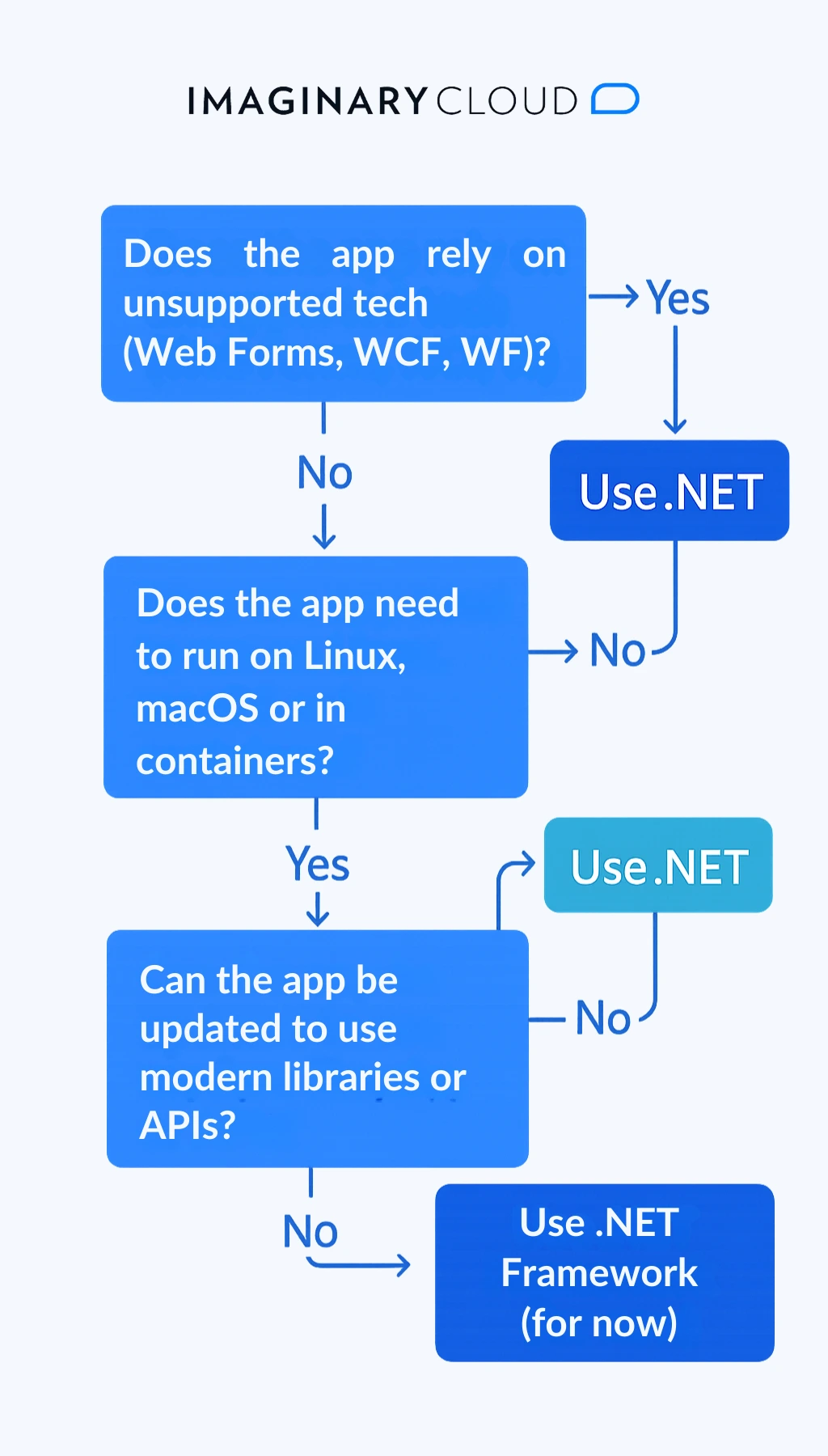
Migrating from .NET Framework to .NET wants a careful, phased approach. Not every application can move, and not every one should, at least not all at once. Treat the checklist below as a way to control risk and protect budget, not just a technical to-do list. Each phase is a checkpoint where you can measure progress, prove value, and decide whether to carry on. And if you would rather not run it in-house, this is the sort of work our .NET development team does day to day.
Migration checklist (5 key steps)
Tools that help migration:
In short:
You rarely have to move everything at once. .NET Standard is a formal specification of APIs that both .NET Framework and modern .NET implement, so a library compiled against .NET Standard 2.0 can be referenced from either side. In practice, that lets you carve shared business logic into .NET Standard libraries and reuse it across an existing .NET Framework front end and your new .NET services while the migration is still in flight. Think of it as a bridge you build before you cross the river.
Two caveats, though. First, .NET Standard covers libraries, not application models, so it will not let you run Web Forms or WCF hosting on modern .NET. Second, .NET Standard is now frozen, since new APIs ship only to .NET. So treat it as a bridge, not a destination.

Choosing a .NET version is partly about features and partly about lifecycle support. Microsoft alternates between Long Term Support (LTS) and Standard Term Support (STS) releases, and that cadence should shape your roadmap as much as any feature list.
Key definitions
.NET support timeline overview
| Version | Release Date | Support Type | End of Support |
|---|---|---|---|
| .NET 6 | November 2021 | LTS | November 2024 |
| .NET 7 | November 2022 | STS | May 2024 |
| .NET 8 | November 2023 | LTS | November 2026 |
| .NET 9 | November 2024 | STS | May 2026 |
Always confirm current end-of-support dates against Microsoft's official .NET support policy before you commit a roadmap, because the cadence advances every November.
Recommendations for enterprises
.NET does cross-platform development, scale-out cloud-native workloads, and performance-sensitive apps well, which makes it a natural fit for the scenarios below.
Cloud-native microservices
Modern web applications
Cross-platform desktop and mobile applications
Illustrative scenario. A healthcare team builds a device-management app with .NET MAUI and Blazor Hybrid to sync medical-equipment data across clinic tablets and remote staff laptops, all from a single shared codebase.
AI, data, and analytics workloads
Illustrative scenario. A financial-services firm folds ML.NET and Azure AI services into a .NET application to support credit scoring and fraud detection during customer onboarding.
IoT and edge computing
Key benefits for enterprises
Staying on .NET Framework is the right call more often than the vendors selling migrations will admit. In our own modernisation work, the costliest mistakes are rarely the delayed migrations. They are the migrations that should never have been scoped as full rewrites in the first place. There are three cases where staying put is the disciplined choice.
A hard dependency on Windows-only app models. Web Forms, WCF server hosting, and Windows Workflow Foundation have no supported equivalent in modern .NET. Porting them is not a recompile. It is a rewrite of that layer, swapping WCF for gRPC or REST, for instance. If those technologies sit at the heart of the app, the migration cost is real and the payback can be years out.
A stable, low-change legacy system. If an application is in maintenance mode, barely changes, and runs on supported Windows infrastructure, the case for moving it is weak. Modernisation budget tends to return more when you spend it on systems that are actively evolving.
Tight third-party or compliance constraints. Some commercial components, reporting engines, or certified integrations target .NET Framework only. Until those vendors ship .NET-compatible versions, moving the host app can break a supported configuration.
The lesson is the same in all three cases. Do not migrate for the sake of it. Isolate the Windows-only dependency behind a clear boundary, keep the .NET Framework app on a supported servicing track, and build anything new alongside it on .NET. That keeps the option to migrate later open, without paying for a rewrite today.
People frame .NET Core vs .NET Framework as a technical call. The bigger consequences are financial. Three costs are worth putting in front of whoever owns the budget.
The budget risk of a big-bang rewrite. Replacing a legacy system in one large project stacks all your chips on a single number. One fixed scope, a long wait before anything ships, and a high chance of overrun.
Two large studies make the risk concrete. The Standish Group's CHAOS research has long found that small software projects succeed around 90% of the time, while large ones succeed less than 10% of the time. Separately, research by McKinsey and the University of Oxford found that large IT projects run, on average, 45% over budget while delivering 56% less value than expected.
The lower-risk alternative is incremental modernisation with the strangler pattern. It spreads cost over time, ships working software as it goes, and lets you stop or re-scope at any phase boundary. You keep your options open instead of betting the year on one delivery date.
The cost of staying on an unsupported platform. Running a runtime past its support window is rarely free. It usually means rising security and compliance exposure, harder hiring for an ageing stack, and a growing pile of workarounds that make every future change slower.
These costs hide well. They do not show up as a line item until an audit, a security incident, or a stalled feature drags them into the light. So treat the support window as a hard planning constraint, not a polite suggestion.
Time-to-value for a phased migration. A phased approach pays you back early and often. New services on .NET can ship and start earning while legacy components retire in sequence, so the returns arrive long before the full migration is done.
When you compare options, compare more than total cost. Compare when the benefits land. A phased plan can deliver its first measurable wins inside a quarter. A big-bang rewrite delivers nothing until the very end.
The hosting and licensing dividend. Here is the cost line most technical comparisons skip. Because modern .NET runs on Linux, you can host it on Linux containers and virtual machines and drop Windows Server licensing on those workloads, which often adds up on high-volume, scale-out services where you run many instances. .NET Framework gives you no such choice, since it is Windows-only and every host carries a Windows licence. For a CFO, that reframes a migration partly as an ongoing infrastructure-cost decision, not just a one-off project cost. The exact saving depends on your cloud provider's Windows-versus-Linux pricing, so model it against your own instance counts.
In practice, this is a question of risk and timing as much as technology, and for most enterprises the phased path carries the least of both.
Building something new? .NET is the stronger default. It is cross-platform, it holds its own in independent benchmarks, and it is where Microsoft ships every new feature. Still tied to Web Forms or WCF? Then .NET Framework stays the right choice until those dependencies are dealt with.
So, .NET Core vs .NET Framework, in one line: build new on modern .NET, keep .NET Framework only where Windows-only features genuinely pin you down, and migrate in phases rather than gambling the year on a single rewrite.
The bottom line:
Once you've settled on modern .NET versus .NET Framework, the harder question is often who builds it. If you'd rather bring in a team than staff this yourselves, here are the .NET development companies we rate.
Are .NET and .NET Framework the same?
No. .NET is the modern, cross-platform platform. .NET Framework is the older, Windows-only one. Same surname, different capabilities and release models.
Is .NET 4.8 the same as .NET 8?
No. .NET 4.8 is the latest version of .NET Framework, and it is Windows-only. .NET 8 belongs to the unified, cross-platform .NET platform. They are not interchangeable.
Should I use .NET Core or .NET Framework?
Use .NET Core (now just .NET) for modern, cross-platform apps. Reach for .NET Framework only when your app depends on Web Forms, WCF, or other Windows-only technologies.
What is .NET Standard vs .NET Framework?.NET Standard is a specification that defines common APIs across .NET implementations. .NET Framework is one specific implementation. .NET Standard is the thing that lets you share code between .NET Framework, .NET Core, and Xamarin.
Is .NET Framework still supported by Microsoft?Yes. .NET Framework 4.8.1 is fully supported on Windows. It gets security and servicing updates, just no new features.
Should I use .NET 8 or .NET 9?
Use .NET 8 for production, since it is a Long Term Support (LTS) release. Keep .NET 9 for short-term use or testing, as it is a Standard Term Support (STS) release. Always confirm current support dates against Microsoft's support policy.
Can I run .NET and .NET Framework side by side?
Yes. Both can sit on the same machine, which is what makes gradual migration and hybrid models possible.
Does .NET support WPF and Windows Forms?
Yes, in .NET 6, 7, 8, and 9. But on Windows only. They are not cross-platform.
What if my application uses Web Forms or WCF?
Modern .NET does not support them. You can stay on .NET Framework, or migrate using alternatives such as gRPC or REST.
How do I know if my app is ready to migrate?
Run the .NET Upgrade Assistant and Portability Analyzer to surface API compatibility and migration blockers. Then run the Imaginary Cloud .NET Readiness Check above to turn the result into a decision.
Is .NET Core faster than .NET Framework?
For most server and web workloads, yes. Modern .NET runs on the CoreCLR runtime and consistently beats .NET Framework in independent benchmarks such as TechEmpower Round 23. The gap is widest on high-throughput APIs and concurrent workloads. For a small internal desktop tool, you probably will not notice it.
Can I use .NET Framework on Linux?
No. .NET Framework is Windows-only. If you need Linux, you need modern .NET (or, historically, Mono for some workloads). This is one of the most common reasons teams migrate in the first place.
What should I use for a new .NET project in 2026?
For almost all new work, use modern .NET on the current LTS release. Start on .NET Framework only if you have a hard dependency on Web Forms, WCF hosting, or another Windows-only technology you cannot replace. Confirm which release is the active LTS against Microsoft's support policy, since the cadence advances each November.
Is it worth migrating from .NET Framework now?
It depends on whether the app is still changing. If you are actively investing in features, migrating cuts long-term risk and unlocks better performance and Linux hosting. If the app is stable and rarely touched, the case is weaker. Isolate it, keep it on a supported servicing track, and put your new work on .NET instead.
What is the 'strangler pattern' in application modernisation?
A way of modernising a legacy system bit by bit, replacing individual components or services rather than rewriting the whole application in one go.
Weighing this decision for a specific system? The fastest next step is to run it through the Readiness Check above, then pressure-test the result with someone who has migrated similar workloads.
→ See how we build and modernise .NET systems: .NET Development Services.
→ Planning a phased migration? Talk to our team. We will review your dependencies and sketch a sequencing plan, no commitment required.
.webp)
Alexandra Mendes is a Senior Growth Specialist at Imaginary Cloud with 3+ years of experience writing about software development, AI, and digital transformation. After completing a frontend development course, Alexandra picked up some hands-on coding skills and now works closely with technical teams. Passionate about how new technologies shape business and society, Alexandra enjoys turning complex topics into clear, helpful content for decision-makers.
Inês Silva is a Project Manager with over four years of experience writing about software delivery, agile methodologies, and tech leadership. Because she started her career as a developer, Inês brings a real, deeply technical understanding to the management side of things. She loves bridging the gap between big-picture business strategy and day-to-day engineering execution, and she's passionate about sharing practical tips that help teams collaborate better and ship great products.
People who read this post, also found these interesting:
















.webp)