If your company publishes often and wants to change its own site without booking developer time, Webflow is the better platform. That is why we relaunched our own site on it and moved our blog onto its CMS. WordPress stays the stronger choice when you need self-hosting, a deep plugin ecosystem, or full control of the code and the server. And here is the part most comparisons miss: this is a commercial decision, not a design one. It turns on total cost of ownership, on how many people it takes to change a page, and on the kind of risk you are willing to carry. The four platform questions below are how we settle it, with clients and with ourselves.
Webflow and WordPress are two of the most powerful website builders and content management systems available today. But which is right for your project? We'll take the differences twice: first for the people signing off the budget, then in the detail a designer needs. And at the end, we'll explain why we run our own site on Webflow (we relaunched it there and moved our blog onto its CMS), and put real numbers against it.
Building a website takes time and careful planning, and picking the tools is where most of the planning goes wrong. Two names come up early in nearly every one of those conversations: WordPress and Webflow.
Think of them as two houses. One comes pre-built: you decorate it, knock through the walls you are allowed to knock through, and call in a builder for anything structural. The other hands you an empty plot, the tools, and the responsibility. Both give you somewhere to live. They ask very different things of you first.
So the differences that matter are not really features. They are the learning curve, who can build the thing, and who can change it afterwards. Let's get to know them.
WordPress was created in 2003 as a blogging platform and gradually grew into a Content Management System, the software that stores your content and puts it on the page. People use it for everything from business websites and portfolios to e-commerce stores and directories. It's free, open-source, and anyone can download it, with a vast community of developers and users behind it.
It also powers a genuinely startling share of the web. As of July 2026, W3Techs puts WordPress at roughly 41.5% of all websites, still far ahead of any other CMS and holding around 59% of the CMS market specifically. Worth noting for currency: that figure has slipped from about 43.2% in December 2025, the first sustained run of decline in years. WordPress isn't going anywhere (its nearest rival, Shopify, sits near 5%), but the "everyone uses it" line now deserves a date attached to it.
Getting started is fast. You pick a free or paid theme, adjust it to suit your visual preferences, and you have a site, though always inside the structure the theme decided on. Need something the theme doesn't do? You install a plugin. That is where WordPress starts becoming dependent on other people's work.
For a genuinely customised website, you code it yourself or hire an expert developer or designer, which may translate into higher costs. Starting with WordPress is easy, and that ease is exactly why it took over. But the more features you need, the more complex it gets. It is versatile and accessible: you can build almost any kind of website with it, and there is a huge library of themes and plugins built by its active and vast community.
Webflow is a no-code visual website builder. You design a site on a blank canvas and publish it without writing HTML, CSS or JavaScript yourself, because Webflow generates that code for you and hosts the finished site on its own infrastructure. It launched in 2013, and its big idea was visual editing: making the design process direct and intuitive rather than a round trip through a developer.
You can start on a completely blank canvas, or from one of its free or paid templates. There is an escape hatch too: if you would rather not host with Webflow, you can export the code and put it elsewhere. In other words, Webflow's builder is a visual tool that generates your website's HTML, CSS and JavaScript.
The platform includes a CMS, and hosting means a plan, which means Webflow sites can't be self-hosted. That is the trade. In exchange, Webflow is highly customisable and lets designers build fully functioning websites quickly, without leaning on developers for every change. It also runs Webflow University, a free training library covering the tool, hosting and the CMS.
The platform is finding its place fast, with a global user base of entrepreneurs, designers, creatives and developers.
The core difference is straightforward. On WordPress, you customise and create your website by adding themes and plugins. On Webflow, you build a fully functioning website from scratch in a built-in drag-and-drop tool called Designer.
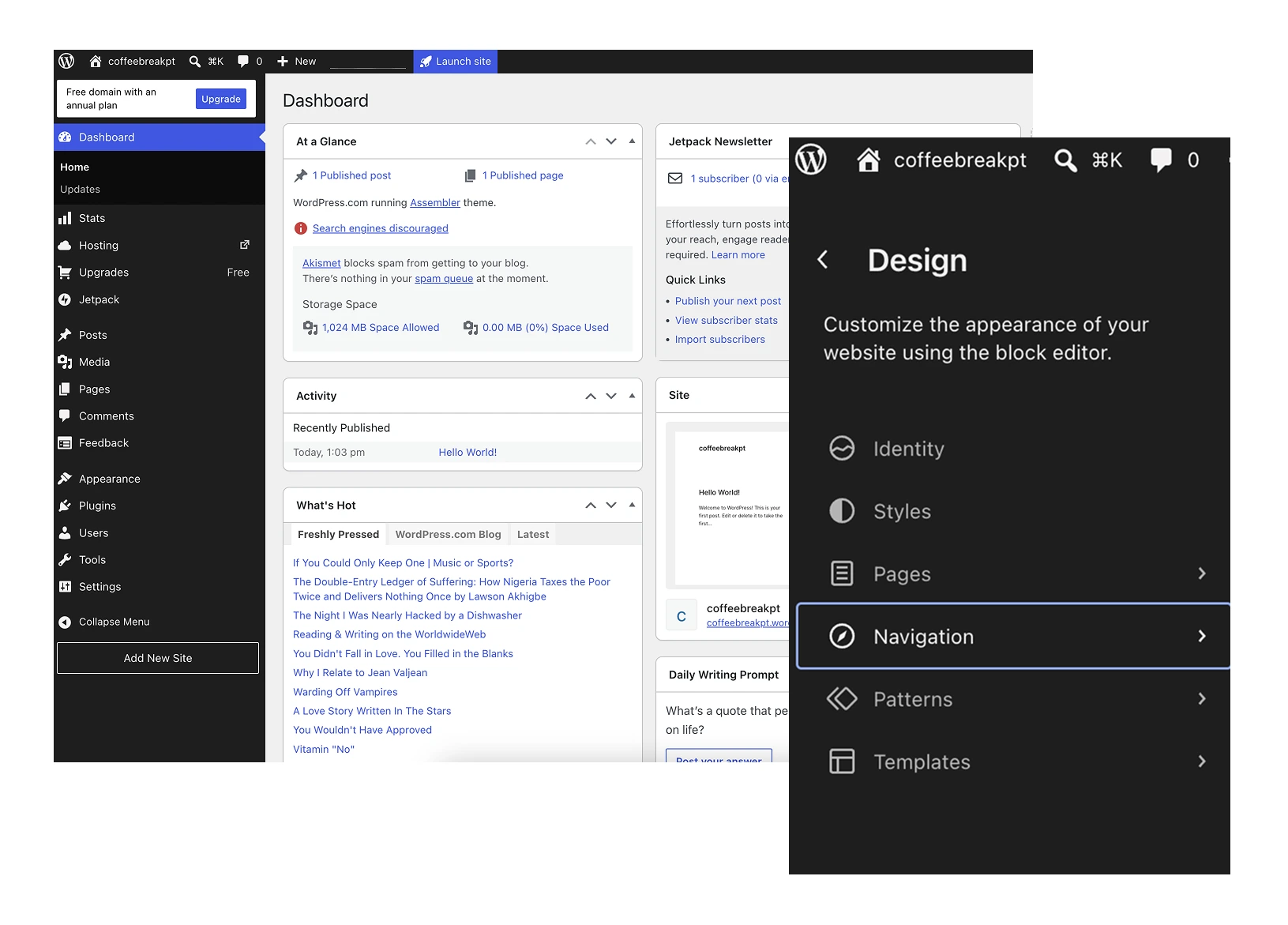
Neither platform demands that you write code, but they get there by opposite routes and with very different learning curves. You change the look of a WordPress site through the "Appearance" section, by choosing a theme. From there you manage content, settings, users and comments across the dashboard. Different themes bring different functions, which makes WordPress powerful and, for the uninitiated, quite complex.
To design a site, developers and designers usually reach for third-party plugins that add visual editing and drag-and-drop. The common solution is to buy a suitable theme, then customise it to branding specs. Practical, yes, but themes are rarely exclusive, so the same layout turns up again and again across the internet, wearing slightly different clothes. One of the best-known page builders is Elementor, and designers tend to find it relatively familiar, since it resembles design software.
To customise the design properly you edit PHP by hand (the server-side language WordPress is written in) or build from scratch in HTML, CSS and JS. Themes usually ship with a native editor, though with real limitations.
Here is the trap: the theme decides the ceiling. Every visual decision the theme didn't anticipate becomes either a plugin or a developer ticket, and the bill for a bespoke design arrives at the end of the project rather than the start. Pre-made themes suit small teams. They fall short at corporate level, where branding carries a lot of the strategy.
Webflow looks more familiar to modern designers, largely because of the tool it calls, curiously, Designer. You build an entire website on a visual canvas with a much higher level of control. Instead of a preformatted layout, you make your own. That can feel overwhelming if you have never built a website, but the results improve quickly as the interface stops fighting you.
Templates sit in the middle: if a blank canvas is more than you need, start from a free or paid template and restyle every element. A WordPress theme won't let you do that without touching code.
Open Designer and the layout is three columns. On the left, a panel to create HTML elements, edit page settings, manage the CMS and add assets. In the middle, the visual canvas. On the right, the style panel (the CSS panel, effectively), where animations and interactions also live.
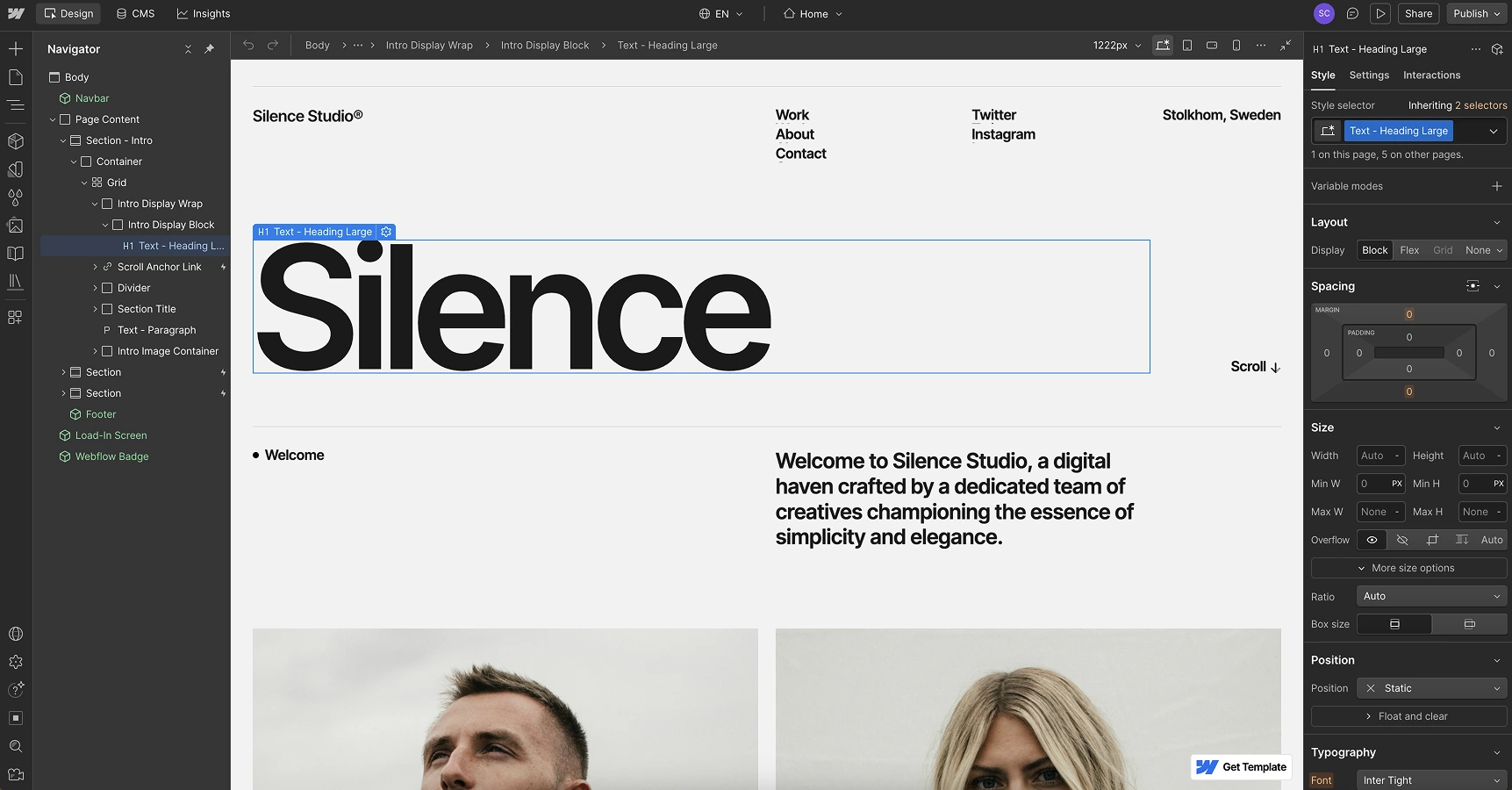
A note from building in it every week: Designer is a CSS editor wearing a visual skin, and teams that treat it as a page builder end up with a site nobody can maintain. The projects that stay easy to change are the ones where somebody sets up the class naming and the style system in week one. That is a designer's job, not a developer's, but it is still an architecture job, and skipping it is the single most common reason a Webflow build turns messy six months in.
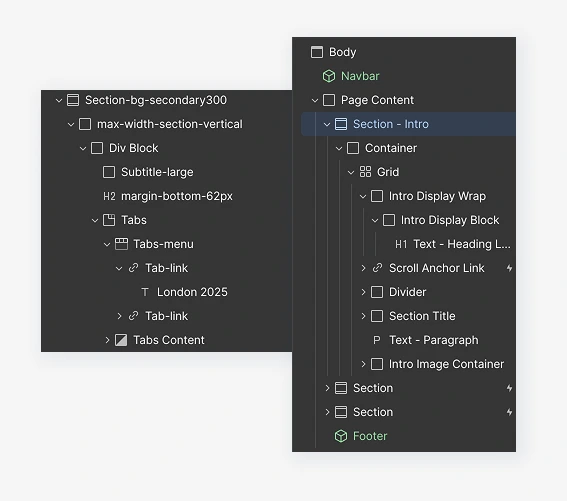
Put the two side by side and WordPress is the more constrained on visuals. If you are a creative trying to reproduce your own designs, that dependence on pre-built themes gets frustrating fast. Webflow gives you considerably more room, because you own the canvas and every element on it. If you want that room without building it yourself, our Webflow development services cover the design-to-Webflow build end to end.
WordPress's CMS dashboard is genuinely easy to use. Powerful publishing features and simple management logic earned it the trust of users worldwide. Being self-hosted, it hands users and developers more control over their sites.
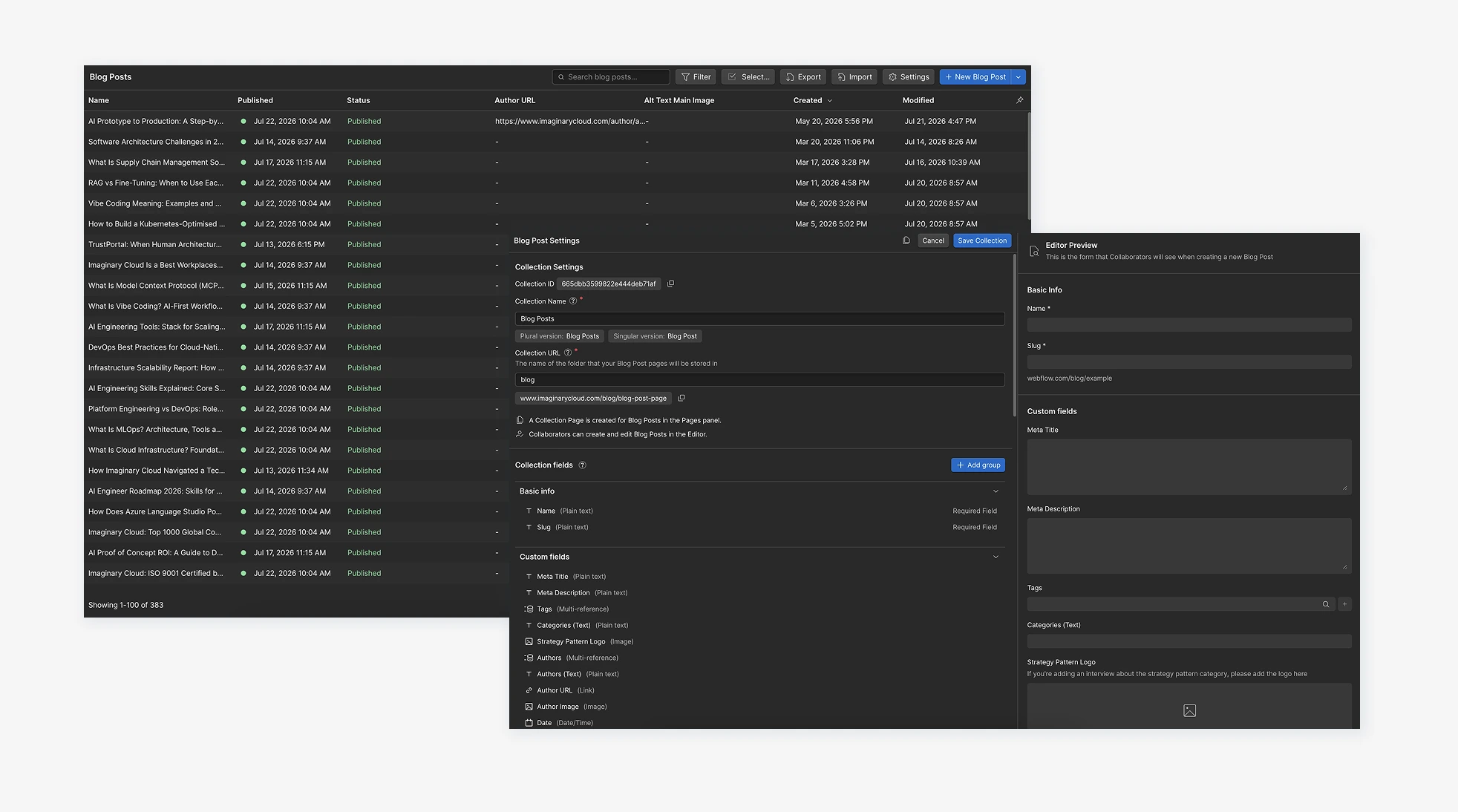
Webflow provides a fully functioning CMS too, positioned as a designer-first alternative. Because you design visually, the designer can build the CMS and hand it to the marketing team to run. Handing hosting to another company, though, won't sit well with everyone.
The real difference shows up when you get the content model wrong. WordPress will happily let you bolt custom fields onto a post type after the fact and carry on. Webflow's Collections are stricter, and reshaping one that already holds live content is proper work, so the modelling conversation has to happen before anyone opens Designer. A nuisance in week one. A relief in year two.
To run a shop on WordPress you install external plugins, because the CMS has no e-commerce engine of its own. WooCommerce is among the most popular, powering roughly a third of online stores depending on the dataset (W3Techs; BuiltWith). Most alternatives are paid, and customisable features vary plugin to plugin, so building your store takes planning before you commit.
Webflow, being an all-in-one platform, lets you run commerce with everything on one canvas and no third-party theme in the way. You can also bring in Shopify through Dynamic Embeds (Webflow's component for pasting third-party code into a page) to create a custom storefront without a pre-built Shopify template.
Our advice here is narrower than the feature lists suggest: if commerce is the business, put it on a commerce platform and use Webflow or WordPress for the marketing site wrapped around it. Both will run a shop. Neither is the reason a shop succeeds.
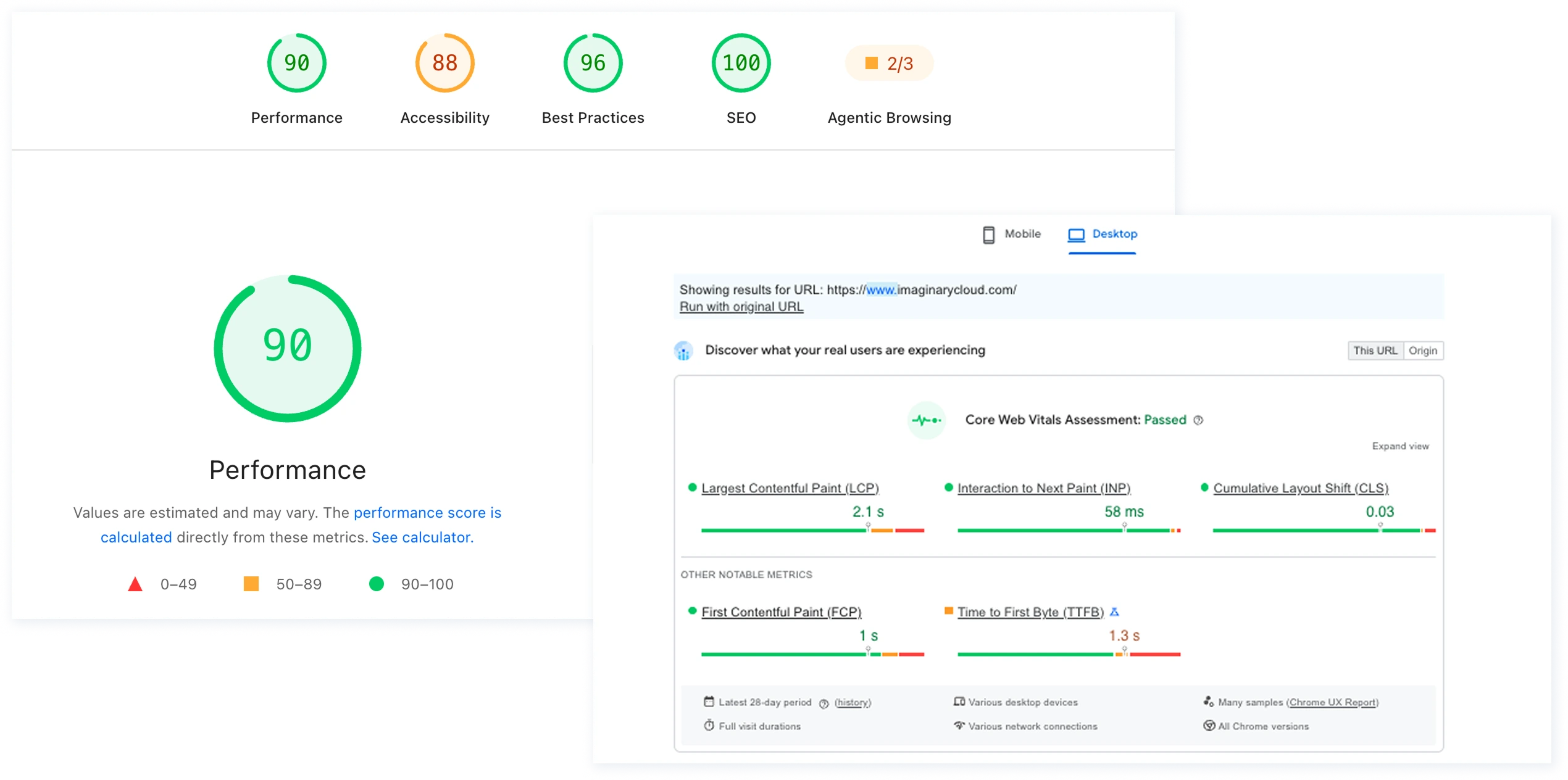
Search engine optimisation matters to every website, especially since Google made page experience and loading speed a ranking signal (Google Search Central, Page experience). One cause of a slow site is simply the volume of HTML and CSS being generated: load a WordPress site with plugins and the output picks up unnecessary weight. Webflow's generated code is usually cleaner, and that generally shows in the page-speed score, though your design decisions matter more than the platform does.
Which deserves saying plainly: a hero video and four web fonts will sink a Webflow site exactly as fast as a WordPress one. The platform buys you a cleaner starting point. Not a good score.
On our own relaunch, the gains showed up in engagement rather than raw speed: time on page rose 3% and average time per page across our services pages ran 69% longer after the redesign (full figures in the relaunch section below).
Both platforms can achieve excellent SEO. The difference is where the controls live: on WordPress you use plugins (Yoast, Rank Math) to manage meta descriptions and open-graph tags; on Webflow you set them directly in the page settings. On third-party integrations, WordPress wins comfortably, since its whole architecture was built around external plugins. Webflow integrates too, with fewer native options; to use HubSpot, for instance, you build the form in HubSpot and embed it in Webflow.
WordPress can be very cheap or very expensive, depending on what you ask of it. A basic site with a free theme, hosting and a domain comes to well under $100 a year. Costs move once you want a premium theme (around $40–60 one-off) or premium plugins ($10–100+ a year, most on annual renewal). All in, a simple WordPress site might cost $40–100 to get going, and climbs every year as you add trustworthy, well-performing plugins.
Webflow has a free plan for the design tool, but running a full site is a different matter. Its Site plans, as verified [publish date] against webflow.com/pricing (Webflow overhauled this lineup on 13 May 2026, merging the old CMS and Business plans into Premium):
| Webflow plan | Price | What you get |
|---|---|---|
| Starter | Free | A webflow.io domain, limited pages, limited CMS, 1 GB bandwidth |
| Basic | $15/mo, billed yearly | Custom domain, static pages, no CMS |
| Premium | $25/mo, billed yearly | Everything in Basic, plus the CMS (20,000 items, 40 Collections), site search and code components. Replaces the former CMS and Business plans. |
| Team | $2,500/mo, annual contract | Bundles a site with 10 seats, 100 CMS Collections, localisation, publishing workflows and governance |
| Enterprise | On request | Granular permissions, custom roles, SLAs, dedicated account management |
The line most comparisons miss: seats. Site plans price the site; your team is billed separately. Past the one full seat your Workspace includes, each Full Seat is around $39/mo and each content-editor (Limited) Seat around $15/mo, with free review-only seats. A small team often pays more for seats than for the plan itself, and add-ons like Webflow Optimize (A/B testing, from ~$299/mo) stack on top. Put those in the business case, not in a later surprise. The jump from $25 to the Team tier catches people out for the same reason: everything below it is priced for one site and a small team; the moment you need permissions, staged publishing or an audit trail, Webflow's pricing changes category.
Both platforms are free to start. What you actually publish, and what that publishing demands, is where the two price ranges pull apart.
Most comparisons stop at the design tooling. That is the wrong altitude for whoever approves the budget, because the tooling is the cheapest part of either decision. Three things settle it.
Licences and hosting are a small slice of what a website costs. The big slice is the people it takes to change it.
| Cost line, three years | WordPress | Webflow |
|---|---|---|
| Platform and hosting | Hosting from ~$100/yr, plus premium theme and plugin renewals | Site plan $15–25/mo, or the Team tier if you need governance (plus per-seat costs) |
| Build | Theme customisation or bespoke development, usually a developer engagement | Design-led build in Designer, typically without a developer |
| Routine content/layout changes | Developer or agency time for anything beyond text | Marketing or design team, in the browser |
| Maintenance | Core, theme and plugin updates, plus testing each one | Handled by Webflow |
| Security and patching | Your responsibility, and the main source of WordPress incidents | Handled by Webflow |
| Exit | Content and code are yours, portable to any host | Code export on a paid plan, but the CMS and hosting do not come with you |
The pattern holds across every project we've seen: WordPress has the lower entry cost and the higher running cost, most of it in people rather than licences. Webflow has the higher subscription line and the lower marginal cost per change.
The two platforms fail in opposite directions.
WordPress risk is operational, and it lives almost entirely in the plugin layer, and it's growing. Patchstack's State of WordPress Security report recorded 11,334 new vulnerabilities across the ecosystem in 2025, a 42% jump on 2024, with plugins accounting for the overwhelming majority year after year (around 96%) and only a handful ever landing in WordPress core. Every plugin you add is another dependency with its own release cycle and maintainer, and nobody else applies those updates for you. It gets sharper from here: under the EU's Cyber Resilience Act, from September 2026 plugin and theme authors must have processes to notify authorities and users of actively exploited or severe vulnerabilities, and Patchstack's own finding is that more than half of the developers it contacted didn't patch before disclosure. That maintenance burden is a cost you carry for the control you keep.
We're not arguing this from the sidelines. We've run WordPress migrations for clients too. On one marketplace project we moved the database off WordPress (MySQL to PostgreSQL) and re-platformed the hosting, so we've felt both the pull of the plugin ecosystem and the weight of maintaining it.
Webflow risk is concentration risk. You cannot self-host, so availability, pricing and the roadmap are Webflow's decisions rather than yours. Code export returns the front end, but not the CMS, the forms or the hosting configuration, which makes an exit a rebuild rather than a migration. And if your sector requires data residency or self-hosting, that settles the whole question before anyone gets to the design arguments.
Here the gap is widest, and it's the easiest thing to measure inside your own organisation. Count the people involved in changing a paragraph, publishing a case study, or launching a landing page, and how long each of them waits. On WordPress, anything structural usually needs a developer. On Webflow, a marketer publishes it. That difference compounds every week, for the life of the site.
Short version: if your site is a publishing and demand-generation asset that changes weekly, Webflow usually wins on cost of ownership. If it's a platform with custom functionality, integrations and a self-hosting requirement, WordPress usually wins, and plugin maintenance is the price you pay for that control.
| Webflow | WordPress | |
|---|---|---|
| Design control | Complete freedom on a blank canvas, or a fully editable template | Constrained by the theme, unless you code |
| Code quality | Generated by the platform, generally clean | Depends on the theme and plugin stack, which can bloat output |
| Content editing | Live, in-page editing with drag-and-drop, built in | Solid editor, but in-page visual editing needs a paid plugin |
| CMS | Native, strict content model, custom fields and filters | Native, mature, forgiving, highly extensible |
| E-commerce | Built in, or Shopify through an embed | Requires a plugin such as WooCommerce |
| SEO controls | Meta and open-graph settings in the page settings | Plugin-based (Yoast, Rank Math) |
| Integrations | Fewer native ones, embeds cover most cases | The stronger ecosystem by a wide margin |
| Hosting | Webflow only, no self-hosting | Anywhere, self-hosted or managed |
| Security and updates | Handled by Webflow | Your responsibility; ~96% of reported vulnerabilities are in plugins |
| Cost profile | Higher subscription (plus seats), lower cost per change | Lower entry cost, higher cost per change |
| Who changes the site | Design and marketing teams | Usually a developer, for anything structural |
As a software development and UX/UI design company, we run our own site as a live experiment in this exact trade-off. Two things happened. We relaunched the main site within Webflow off the back of a Growth Audit. And, the part that matters most for this argument, we migrated our blog off a separate CMS onto Webflow's native CMS, so publishing no longer waits on a developer. We did the whole thing in-house: one Project Manager, four designers, two developers and two growth specialists, with the style guide, design system and wireframes built in Figma first, then brought to life by our Webflow team.
The relaunch was measured, not guessed. Using Google Analytics and Hotjar before and after, the redesign delivered a 5% increase in conversions within three months of launch, and, at last check, still climbing. Alongside it: time on page up 3%, page abandonment down 4.26%, and average time per page across our services pages 69% longer. The project holds a 5.0/5.0 client rating on Clutch. You can read the full write-up in our website relaunch case study.
We pre-evaluated several platforms (Wix and Squarespace among them) against four questions. They're the same four we now put to every client facing this decision. Steal them.
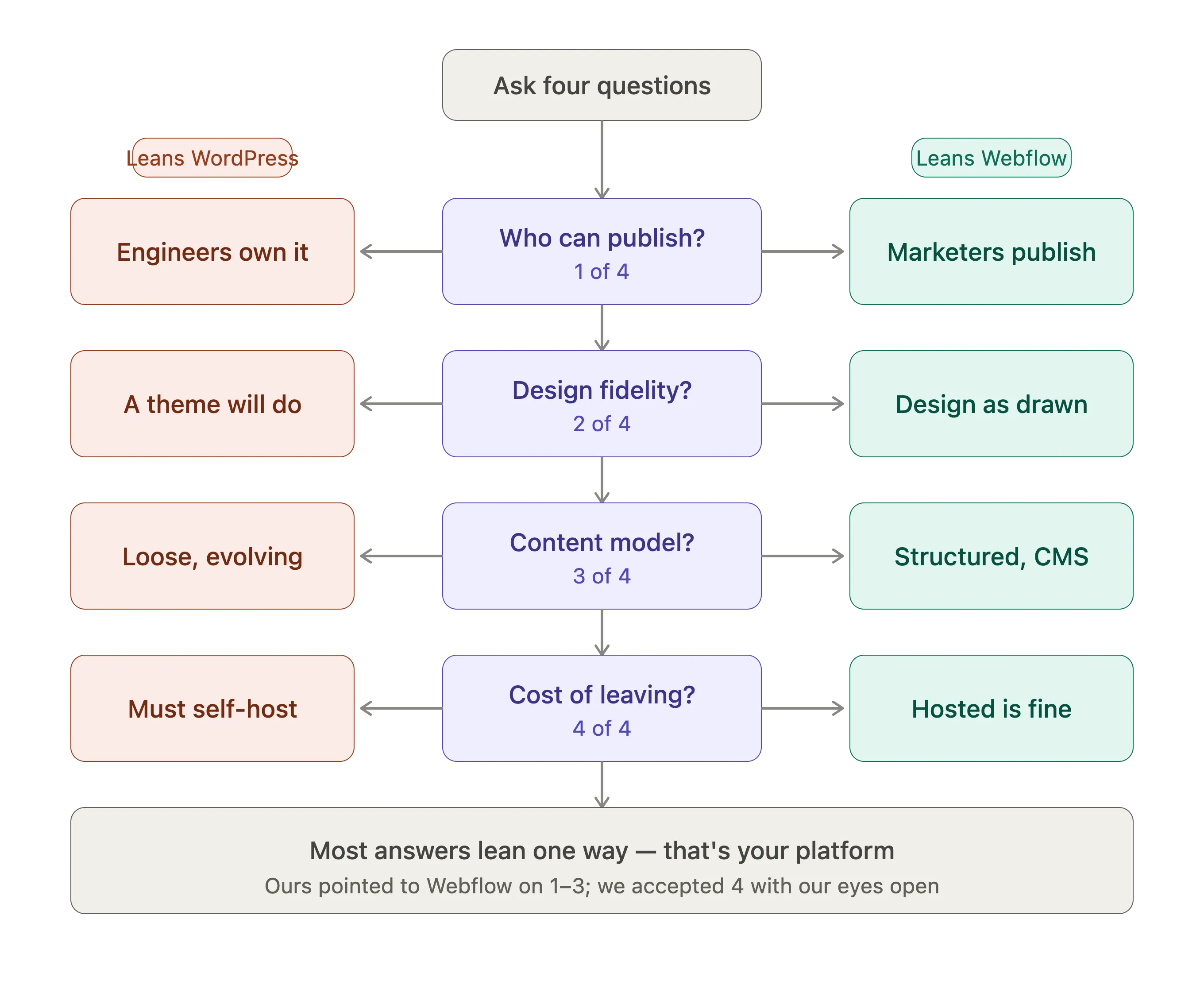
Webflow was the only platform we evaluated that answered the first three well. We accepted a weaker answer on the fourth deliberately, with our eyes open.
What the blog migration changed. Question one decided it, and the effect is easiest to see in the blog. On the old CMS, getting a post live meant a developer sat somewhere in the chain. Once the blog moved to Webflow's CMS, that dependency went away: Marketing and Design now publish directly, in the browser, and nothing waits for a release. We use the same native CMS to post new projects and keep the portfolio current. Both teams own content management, and any change gets made quickly, by anyone, whether or not they know how to code, so we respond faster to our communication needs and reserve developer time for the work that actually needs it.
Choose Webflow if your website is a marketing asset that changes weekly, if the people who need to change it are designers and marketers rather than engineers, and if you can live with hosting you do not control. That was our position, and it's the position most of the companies we work with are in.
Choose WordPress if you need to self-host, if the site carries custom functionality that will keep growing, or if you already have engineers looking after it. You take on the plugin maintenance and the patching. In exchange, you keep the keys to the whole stack.
Stuck between the two? Run the four platform questions against your own situation. The answers tend to point the same way for a given company, and they get there a lot faster than a feature comparison does.
It depends on what you need. WordPress offers great flexibility and an enormous library of themes and plugins; Webflow offers modern visual editing, so you can design functional websites quickly without relying on developers. If you value a visual, integrated design experience, Webflow will appeal. If you want maximum flexibility and a vast plugin ecosystem, WordPress is likely your choice.
Both offer strong SEO capabilities. WordPress manages SEO through plugins such as Yoast or Rank Math, while Webflow builds the controls directly into page settings, usually a more streamlined experience. Webflow tends to ship cleaner code out of the box, but your own design decisions (image weight, fonts, video) affect page speed far more than the platform does. Managed properly, both support strong SEO.
There are real reasons to say no. Unlike WordPress, Webflow offers no self-hosted option, a barrier if you need to control your own hosting environment or meet data-residency requirements. Code export returns your front end but not the CMS or hosting, so leaving is a rebuild rather than a migration. And WordPress has a longer track record and larger community, so support tends to be deeper.
Yes, and its use is growing. Intuitive visual editing and integrated SEO keep attracting businesses, agencies and individuals. The choice between the two usually comes down to the specific needs of a project.
Yes. As of mid-2026 W3Techs puts WordPress at roughly 41.5% of all websites and around 59% of the CMS market, comfortably ahead of every rival, though its overall share has eased over the past six months rather than continuing to climb.
We run our own site on Webflow, and we've built and rebuilt sites on both platforms for clients since. If you're weighing up the same decision, the four platform questions are a good place to start, and we're happy to work through them with you against your own numbers. Have a look at our work, all of it running on Webflow, or get in touch and we'll tell you where we think you'd be better off.

UX/UI Designer who focuses on developing Digital Services that can improve and empower aesthetics and efficiency.
People who read this post, also found these interesting: