
Written by:


Last Published:
02 August 2026
•
Kubernetes vs Docker is the wrong comparison. It is also the first one almost every team makes. Docker packs your application into a container; Kubernetes runs thousands of those containers across a fleet of machines and decides which one goes where. Two of the core technologies in containerisation, sitting at two different layers of the stack.
So the real question is not which one you pick. It is whether the second one is worth its operating cost yet.
Think of a shipping port. Docker is the box: standard dimensions, sealed, stackable, and it does not care whether the thing inside is coffee or car parts. Kubernetes is the port authority: the cranes, the scheduling, the manifest that says which box lands on which ship, and the crew that reloads the box when a crane drops it. You can run a small quayside with a few boxes and a clipboard. Rotterdam needs the port authority.
This article explains what containerisation is, what Docker and Kubernetes each do, where the fair comparison actually lies, and how to decide when orchestration pays for itself.
The short version:
Docker is a containerisation platform. It takes your application and its dependencies and packages them into an image that runs identically anywhere. Kubernetes is a container orchestrator: it takes those images and decides which machine runs them, how many copies exist, what happens when one dies, and how traffic finds them.
Can you use Docker without Kubernetes? Yes, and most teams start exactly there. The reverse is not really true. Kubernetes needs something to build container images, and for most organisations that something is still Docker.
| Docker | Kubernetes | |
|---|---|---|
| Purpose | Builds and runs individual containers | Runs and manages containers across a cluster |
| Scope | One machine, one application at a time | Many machines, many services, one control plane |
| Scaling | Manual, or through Docker Compose and Docker Swarm | Automatic, declarative, based on load and policy |
| Failure handling | The container stops | Self-healing: failed workloads are rescheduled |
| Learning curve | Days to be productive | Weeks to months, and it does not stop there |
| Operational cost | Negligible beyond the developer machine | A funded platform capability: cluster, upgrades, on-call |
| Who owns it | Every developer | A platform or DevOps team |
Two names in that table deserve a definition up front. Docker Compose is the tool for defining and running a multi-container setup on a single machine. Docker Swarm is Docker's own orchestrator, and we come back to it further down.
Let's walk the layers.
Containerisation lets developers package software code and everything it needs to run (frameworks, libraries and other dependencies ) into a single isolated container. Once it is boxed, it travels. Any application inside a container can be moved to a different infrastructure and still run, whatever operating system or environment sits underneath.
That portability is the whole point, and security comes along with it, because the same build behaves the same way on every machine you put it on. Not everything belongs in a box, mind you. Graphics-heavy desktop applications are usually virtualised at the hypervisor layer instead — the layer that runs full virtual machines with their own operating system, with tools such as Vagrant — because they need hardware access a container will not give them.
Before containers, developers wrote code in one computing environment and then hit trouble the moment they moved it. Going from Linux to Windows made the code prone to bugs and environment-specific errors. Containers fix that by abstracting the software away from the host operating system, so the ground stops shifting underneath it.
Applications get to live in independent, encapsulated environments. Scalability, quicker deployment and closer parity between environments: those are the primary benefits, and adoption reflects them. Container use among backend developers passed 60% as early as 2020 (SlashData, State of Cloud Native Development), and it has only deepened since: the CNCF's most recent Annual Cloud Native Survey, published in January 2026, found 82% of container-using organisations now running Kubernetes in production, up from 66% two years earlier.
The concept is older than Docker, by the way. Linux Containers (LXC) were providing container technology well before 2013. What Docker changed with its open-source release that year was the developer experience, and that is how it became the default container format. It still is: the Stack Overflow Developer Survey continues to rank Docker among the most widely used developer tools, ahead of every other containerisation tool by a wide margin.
Docker is a containerisation platform used to develop, ship and run an application as a portable, self-sufficient container. Laptops, cloud environments, data centres: it runs virtually anywhere.
Over the years Docker has built a broad platform around that core. That does not make every Docker tool the obvious choice, though. The field is competitive, and several of its layers have strong alternatives.
A Docker container is a running instance of a Docker image: your application plus everything it needs, sealed off from the host and from every other container. It borrows the host's operating system kernel rather than carrying its own. That is why a container starts in seconds and a virtual machine takes minutes.
Three pieces make that work:
You do not always need a Dockerfile. Developers can pull a ready-made image from a registry such as Docker Hub or Azure Container Registry and save themselves the work — there is plenty on the shelf. So, to run a Docker container, you either pull an image from a public registry or build your own with a Dockerfile.
Building your own is where the discipline shows. A throwaway Dockerfile and a production one look nothing alike. Here is the shape we ship — a multi-stage build that keeps dev dependencies out of the final image, runs as a non-root user, and produces a small, reproducible artefact:
# syntax=docker/dockerfile:1

# IC house-standard Node/TypeScript service image.
# Multi-stage: deterministic prod dependencies, minimal non-root runtime.

ARG NODE_VERSION=22.11.0        # IC: pin by digest in production
ARG APP_PORT=3000

# ---- Stage 1: install everything and build ----
FROM node:${NODE_VERSION}-bookworm-slim AS build
WORKDIR /app
ENV NODE_ENV=development
COPY package.json package-lock.json ./
RUN --mount=type=cache,target=/root/.npm npm ci
COPY . .
RUN npm run build                # IC: expects a build script emitting to ./dist

# ---- Stage 2: production dependencies only ----
FROM node:${NODE_VERSION}-bookworm-slim AS prod-deps
WORKDIR /app
ENV NODE_ENV=production
COPY package.json package-lock.json ./
RUN --mount=type=cache,target=/root/.npm npm ci --omit=dev

# ---- Stage 3: runtime ----
FROM node:${NODE_VERSION}-bookworm-slim AS runtime
ARG APP_PORT
# tini gives us correct signal handling and zombie reaping as PID 1.
RUN apt-get update \
 && apt-get install -y --no-install-recommends tini \
 && rm -rf /var/lib/apt/lists/*
WORKDIR /app
ENV NODE_ENV=production PORT=${APP_PORT}

# Copy only what runtime needs, owned by the image's built-in non-root user.
COPY --chown=node:node --from=prod-deps /app/node_modules ./node_modules
COPY --chown=node:node --from=build     /app/dist          ./dist
COPY --chown=node:node package.json ./

# OCI provenance labels (IC: wire GIT_SHA / BUILD_DATE from CI).
ARG GIT_SHA=unknown
ARG BUILD_DATE=unknown
LABEL org.opencontainers.image.vendor="Imaginary Cloud" \
      org.opencontainers.image.revision="${GIT_SHA}" \
      org.opencontainers.image.created="${BUILD_DATE}"

USER node
EXPOSE ${APP_PORT}

# Docker-level healthcheck. In Kubernetes, prefer liveness/readiness probes.
HEALTHCHECK --interval=30s --timeout=3s --start-period=10s --retries=3 \
  CMD node -e "fetch('http://localhost:'+process.env.PORT+'/health').then(r=>process.exit(r.ok?0:1)).catch(()=>process.exit(1))"

ENTRYPOINT ["tini", "--"]
CMD ["node", "dist/main.js"]
That HEALTHCHECK line is a small demonstration of the article's whole thesis in miniature: it works, but the moment you run this image under Kubernetes you hand that job to a liveness probe instead. The build stays the same; the layer around it changes.
Docker is used to make software behave the same way everywhere it runs. In practice that covers four things:
Then the boxes multiply. As the number of containers grows, so does the complexity of managing them, and a familiar set of problems arrives, all of which fall under orchestration:
Docker's answer was Docker Swarm, its own container orchestration technology. And this is the detail most comparisons miss: Swarm, not the Docker platform as a whole , is the component that genuinely compares with Kubernetes.
Kubernetes is a container orchestration technology, in the same category as OpenShift or Amazon ECS. Google introduced it in 2014, a year after Docker's release, and it is now governed by the CNCF, the Cloud Native Computing Foundation.
It was built to schedule, manage, automate the deployment of and scale containerised applications. In other words, it handles the complexity of running a large number of containers across many servers without a human standing at the quayside deciding where each box goes.
It does that through an open-source API that regulates how and where containers run. Containers are grouped into pods, the basic operational unit in Kubernetes. Pods run on nodes, the machines in the cluster, and the control plane is the set of components that decides what should be running where and quietly corrects the cluster whenever reality drifts from that intent. Once grouped, pods can be scaled up or down and their lifecycle controlled declaratively.
So Kubernetes orchestrates machines and schedules containers onto them according to available compute and each container's requirements. Your team declares the desired state of a cluster; the platform handles scheduling, connection management and recovery. The project moves fast — Kubernetes reached version 1.36 in 2026 — but that declarative core has been stable for years.
Kubernetes supports a wide range of container tools, Docker images among them, which brings us back to the comparison we started with.
If we want to compare Docker vs Kubernetes properly, the fair fight is Docker Swarm against Kubernetes, since both are container orchestration technologies. Docker leads the containerisation market. It did not win orchestration. Kubernetes did, and decisively: the Kubernetes repository carries roughly 115,000 GitHub stars as of 2026, against a few thousand for the library behind Docker Swarm, which has been effectively dormant for years. The gap in commercial support is wider still, with every major cloud provider offering a managed Kubernetes service.
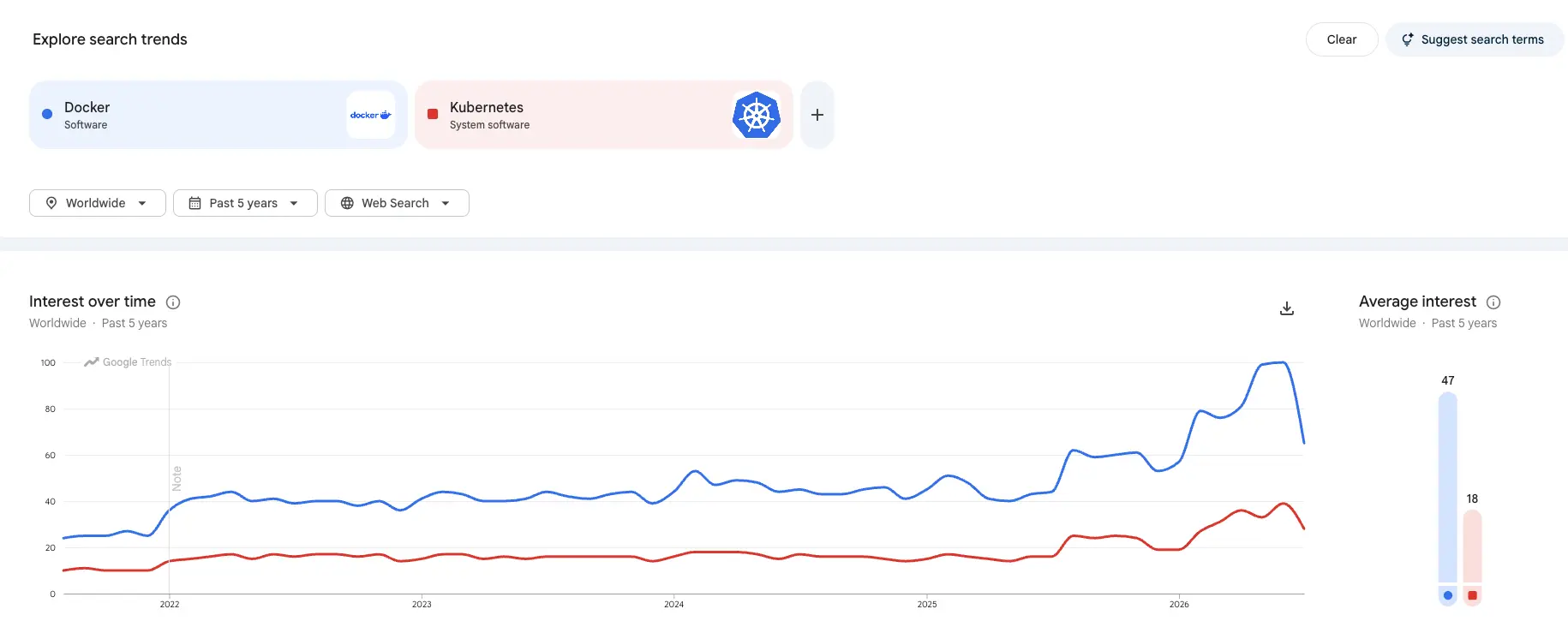
Docker and Kubernetes are complementary technologies. Their roles overlap in the popular imagination and barely overlap in practice. Docker produces the boxes. Kubernetes runs the port.
Kubernetes also brings a set of capabilities that start to matter once you are running more than a handful of services: load balancing, network policy, secrets handling, isolation between workloads, self-healing, and the ability to scale across every node in the cluster.
Getting the most out of Docker and Kubernetes together means being honest about how useful each one is to you. Not every organisation running containers needs an orchestrator. Teams with small applications and a low, controllable number of containers generally do not, and adding one costs them more than it returns.
As software needs grow, the applications behind them have to scale too. To benefit from a microservices architecture, the surrounding requirements have to be in place. Otherwise containerisation becomes another liability in the tech stack rather than an advantage.
Kubernetes, or a tool like it, is therefore not mandatory. It is strongly recommended for infrastructures that need to scale and that handle a high number of containers across distributed systems. At any real scale, orchestration is now the norm rather than the exception: the CNCF's 2026 survey puts Kubernetes in production at 82% of the organisations surveyed, with a further slice piloting or evaluating it — the direction of travel has been firmly towards managed Kubernetes, not away from orchestration.
The benefits those organisations report are consistent:
This one caused genuine alarm when Kubernetes 1.20 announced that Docker support in the kubelet was deprecated and would be removed in a future release. Many developers read it as the end of Docker, and with it the end of the Docker-plus-Kubernetes combination. Kubernetes published a clarification on 2 December 2020, Don't Panic: Kubernetes and Docker, explaining that it was not as dramatic as it sounded.
Here is what was actually going on. Inside a Kubernetes cluster, a component called the container runtime pulls and runs container images, and the kubelet is the agent on each node that talks to it. Docker was the most popular runtime for that job, but it was never designed to be embedded inside Kubernetes. It is built to be driven by people at a command line, not by another piece of software. So Kubernetes needed a shim, Dockershim, to translate between the kubelet and Docker — and underneath Docker it was really reaching containerd, the lower-level runtime Docker itself uses. An extra layer to maintain, for no functional gain.
The removal happened. Dockershim was taken out of the kubelet in Kubernetes 1.24, released in May 2022, and containerd is now the default runtime on most managed clusters, with CRI-O — a lightweight runtime built only for Kubernetes — as the main alternative. What did not happen was any break in compatibility. Images built with Docker follow the Open Container Initiative standard and run on Kubernetes exactly as they did before: the dockershim removal FAQ has the detail. So, is this the end of Docker? No. Kubernetes stopped using Docker as a runtime. It never stopped running Docker images. And four years on, it still runs them without modification.
Every article on this keyword compares features. Very few say what the decision costs, which is the part a CTO actually has to sign off.
Kubernetes is not a tool you adopt. It is a platform capability you fund. The cluster is the cheap part. The expensive parts are the people who keep it current, the upgrade cadence, the on-call rota, the security and network policy work, and the months in which delivery slows down while the team learns. Managed services from the major cloud providers remove a large share of the operational burden. None of the ownership.
We use a simple test with clients, which we call the orchestration threshold. Kubernetes earns its cost when at least three of these five statements are true:
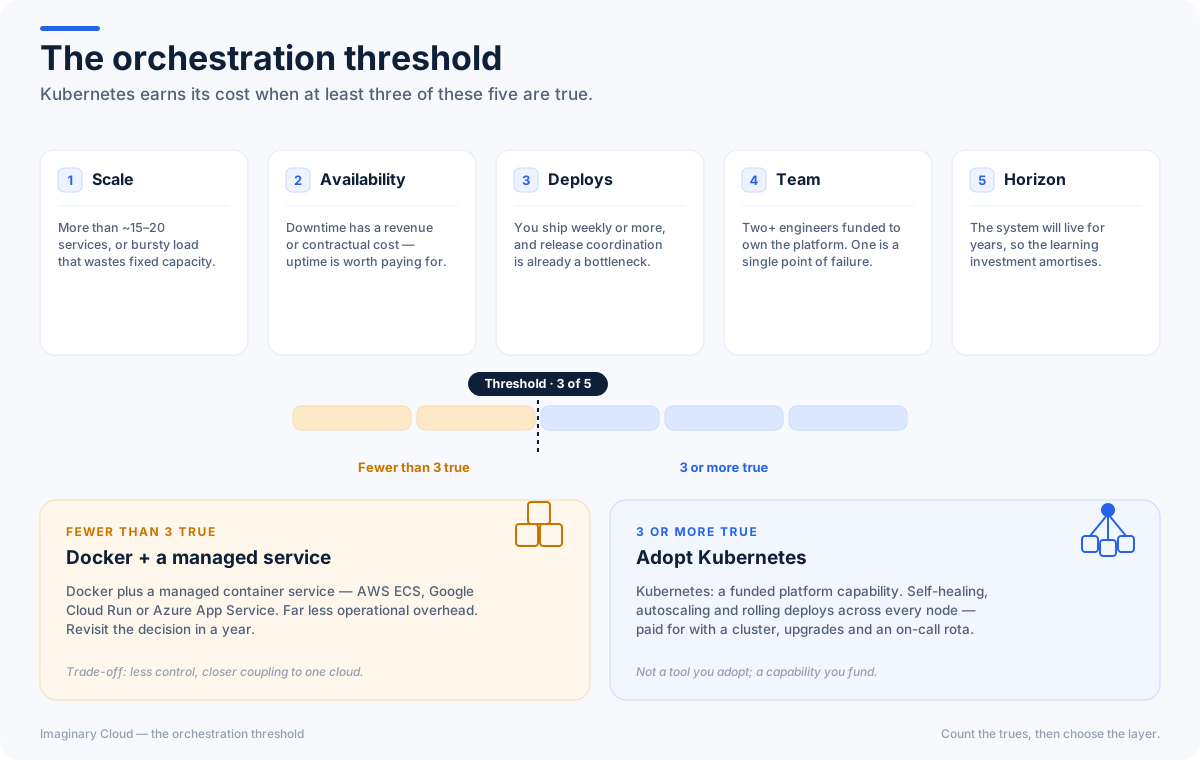
Fewer than three? Then the honest recommendation is usually Docker with a managed container service such as ECS, Cloud Run or App Service, and a diary note to revisit the question in a year.
We put our own money where that recommendation is. On a recent maritime-communications platform (Sedna), we took the opposite bet to orchestration: rather than stand up a cluster, we migrated the client's integration workflows onto bespoke services on AWS — Terraform-defined infrastructure, CI/CD pipelines and Lambda functions — and cut their workflow-tooling costs by 80%. Below the threshold, that is usually the trade that pays.
In our delivery work the pattern holds either way: teams that adopt Kubernetes below this threshold spend more engineering time on the platform than on the product for their first two quarters, while teams that adopt it above the threshold stop treating deployment as an event within roughly the same period.
Then there is the risk nobody budgets for: the unowned cluster. A Kubernetes installation that no one is funded to maintain drifts out of support, accumulates unpatched components and becomes harder to leave than it was to adopt. A ship nobody is paid to unload. That is a governance problem long before it is a technical one.
Containerisation is not the right approach for every workload, but the benefits have earned their attention: better application quality, higher productivity, less downtime and faster response to change.
So how do Docker and Kubernetes work together to deliver that?
The box and the port. They complement each other, and combining them with DevOps practices gives you a microservices baseline that supports fast delivery and scalable cloud-native applications. Which means the decision was never which one to choose. It is whether your organisation has crossed the orchestration threshold. And if it has not yet, when it will.
Not the Docker runtime, but almost certainly the Docker tooling. Kubernetes runs containers through containerd or CRI-O, not through Docker. You still need something to build container images, and Docker remains the most common choice for that, as well as the standard way developers run containers locally.
No. Kubernetes replaced Docker as the container runtime inside its own nodes in version 1.24, in May 2022. It did not replace Docker as an image format or a build tool, and images built with Docker run on Kubernetes without modification.
A Docker container is a running instance of a Docker image: an application packaged with its dependencies, isolated from the host machine. It shares the host operating system kernel, which is why it starts in seconds and uses a fraction of the resources of a virtual machine.
Docker is used to package applications so they run identically everywhere: on a developer laptop, in a continuous integration pipeline and in production. It underpins microservices architectures, removes environment-specific bugs and gives deployment pipelines a single artefact to promote.
Docker Swarm suits small clusters with straightforward workloads, particularly where a team already knows Docker Compose and wants scheduling without learning a new operating model. It is simpler and quicker to pick up than Kubernetes. The trade-off is a much smaller ecosystem, limited managed hosting and a shrinking pool of engineers who have used it.
Yes, and many organisations should. A managed container service such as AWS ECS, Google Cloud Run or Azure Container Apps runs containers in production with far less operational overhead than Kubernetes. The trade-off is less control and closer coupling to one cloud provider.
Deciding whether Kubernetes is worth it for your organisation? From maritime-scale communication platforms to serverless migrations on AWS, we design and run cloud-native platforms teams can actually maintain — and we are equally willing to tell you when you do not need one. Talk to our team about where your infrastructure is heading.
Marketing Intern with a particular interest in technology and research. In my free time, I play volleyball and spoil my dog as much as possible.
Security and Cloud Operations expert. Background in Public Transport, Finance, and Government. Usually trading coins on decentralized exchanges :)
People who read this post, also found these interesting:
















.webp)

.webp)


