
Written by:



Last Published:
09 July 2026
•
Two container engines, one recurring argument. Podman vs Docker comes up on nearly every platform project we take on, and it rarely gets settled by a feature list. Docker runs on a background daemon and brings a huge ecosystem with it. Podman runs daemonless and rootless by default. The right pick depends on your security posture, your orchestration plans, your licence exposure, and how your team actually works.
So let's compare them properly. This guide weighs Docker against Podman on architecture, rootless security, Kubernetes fit, system integration, ecosystem maturity, and the real cost of switching, including the scoring framework we use with clients, so you can tell which engine fits your infrastructure rather than guessing.
Docker is a daemon-based container platform with a mature ecosystem, strong CI/CD integrations, and huge developer adoption.
Podman is a daemonless, rootless container engine built for tighter security, systemd integration, and enterprise Linux.
Think of a container as a lunchbox for software. You pack the meal, the cutlery, and the napkin together, and it eats the same at your desk, on the train, or on someone else's kitchen table. The container is the lunchbox. But somebody still has to own the kitchen it was packed in, and that is the engine.
That owner decides who holds root on your hosts, how your workloads talk to the operating system, and what your licence bill looks like once the team grows. So Docker vs Podman is not a tooling preference. It is an infrastructure decision with security, cost, and operational consequences attached, and the rest of this article measures the two engines on exactly those terms so you choose on purpose rather than by habit.
Containers keep spreading across enterprise and cloud-native shops, and the numbers back it up. According to the 2025 CNCF Annual Survey, the overwhelming majority of organisations now run containers in production, with Kubernetes as the dominant orchestrator.
Search interest tells the same story from a different angle. Google Trends' five-year comparison of Docker and Podman (retrieved 9 July 2026) keeps Docker well ahead on volume, while Podman's share climbs steadily, most sharply after Docker's licensing changes landed.
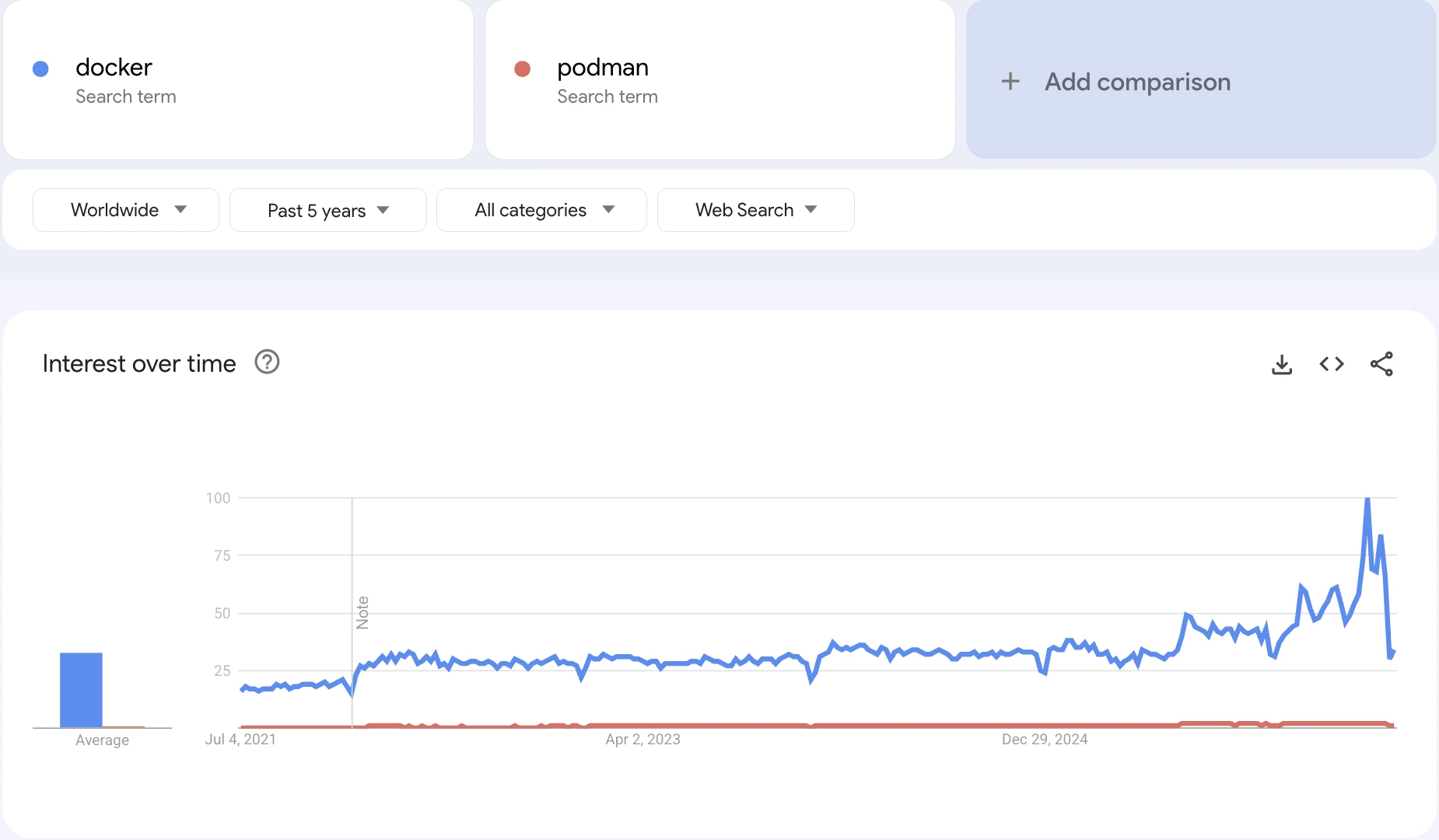
Docker is still the name most developers reach for, especially on their own machines. Podman has carved out enterprise Linux, though. It is officially supported in Red Hat Enterprise Linux (RHEL) and ships as the default engine in modern RHEL, which is about as clear a maturity signal as production software gets.
Docker is the platform that made containers mainstream. It packs an application and its dependencies into a portable unit that runs the same everywhere, and it plugs into just about every CI/CD tool a delivery team is likely to touch. On most projects that reach us, Docker is already in the building. It is the default developers arrive with, and often the reason the codebase ships consistently at all.
A Docker container is a running instance of a Docker image. Picture the image as a recipe and the container as the finished dish: an isolated, lightweight environment that bundles an application with everything it needs and borrows the host's kernel instead of faking a whole machine. Containers start in seconds and sip resources next to a virtual machine. That sameness, dish after dish, is why containers became the standard unit of modern software delivery.
Docker grew up doing everything itself: building images, running containers, wiring their networking, balancing their load, and clustering them through its own orchestrator, Docker Swarm. One install, one command-line tool, one mental model. That breadth is genuinely handy, and it is a big part of why Docker became the reference technology.
The catch is coupling. Because Docker owns the whole lifecycle, other tools have long had to work around it rather than alongside it. As leaner, standards-based alternatives matured, plenty of teams kept Docker as their starting point and handed individual jobs (image building, image inspection, the runtime itself) to smaller tools that each do one thing well.
Then there's the bill. Docker's changes to its subscription model, which limit free Docker Desktop use for larger commercial entities, turned a purely technical call into a commercial one. At enterprise scale, every seat now carries a cost, and that has dragged licensing into a decision that used to be about architecture alone. We put actual figures on it in the CTO section below.
For the wider orchestration picture, see our comparison of Docker vs Kubernetes.
.webp)
Podman is an open-source, Linux-native container engine built by Red Hat under Open Container Initiative (OCI) standards. It exists to answer one pointed question about Docker's design. Why should running a container need a privileged background program at all? Podman's answer: it shouldn't. Containers run as ordinary child processes of the user, daemonless, and rootless by default. (A daemon, if the word is new, is just a program that sits running quietly in the background with no interface of its own.)
That one decision drives most of what makes Podman worth a look in production. No daemon means no always-on process clutching root. Rootless by default means a compromised container lands in a plain user account, not on a privileged doorway straight to the host.
Where Docker is one tool that does the lot, Podman is the runner in a modular set, each piece built for a single job:
Every tool in the set is OCI-compatible, so each one also works with Docker. That is what makes an incremental switch, or a side-by-side setup, a practical plan rather than wishful thinking.
Podman borrows its headline idea straight from Kubernetes: the pod. A pod groups related containers (a frontend, a backend, a database) into one unit that shares resources and gets managed together. Pod definitions export directly to Kubernetes-compatible YAML, which shortens the trip from your laptop to a running cluster.
Podman's systemd integration finishes the production story. You can generate system-managed service units straight from containers, so they deploy and restart like any other long-running Linux service. Pair that with its OCI compliance and you have the reason Podman went from developer curiosity to enterprise-class engine, and on Red Hat platforms, the default one.
Can you use it without ripping Docker out first? Yes. Podman speaks a Docker-compatible command-line interface, so it slots in as a drop-in for everyday commands or runs happily beside an existing Docker install.
Podman and Docker share plenty. Where they split is in the fundamentals, and those splits don't crown a winner. They make each engine the right answer to a different question.
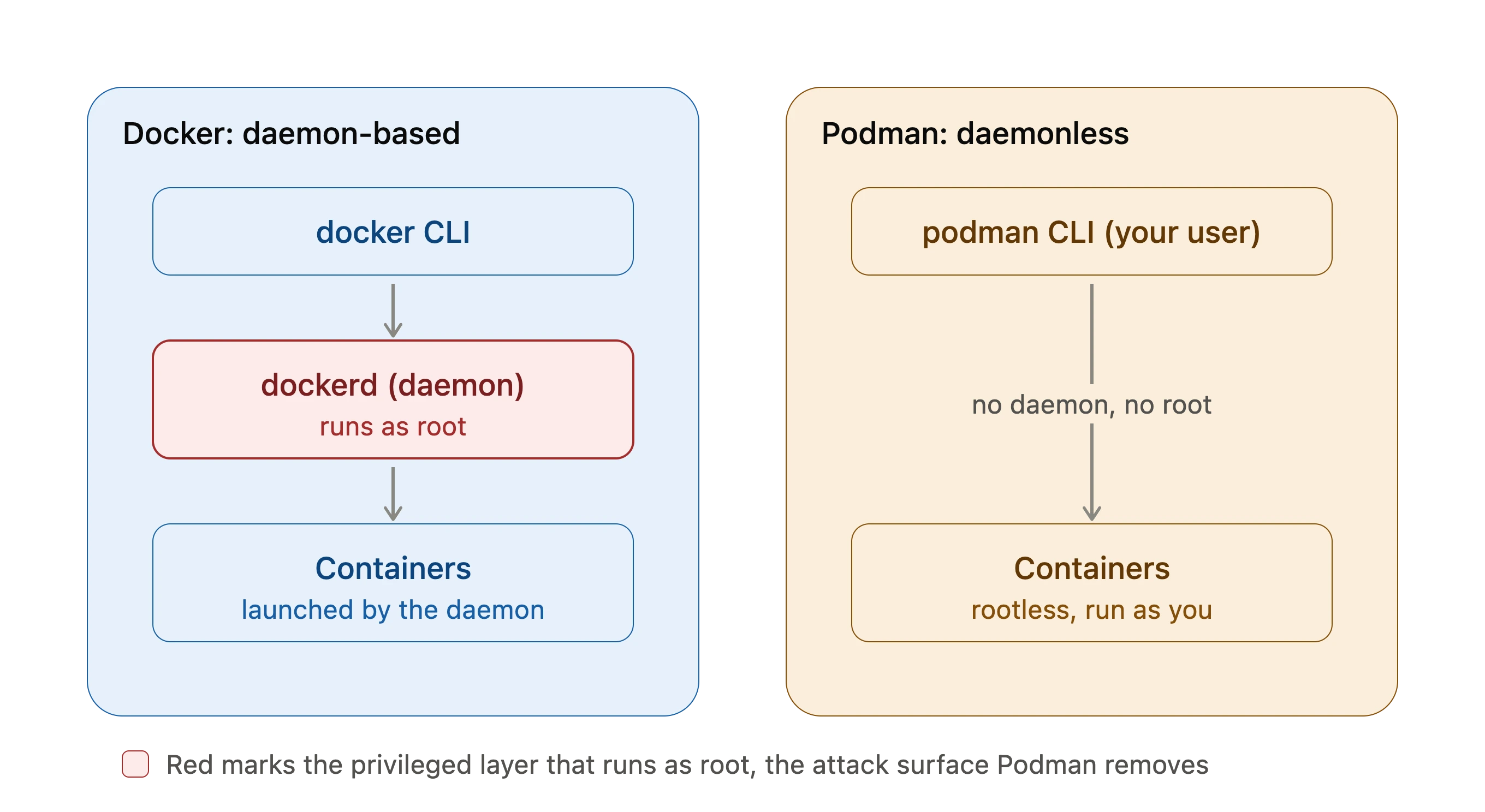
Docker uses a daemon, a program running away in the background, to build images and run containers. Podman is daemonless, so it runs containers under the user who starts them. Docker routes everything through a client-server model with the daemon in the middle. Podman skips the middleman.
No daemon means no standing need for root, so Podman drops root privileges for its containers by default. Docker later added a rootless mode to its daemon, true. But Podman got there first and made it a headline feature rather than an option, and the next point explains why that matters.
Is Podman safer than Docker? By default, yes, and here's the plain reason. Rootless containers are considered safer than root ones, and Podman runs rootless out of the box. Docker's daemon holds root privileges, which makes it a favourite doorway for attackers. Podman's containers have no root access by default, which sets a natural barrier between the rootless and root levels. It can still run both kinds when you need them.
With no daemon of its own, Podman needs something else to keep containers running in the background, and systemd is that something. It creates control units for existing containers or spins up new ones, and it hooks into Podman so containers run with systemd enabled by default, no fiddling required.
Lean on systemd and vendors can install, run, and manage their apps as containers, which is how most software is packaged and shipped now anyway.
Being self-sufficient, Docker builds container images on its own. Podman hands that job to a separate tool, Buildah, which tells you something about its character. It is built to run containers, not to build them single-handed.
Podman does not support Docker Swarm, so Swarm commands throw an error, and that alone can rule Podman out of a Swarm-based project. It does support Docker Compose workflows through podman-compose, which claws back part of the gap. Docker, unsurprisingly, plays nicely with Swarm.
Here is the crux. Docker is one monolithic, capable, self-contained tool that handles every containerisation task end to end. Podman is modular, leaning on specialist tools for specific jobs. Neither instinct is wrong. They just suit different rooms.
Run your setup past this quick selector and see which way it points.
Plenty of teams run both: Docker on the laptop, Podman in production, where rootless operation and system integration earn their keep.
Across our cloud-native platform engagements, the Docker-or-Podman question almost never gets settled by a feature checklist. It gets settled by four questions, asked in a fixed order. We turned them into the Container Engine Fit Score, the shorthand our platform teams reach for before writing a single line of infrastructure code.
Score each question from 0 (Docker-leaning) to 2 (Podman-leaning), then read your total against the bands below.
Two things we have learned from using this in the field. Question 1 tends to dominate in regulated work (fintech, healthtech, public sector), where a privileged daemon is often simply off the table, and a high score there usually settles the whole thing on its own.
The scores also drift upward with time. Teams often score low on questions 1 and 4 at kick-off, then cross the threshold 18 to 24 months later as headcount and compliance catch up. Scoring early, before the pipeline sets hard around one engine, is what keeps that later move cheap.
The engineering comparison tells you which engine fits the workload. Four commercial questions tell you which one fits the organisation.
Docker Desktop needs a paid subscription for commercial use in organisations with more than 250 employees or over $10M in annual revenue. At current list prices (retrieved 9 July 2026), Docker Team runs around $15 to $16 per user per month, and Docker Business sits at $24 per user per month.
The sum is not complicated. Seats times tier price times twelve, and it climbs in a straight line with headcount:
Consumption add-ons such as Build Cloud minutes stack on top of those figures. Podman carries no per-seat licence at any company size (Apache 2.0). That gap is the whole commercial argument in one line.
Both engines share the OCI image format and a near-identical command line, so the risk does not live in the mechanics. It clusters in three spots: Compose file translation, CI runners that assume a Docker socket, and file-permission tweaks for rootless execution.
In our experience, teams with clean Compose-based stacks finish the switch inside a sprint or two. Pipelines welded to Docker Desktop or Swarm should budget a quarter and move service by service. Swarm dependence is the one real blocker. There is no Podman equivalent, so those workloads want to move to Kubernetes first.
For application developers, the overhead is close to nil. alias docker=podman covers most days. The real learning sits with the platform team, where rootless networking, systemd unit generation, and volume permissions all behave a little differently. Plan focused enablement for the DevOps group rather than a training day for everyone.
If your roadmap runs through RHEL, OpenShift, or a Red Hat partnership, Podman is the natively supported path. If your teams live in Docker Desktop on macOS and Windows, Docker's pull is real, and prying it loose has a productivity cost. Either way, keeping your images, registries, and pipelines OCI-standard rather than engine-specific is the cheapest lock-in insurance going, on both sides.
Docker is still the go-to engine for many CI/CD setups, thanks to a mature ecosystem and clean integration with tools like Jenkins, GitLab, and GitHub Actions. You get consistent builds and broad community support, which is exactly what a fast delivery pipeline wants.
If you are designing or modernising your CI/CD architecture, our guide to DevOps best practices for cloud-native applications is worth a read.
In finance, healthcare, and the public sector, the whole comparison narrows to one question: can you defend a privileged daemon to your auditors? Podman's rootless architecture, daemonless operation, and fit with SELinux and systemd make that conversation a lot shorter. That is why it keeps winning ground on servers, edge devices, and zero-trust setups, where least privilege is policy, not preference.
If you are weighing runtime choices inside a wider modernisation effort, our Infrastructure Scalability Report digs into how mature container adoption lines up with scalable, secure system design.
Most migration guides march you through installation. Installation is not where migrations fall over. Because Docker and Podman share the OCI image format and a near-identical command line, the mechanical part is trivial. The effort clusters in three risk areas, so migrate by risk, not by checklist.
If your services live in docker-compose files, decide early whether to translate them or leapfrog them. podman-compose runs your existing Compose files with barely a change. podman kube play skips Compose entirely and moves you onto Kubernetes-format YAML, which is the better long-term seat if production is a cluster.
# Option A: run an existing Compose file with podman-compose
pip install podman-compose
podman-compose -f docker-compose.yml up -d

# Option B: go Kubernetes-native. Generate YAML from a running pod
podman kube generate my-pod > my-pod.yaml
podman kube play my-pod.yamlComb your pipeline for jobs that mount or assume /var/run/docker.sock. These are the ones that break quietly, and they are why we migrate service by service rather than in one big cut-over. Podman exposes a compatible socket for tools that need one, but test each socket-bound job on its own in staging.
Rootless execution is the point of the whole exercise, and also where most post-migration surprises hide. Volume ownership, low-port binding, and user namespaces all shift once root leaves the room. Validate every service under rootless execution in staging before production, and treat any that genuinely need root as documented exceptions.
The rest is quick. On RHEL 8 and later, Podman is already the default engine, so there is nothing to install. Elsewhere:
# Fedora / RHEL
sudo dnf install podman

# Ubuntu / Debian
sudo apt-get install podman

# macOS
brew install podman

# Make existing Docker habits work unchanged
alias docker=podman

# Move images: pull from your registry, or export and load
podman pull docker.io/library/nginx:latest
docker save my-app:latest -o my-app.tar
podman load -i my-app.tar
Podman is built for exactly this kind of gradual adoption. Retire the three risk areas one at a time, without upending the workflows around them.
So which engine wins? Whichever one your context rewards, and the Container Engine Fit Score makes that call out loud instead of leaving it to instinct. Score your root policy, your production target, your pipeline coupling, and your licence exposure honestly, and the answer usually announces itself. Low scores stay with Docker, because switching buys nothing. High scores move to Podman, where rootless execution and zero per-seat licensing compound as you grow. The crowd in the middle lands on the hybrid pattern, Docker for local development and Podman rootless in production, keeping Docker's developer experience without carrying its daemon or its licence line into the data centre.
Whichever way you go, keep your images, registries, and pipelines OCI-standard. That one habit keeps tomorrow's answer cheap to change, whatever it turns out to be.
Yes, in most development and production cases. It supports OCI-compliant images, Docker-compatible commands, and Kubernetes workflows. Teams leaning hard on Docker Swarm or specific Docker Desktop features may need to adjust their tooling.
Architecture. Docker uses a daemon-based client-server model, while Podman runs containers daemonless as user processes. Podman is rootless by default, which trims the attack surface in security-sensitive environments.
By default, yes. Podman runs containers rootless and skips the central privileged daemon. Docker can run rootless too, but with Podman that security model is native rather than an opt-in.
For finance, healthcare, and the public sector, Podman's rootless-by-default design, SELinux compatibility, and daemonless architecture line up more directly with least-privilege and audit requirements. Docker can be hardened to a similar posture, but Podman gets there with less configuration and fewer exceptions to defend.
On RHEL 8 and later, Podman is already the default engine, so there is nothing to install. The migration is moving OCI images (which both engines share), translating Compose files via podman-compose or podman kube play, retargeting any CI jobs bound to the Docker socket, and validating services under rootless execution. Most RHEL migrations go service by service rather than in one cut-over.
Docker Desktop needs a paid subscription for commercial use in organisations with more than 250 employees or over $10M in annual revenue. At current list prices, Docker Team costs around $15 to $16 per user per month and Docker Business $24 per user per month, roughly $57,600 a year for a 200-developer organisation on Business, before consumption add-ons. Podman has no per-seat licence at any company size.
Yes, through podman-compose. It has no native Swarm support, but it runs many Compose-based configurations and can generate Kubernetes YAML for orchestration.
Yes, and it is officially supported in Red Hat Enterprise Linux. Its systemd integration, rootless architecture, and OCI compliance suit enterprise workloads, regulated industries, and Kubernetes-based deployments.
Podman fits Kubernetes workflows more directly, since it generates Kubernetes YAML natively. Docker works with Kubernetes through external orchestration. For Kubernetes-first production, Podman often lines up more naturally.
Use Docker if you prize developer velocity, mature CI/CD integrations, and a broad ecosystem. Use Podman if security, rootless execution, systemd integration, or hardened Linux environments come first. Plenty of organisations use both.
Most container engine decisions go wrong on context, not features. A licence bill that surfaces at renewal. A pipeline that set hard around the wrong default. If you are weighing Docker against Podman as part of a bigger platform decision, our cloud-native engineering team is happy to walk through your setup and score it against the framework above. No pitch. Just a working session on your container strategy.
Content Writer and Digital Media Producer with an interest in the symbiotic relationship between tech and society. Books, music, and guitars are a constant.
CEO @ Imaginary Cloud and co-author of the Product Design Process book. I enjoy food, wine, and Krav Maga (not necessarily in this order).
Alexandra Mendes is a Senior Growth Specialist at Imaginary Cloud with 3+ years of experience writing about software development, AI, and digital transformation. After completing a frontend development course, Alexandra picked up some hands-on coding skills and now works closely with technical teams. Passionate about how new technologies shape business and society, Alexandra enjoys turning complex topics into clear, helpful content for decision-makers.
People who read this post, also found these interesting:
















.webp)

.webp)


