Written by:


Last Published:
9 August 2026
•

The software development life cycle (SDLC) is the seven-stage path every piece of software travels, from first idea to the maintenance of a live product. Think of it as a river with seven locks: the water reaches the sea either way, but the locks are where you control the level, and a lock you never built is one you cannot close when the water rises.
This article maps 18 Agile practices onto those stages, so you can see which belongs where, what it costs to adopt and what risk it removes. It is written for the person deciding where the delivery budget goes: a CTO, a head of engineering or a product leader choosing what to fund first, and answering to a board for the result. The practices are used across the software lifecycle by teams worldwide, including ours at Imaginary Cloud.
SDLC stands for Software Development Life Cycle. Contrary to popular belief, it is not a framework, and not even a described process. It is a conceptual model: a way of representing how software gets made, in a series of steps that run from ideation through to delivery.
Whatever methodology your team uses, it covers all seven, in more or less detail. A waterfall approach treats each one as a distinct phase, and the end of each is a phase gate: a milestone signed off before the next phase starts. An Agile methodology condenses the same seven into repetitive, cyclical, iterative chunks, and covers all of them in every iteration.
The concept of Agile in software development has been around for decades. Until the end of the 90s, Waterfall-oriented projects were the norm, and so were the complaints: heavyweight processes, no malleability, and a deep resistance to change. Then a new direction appeared.
That was when Agile methodologies (they did not even have this name back then) like Scrum, XP, Crystal, Feature-Driven Development (FDD) and Dynamic Systems Development Method (DSDM) began to show up.
Four things. Agile welcomes changing requirements instead of freezing them, delivers software frequently instead of in one release, puts business people and the development team in close and continuous contact, and builds in regular reflection on how to improve.
Buzz and trends come and go. The real benefit Agile proposes is to take the known, tedious, recurring problems of software development and look at them from a different angle.
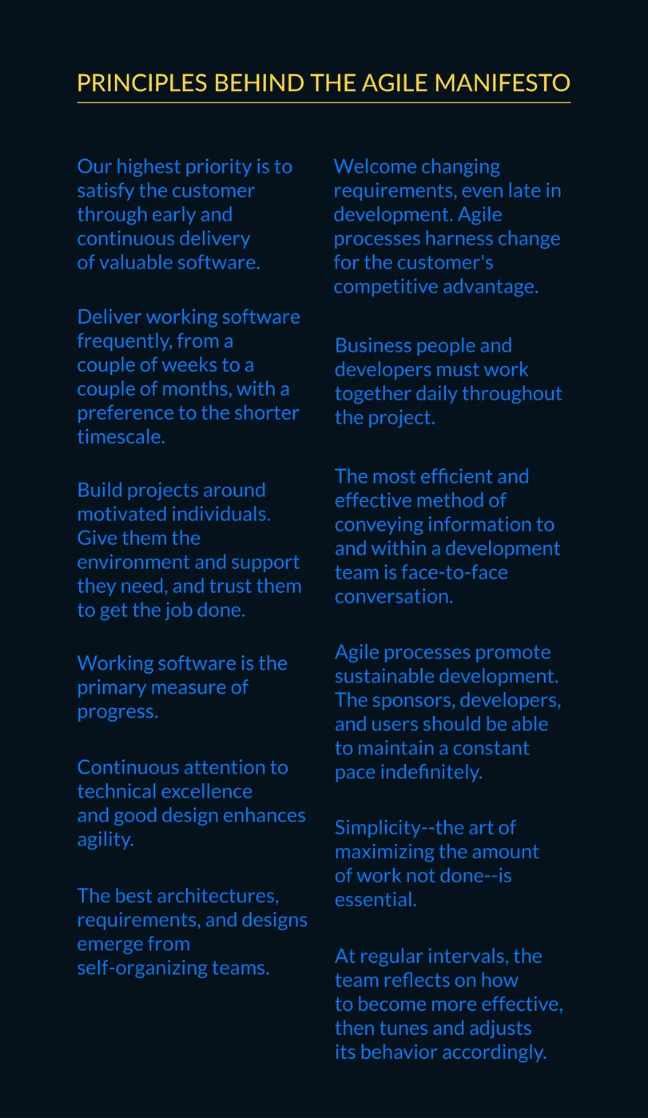
Rather than the overused path of covering the four values in the Agile Manifesto, we will talk about Agile's principles and best practices. They get overlooked, which is a shame, because they carry far more of the detail of the mindset Agile is meant to bring.
The twelve principles behind the Agile Manifesto, published at agilemanifesto.org/principles, are the reference point for everything below.
A "practice" is "the actual application or use of an idea, belief, or method, as opposed to theories relating to it". Which is exactly what an Agile practice is: the theory of being Agile, applied to something real.
You can use these practices without following any Agile methodology at all. Using TDD (Test Driven Development) alone will not make your delivery Agile, of course. Most of these are called Agile practices because they either emerged from an Agile methodology or were invented by Agile practitioners.
Different methodologies encourage different practices, to make them more objective and productive. Each one generally focuses on a single aspect: management, development, testing, and so on.
So, here is the list, mapped to the steps of your SDLC. Several apply more than once across a project, and a practice that covers one stage fully will often cover the next one partially. The rule of thumb has always been: less focus on being strict, more focus on achieving the desired results.
If you are deciding where to invest first, the table below sets out what adopting the practices at each SDLC stage typically demands, the risk it removes, and how long it takes before that shows up in delivery.
Planning practices are the cheapest on this list, and the only ones that pay back immediately. A week of the right people's time is what stops a team spending six months building the wrong product.
Your project's first stage should be its product vision. The initial envisioning needs a handful of brief definitions: who the clients are, who the team is, a high-level scope (and a counter scope), blueprints of the technical approach, potential risks, plus estimated time and cost.
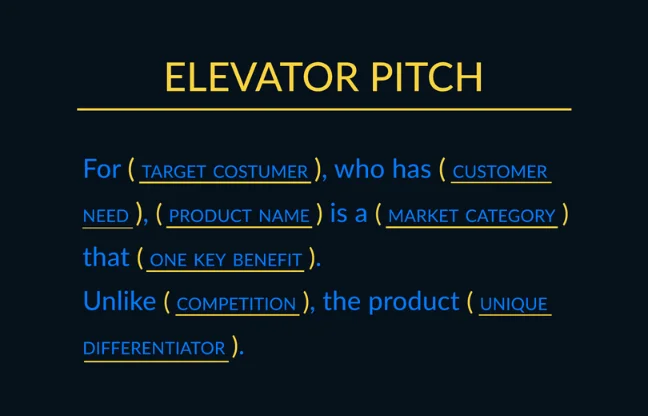
A nice-to-have here is the Vision statement, also known as the "elevator pitch". It fills a single sentence: for a target customer, who has a need, the product is a category that delivers a key benefit, unlike the main competition, because of one clear differentiator.
If you are validating a new idea, this is where the thinking about a minimum viable product starts, well before a line of code is written.
The Business Model Canvas shapes the product you are about to build, and takes a hands-on direction to defining business models. Used alongside Lean Startup, it serves as a visual chart of the ideas and perceptions behind an existing or new business.
It works by forcing the business model onto a single page, split into nine blocks: activities, partners, resources, value proposition, customers, customer channels, customer relationships, costs and revenue. Filling those blocks in turns assumptions into hypotheses you can name, argue with and test. That is where its value to a planning session lies.
The Product Backlog is the list of business and project goals, containing what is forecast to be developed by the team and maintained by the Product Owner. It is a living document: updated continuously, prioritised, and ordered by business value.
It may also hold product improvements, bugs, technical questions, and so on. Its purpose is to have everything needed to reach the project's Product Vision, in one place.
A requirement found in a workshop costs a conversation. The same requirement found mid-build costs rework, and found after release it costs a hotfix and the trust of whoever asked for it. That gap is what the week spent here buys you.
Paulo Caroli created Lean Inception as his adaptation and evolution of the Inception phase used at ThoughtWorks. The idea is to combine Design Thinking and Lean Startup in a discovery workshop that defines the product's MVP: the minimum viable product, meaning the smallest version of a product that still delivers value to a user.
Over one week, the workshop aims to find the direction the team should take to build the ideal product. Think of it as the product vision topic above, extended. It also covers the definition of personas, journeys, features, and technical, UX and business reviews, all inside that one-week timeframe.
The Product Design Process is how we, at Imaginary Cloud, define the way digital products get created. We use it internally on the projects we work on, and different industry players use it externally. It covers the steps needed to create a solution that works for the business and the user, bringing customers and product owners to the centre of the discussion, and the users with them.
It may take one to a few weeks, depending on how complex the product is and how deep we need to dig to define the solution. Twelve steps, running from research and ideation through execution and technical assessment, to identify the product's trajectory as precisely as possible. We wrote up how the process came to be, and every step in it, in our Product Design Process guide.
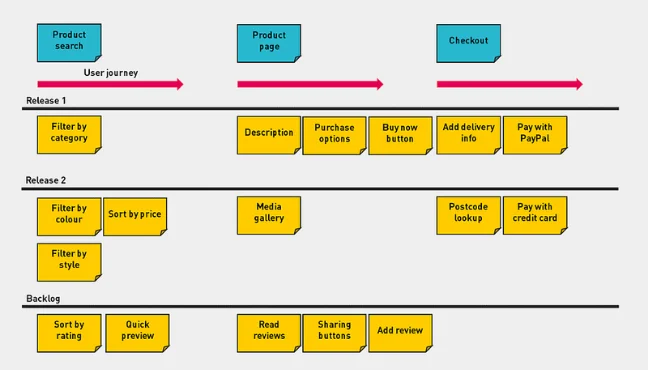
We mentioned the Product Backlog earlier as a way to structure your product goals. It is worth showing a method for working with it, assuming User Stories are what you use to create and maintain that backlog.
User Story Mapping, the technique described by Jeff Patton, allows a visual breakdown, or "slicing", of user stories, so they can be tackled in a sequential order that makes sense as a product: backbone first, smaller details after.
Why bother? Because it shows how features split across the project as a whole, rather than as a grouped list. How thin or thick the slices are, aiming at an end-to-end narrative, comes from talking directly to customers and users.
Design decisions are the most expensive ones to reverse. The practices here are deliberately light: commit to just enough architecture to start, keep the rest open until the requirements are real.
Domain Driven Design, or DDD, structures software architecture models using an abstraction of the application's business domain. It needs technical and business sides working together, which is where one of DDD's main characteristics comes in: a ubiquitous language, meaning one agreed set of terms for the domain that developers, testers and business stakeholders all use in code, in conversation and in documentation.
Because DDD leans so heavily on the domain layer, and takes advantage of Object-Oriented Programming concepts, it became popular with the OOP community. Its general idea works regardless of the programming paradigm, though, especially since it can be utilised as a foundation for TDD, BDD, CI, refactoring and the rest.
DDD splits the domain into bounded contexts, which are areas of the business where one model and one vocabulary apply consistently. Inside them it models Entities, meaning objects with an identity that persists through change, such as a customer, and Value Objects, meaning objects defined only by their attributes, such as a postal address. Together they bring a strategic design to the application, combining the domain's structure, life-cycle and behaviour in a concise and related way.
Spike is a common Agile term, borrowed from XP (Extreme Programming). It refers to a type of user story used to explore an approach and gain just enough understanding of it to reduce the risk of taking it. Architectural Spike goes one step further, towards software design and architecture.
It defines the backbone of the modelling architecture and how it all fits together, pragmatically enough that the solution is proposed on the limited information available about the problem domain. The definitions usually involve software layers, subsystem boundaries, very likely some working code, and source control tools as a minimal skeleton of the application. It feeds the System metaphor, a "simple shared story of how the system works" that everyone on the project can use to describe it.
As the project and the application evolve, the architecture is adapted and refined with them. The Architectural Spike is only the first task in that direction, and the practice below covers what happens next.
The eleventh principle of the Agile Manifesto says that "the best architectures, requirements, and designs emerge from self-organizing teams". Strictly on the design side, you may still be wondering what that means in practice.
Emergent Design builds the solution evolutionarily, letting its design and architecture take shape throughout the development journey. To use the jargon: instead of BDUF (Big Design Up Front), you get JEDI (Just Enough Design Initially).
Working incrementally gives developers room to focus on what the project actually needs, and avoids an early, suboptimal architecture. Address the requirements you have. Do not design for the ones you are guessing at.
Is Emergent Design uncontested? Not remotely. The objection is that leaving the backbone of an application undefined risks structural decisions being made piecemeal, by whoever happens to be writing the code that week. The risk is real, and it is precisely why the Architectural Spike above exists: enough of a skeleton to start with, and no more.
This is where the persistent cost sits. Continuous integration tooling is cheap. The developer time spent writing tests is not, and it never stops. What it buys you is the ability to change the codebase in year three as fast as you could in month three.
Continuous Integration (CI) means having one main streamline of code that receives the changes and additions developers make separately, in a single project repository or branch. Each integration should trigger a few steps, like automated tests and syntax style review tools, usually orchestrated by a CI tool alongside a Version Control Management System.
XP suggests doing this several times a day, so that a running, integrated version of the code always exists. CI is the first phase in a chain that covers Continuous Deployment (an application is released in production if it succeeds with all the steps of the automated deploy process) and Continuous Delivery (having the codebase deployable to different environments at any given time).
The standard strategy of Continuous Integration is the one described by Martin Fowler: a single source repository, an automated and self-testing build, frequent commits to mainline, a fast build kept in working order, and a transparent, visible pipeline.
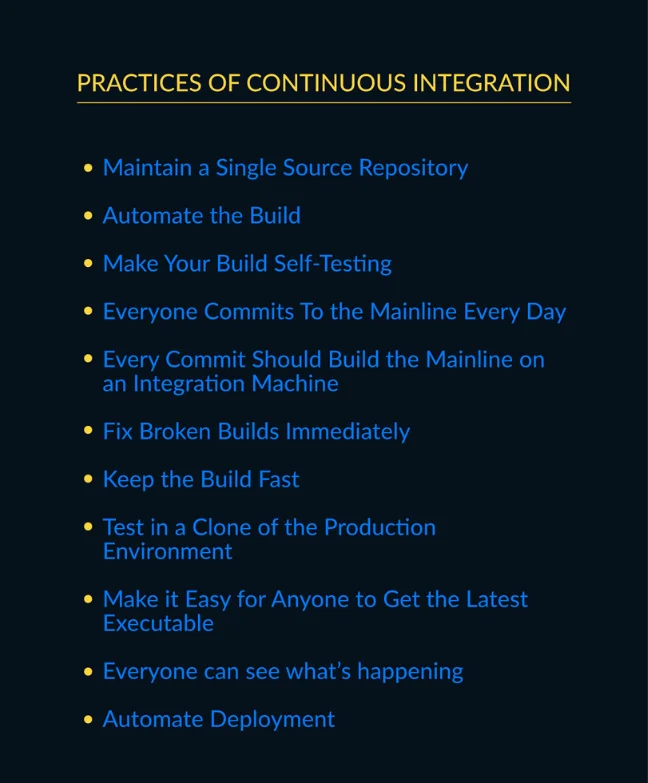
The benefits stack up: bugs detected more efficiently, no overhead from manual integration, environments always available to build against, a more transparent process (and therefore better communication), and more robust test coverage. CI also creates room for pull requests and code review.
DORA, the research programme that began in 2014 and has since gathered data from tens of thousands of engineering professionals, consistently finds continuous integration among the technical capabilities that predict higher software delivery performance, measured across throughput and stability. One point worth keeping current: in its 2025 report, DORA de-acronymed its name to stand on its own, renamed the annual study from "Accelerate State of DevOps" to the State of AI-assisted Software Development, and evolved the original four delivery metrics into five, adding a reliability dimension alongside deployment frequency, lead time for changes, change failure rate and failed-deployment recovery time.
Test-driven development, or TDD, is test-first programming. Using automated unit tests, it follows a repeatable flow:
The goals are clearer, simpler, bug-free code, written by someone who has had to think about structure, internal interfaces and responsibilities before writing a line of it.
Plenty of tools support unit testing and TDD. The best known are the xUnit family, the unit testing frameworks modelled on the original SUnit: JUnit, NUnit, XPyUnit, PHPUnit and their relatives.
For a developer who has never worked this way, TDD is a paradigm shift. The usual objection is that it eats too much time and effort to be worthwhile. Find the middle ground: TDD should give you both more tested and, therefore, cleaner code.
One caveat. TDD cannot be your whole quality assurance strategy, as we will get to when we talk about QA. And the automated tests it produces should be part of your Continuous Integration strategy, since running them is one of the steps that makes CI work.
Two definitions of Refactoring from Martin Fowler are worth keeping in mind. The first calls it a disciplined technique for restructuring an existing body of code, changing its internal structure without changing its external behaviour. The second frames it as a change to the internal structure of software that makes it easier to understand and cheaper to modify, again without changing its observable behaviour. Both are set out on Fowler's own definition of refactoring.
The need for it usually announces itself as a "code smell": an indication that some reorganisation is due, because of a weakness or a potential problem in the code. A common use of Refactoring is to pay down technical debt, which compounds quietly and shows up as slower delivery long before anyone calls it a problem. In TDD, incidentally, the step where you rewrite code that passes the test is also called Refactoring.
We can put a number on this. When AppTweak, an app-store-optimisation platform, came to us about their homepage dashboard, the honest choice was rebuild or refactor. We refactored. Our frontend developers embedded into one of AppTweak's own squads, worked to their project-management rules rather than importing ours, and restructured the dashboard's state handling in React and TypeScript with Redux and Redux-Saga. The observable behaviour stayed put; the internals did not. Loading time fell by 80 percent. That is the argument for refactoring in a single line: users got a faster dashboard, and nobody had to stop shipping to deliver it.
The caveat we would give any CTO weighing the same call: refactoring earns its place when the architecture is sound and the code has simply rotted around it. When the underlying model is wrong, you are polishing something you should be replacing, and a rebuild, not a refactor, is the more honest spend.
Spending effort on code that already works can be a hard sell. It does, though, raise maintainability, cohesion, readability, performance and reusability, which between them tend to justify the time.
Refactoring is not about creating new features. That goes beyond its purpose. The target is always to keep current behaviour intact, with existing or new tests in place to guarantee it. Common examples: use of design patterns, polymorphism, encapsulation of fields, changing the use of parameters, exceptions, and so on.
Testing is the stage where cost and risk are easiest to quantify. Automation carries an engineering bill and a licensing bill. The alternative is a manual regression cycle that lengthens with every release, until it sets the pace of the whole project.
BDD exists to stop business, development and testing working off three different understandings of the same feature.
BDD stands for Behaviour-Driven Development, an approach to development that improves communication between business and technical teams to create software with business value. It aims to be the binding point between business people, developers and QA testers, and everyone else on the project, so that the characteristics of the application are understood and described the same way by all of them. You get there by writing specifications as scenarios and examples, using the "Given-When-Then" pattern to represent the actual behaviours of the solution.
ATDD (Acceptance Test-Driven Development) goes a step further, using the basis of BDD to implement coded acceptance tests against the behaviour those scenarios defined. It resembles TDD: automate a series of failing acceptance tests, then write the code that makes them pass.
Testing tools such as Behat, Cucumber and SpecFlow support executable specifications, which is what lets you run ATDD off the back of what BDD defined.
Automated testing is not formally an Agile practice, but it is the structure quality assurance in Agile rests on, and the practice that makes ATDD, TDD and CI worth running at all. Without it, quality assurance becomes a phase rather than a habit.
It means using a separate piece of software to run the tests against your software: external interfaces, such as mobile or browser-based GUI testing; internal communication between layers, such as APIs; or performance. The clearest benefit is avoiding the repetition of manual processes, along with the human error repetition introduces.
You see the advantage in strategies like regression testing, or in a Continuous Integration pipeline. What to automate, and when, is worth thinking about, given the effort those tests take to implement.
Coverage decisions matter too: unit, integration or the broader end-to-end testing all demand different effort and return different value, depending on your focus. DORA's research consistently identifies continuous testing, meaning automated tests that run on every commit rather than in a phase before release, as one of the capabilities that separates high-performing delivery teams from the rest.
Similar logic applies to the toolset, which deserves a conscientious evaluation rather than a default. Selenium, Jasmine and RSpec are examples of tools built for different testing purposes.
Session-based testing is another practice that was never officially declared Agile, and has been widely adopted in the Agile world anyway. It is a more structured way of doing manual exploratory testing: testing software with no prior design or defined test cases, freely hunting for defects.
It follows a "divide and conquer" idea, splitting timed tests into sessions. The steps are mission, charter, session, session report, debriefing and parsing, which together cover what the process needs in just enough detail.
In an Agile context, you can define multiple sessions per user story, going deeper or shallower depending on the risk attached to each. That flexibility is what lets the practice keep up with the pace.
Manual testing still earns its place next to automation. An exploratory session finds the defects nobody thought to write a test for, which is precisely the class of defect that reaches production. Both strategies together are what guarantees the quality assurance a project needs.
These practices take the longest to pay back, and are the most visible when they are missing. Deployment frequency and mean time to recovery are the two numbers a board will eventually ask about, and both are set at this stage.
DevOps is the combination and collaboration of Development and IT Operations teams to achieve continuous, fast delivery. It puts both sides to work together, and underlines how much their communication and integration matter, through the concept of Infrastructure as Code (IaC).
Getting there involves Infrastructure Automation (systems, configurations and app deployments held as code in the project's structure), Continuous Delivery (build, test and deploy apps in an automated, timely way), and Site Reliability Engineering (operate systems, meaning monitoring and orchestration, and guarantee they support those functionalities from the beginning).
That sets up the "DevOps ladder":
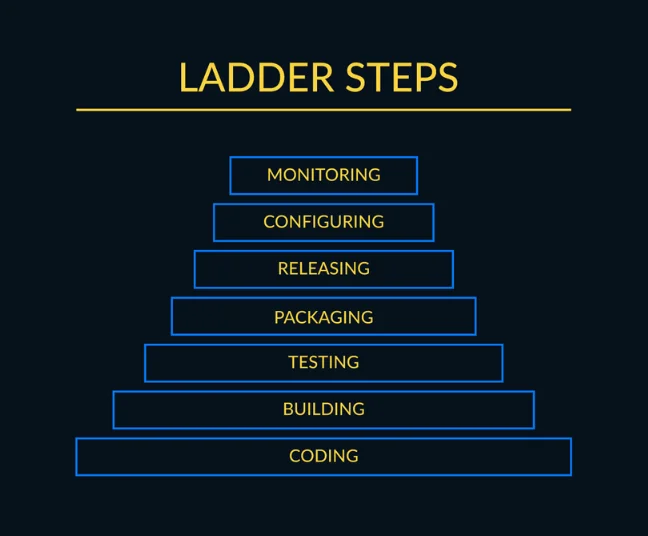
The advantages of using DevOps include scalability, reliability, security, rapid delivery (and faster time to market, where that matters), shorter Mean Time To Recovery (MTTR), prevention of human-error risk, and a lower failure rate on new releases.
The size of that gap is measurable. In its 2024 State of DevOps report, DORA found that the highest-performing organisations deploy on demand, ship changes to production in under a day and restore service in under an hour, while the lowest performers measure the same things in months. The 2025 edition adds an important caveat for anyone about to spend on tooling: AI acts mainly as an amplifier, magnifying the strengths of teams that already have solid delivery foundations and the dysfunctions of those that do not. DevOps complements Agile: frequent delivery, early detection of errors, more transparency when monitoring an application. It is also built into scaled Agile frameworks such as SAFe (the Scaled Agile Framework, used to apply Agile across many teams at once).
A worked example sits behind those numbers. On a marketplace project carrying thousands of large assets, the platform was hosted on Heroku, which constrained its ability to scale. The team moved the database from MySQL to PostgreSQL and the infrastructure across to AWS, completing the first stage in two months, then continued on a continuous-development basis. The decision was not AWS over Heroku for its own sake; it was scaling headroom the old host could not give, bought at a cost the client could see.
This one covers ground already described under Continuous Integration and DevOps, and it correlates closely with automated testing. Bind the concepts together and Continuous Deployment is the next step after Continuous Integration.
It uses automated testing to ensure correct code is released into production automatically, usually via DevOps infrastructure tools. That automated release is the common point of confusion with Continuous Delivery: the two share an abbreviation, but in Continuous Delivery the "go to production" action is manual.
Continuous deployment is the complete end-to-end, automated software deployment flow, and it can run as often as a given application needs it to. The typical steps are:
Together, those steps give you enough guarantee that the code is covered and checked, and mature enough to reach production without major threats, with the option to revert the change easily from the pipeline if it comes to that.
Worries about automating something this important are fair, and the risks are genuinely there. Building the structure also carries a cost, in pipeline engineering and in the monitoring that has to sit underneath it. In return, releases stop being events that need scheduling and rehearsing, which is what makes shipping small changes affordable.
Kanban is a workflow management method that visualises the work it controls. It was created in the Japanese lean manufacturing field, more precisely the Toyota Production System.
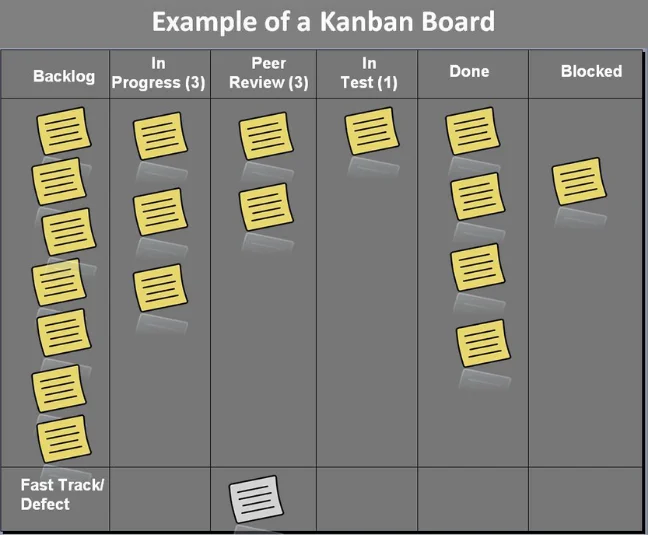
More recently, its main ideas moved into the software industry as the Kanban Method, whose primary artefact is the Kanban board. That board is the real-time visual repository of information and progress for a given process, and it makes blockers and bottlenecks obvious.
The columns represent steps in the flow, and carry the concept of Work In Progress, along with its limit per column, which is a valuable resource. The whole idea is to have your tasks (tickets, issues, and anything else the team tracks) flowing through each column on the board.
Kanban is an evolutionary method, easy to implement and to evolve progressively as you use it. Because it is a non-disruptive change management system, it has been widely applied in Operations and Maintenance projects. That is the context where it beats Scrum: continuous-flow work with an unpredictable arrival rate, where fixed sprint boundaries add ceremony without adding predictability, because the work that lands on day three of the sprint cannot wait for the next one.
Kanban is not strictly defined as an Agile practice. It is, though, used to implement Agile and lean principles, while increasing employee and customer satisfaction along the way.
The goal here was to present real options you can use in any SDLC, with a strong focus on Agile practices.
None of the 18 has to be adopted at once, and the order matters more than the count. Start where your projects currently hurt most, whether that is requirements churn, regression cycles or slow releases. Those practices pay back first, and the table above is there to make that a budget decision rather than a preference.
At Imaginary Cloud we evaluate each scenario first. Then we apply the practices and techniques that fit the stage the product is at, and the risk the client is carrying, rather than a standard set applied to every engagement. The way an embedded refactor for AppTweak looked nothing like a greenfield MVP, even though both drew on the same practices above.
Based on our team's expertise, we can define and recommend how to make the best use of Agile practices, and when to apply them in the life cycle of your web application or UI/UX Design projects. You can browse our case studies to see how this plays out in practice.
Planning, analysis and requirements, design and prototyping, software development, testing, deployment, and operations and maintenance. Every methodology covers these seven stages, in more or less detail. What changes is whether they run once as sequential phases, as in Waterfall, or repeatedly inside each iteration, as in Agile.
No. The SDLC is a conceptual model describing the stages software passes through; Agile is a mindset, and its methodologies are ways of moving through those stages. An Agile team still plans, analyses, designs, builds, tests and deploys. It just does all seven in short, repeating cycles rather than as one pass.
Planning: product vision, Business Model Canvas and the product backlog. Analysis and requirements: Lean Inception, a product design process and user story mapping. Design and prototyping: Domain Driven Design, architectural spikes and emergent design. Development: continuous integration, TDD and refactoring. Testing: BDD and ATDD, automated testing and session-based testing. Deployment and operations: DevOps, continuous deployment and Kanban.
Yes. Practices such as TDD, continuous integration, refactoring and Kanban are independent of any single methodology, and most teams adopt them one at a time. The reverse is also true: running Scrum ceremonies without any of these practices will not make delivery Agile on its own.
Use delivery outcomes rather than adoption checklists. DORA's delivery metrics, deployment frequency, lead time for changes, change failure rate and failed-deployment recovery time (with a reliability dimension added in 2025), tell you whether a practice has improved how the team ships. Track them before you adopt a practice, so you have a baseline to compare against.
It depends on the stage. Planning practices pay back immediately, because they produce the plan the team works from. Development and testing practices need one to three months for a test suite to become dense enough to catch regressions. Deployment and operations practices take three to six months, measured in deployment frequency and mean time to recovery.
Not sure which of these to fund first? Get in touch and we will review where your delivery currently loses time, which practices fit the stage your product is at, and what adopting them would cost.
Passionate about software stuff and agile. Can be easily found cooking, playing volleyball or spending some time with video games.
Alexandra Mendes is a Senior Growth Specialist at Imaginary Cloud with 3+ years of experience writing about software development, AI, and digital transformation. After completing a frontend development course, Alexandra picked up some hands-on coding skills and now works closely with technical teams. Passionate about how new technologies shape business and society, Alexandra enjoys turning complex topics into clear, helpful content for decision-makers.
People who read this post, also found these interesting: