Written by:

Last Published:
3 November 2026
•

Everyone wants an AI agent. Far fewer people can say which problem it would solve. The short answer: build an agent only when the work is messy, variable and needs judgement. Otherwise, traditional automation is cheaper, faster and easier to audit.
That gap is expensive. A large share of agentic AI projects is expected to be cancelled before it delivers value, because of escalating costs, unclear business value or inadequate risk controls. Many of the use cases sold as agentic do not even need an agentic implementation. In other words, a lot of the damage starts with choosing the wrong job.
So ask one question before you build anything. Does this workflow need an agent at all? Often, no. A well-built automation can do the job faster, cheaper and with fewer surprises.
That is why this guide to how to build an AI agent for your business starts with a decision, not a tutorial. It gives you a five-question test, a real Imaginary Cloud example where traditional automation won, and six steps to build an agent when the answer is yes.
An AI agent is a system where a language model decides, step by step, which actions to take and which tools to use to reach a goal. Traditional automation follows a path you wrote in advance. The difference is who chooses the route: you, or the model.
| Traditional automation | AI agent | |
|---|---|---|
| Who chooses the route | You, in advance | The model, step by step |
| Best for | Known rules and structured data | Messy inputs and judgement calls |
| Cost per run | Low and predictable | Higher and variable (model calls) |
| Main risk | Breaks when the process changes | Wrong or unsafe actions without guardrails |
| Auditability | Straightforward | Needs deliberate logging and oversight |
Anthropic draws the same line. Workflows orchestrate models and tools through predefined code paths, while agents let the model direct its own process and tool use.
Think of a train and a taxi. A train runs a fixed route, costs little per passenger and almost never surprises you. A taxi goes anywhere, copes with a closed road, and costs more per trip. Nobody takes a taxi to commute along a line the train already serves.
Plus, most real systems sit in between. A workflow with one or two agentic steps, where judgement is genuinely needed, is often the sweet spot. We will come back to that in the build steps.
The five-question test looks at steps, inputs, exceptions, judgement and systems. If most answers point to messy, variable work, an AI agent deserves a serious look. If they point to known rules, traditional automation will be cheaper, faster and easier to audit.
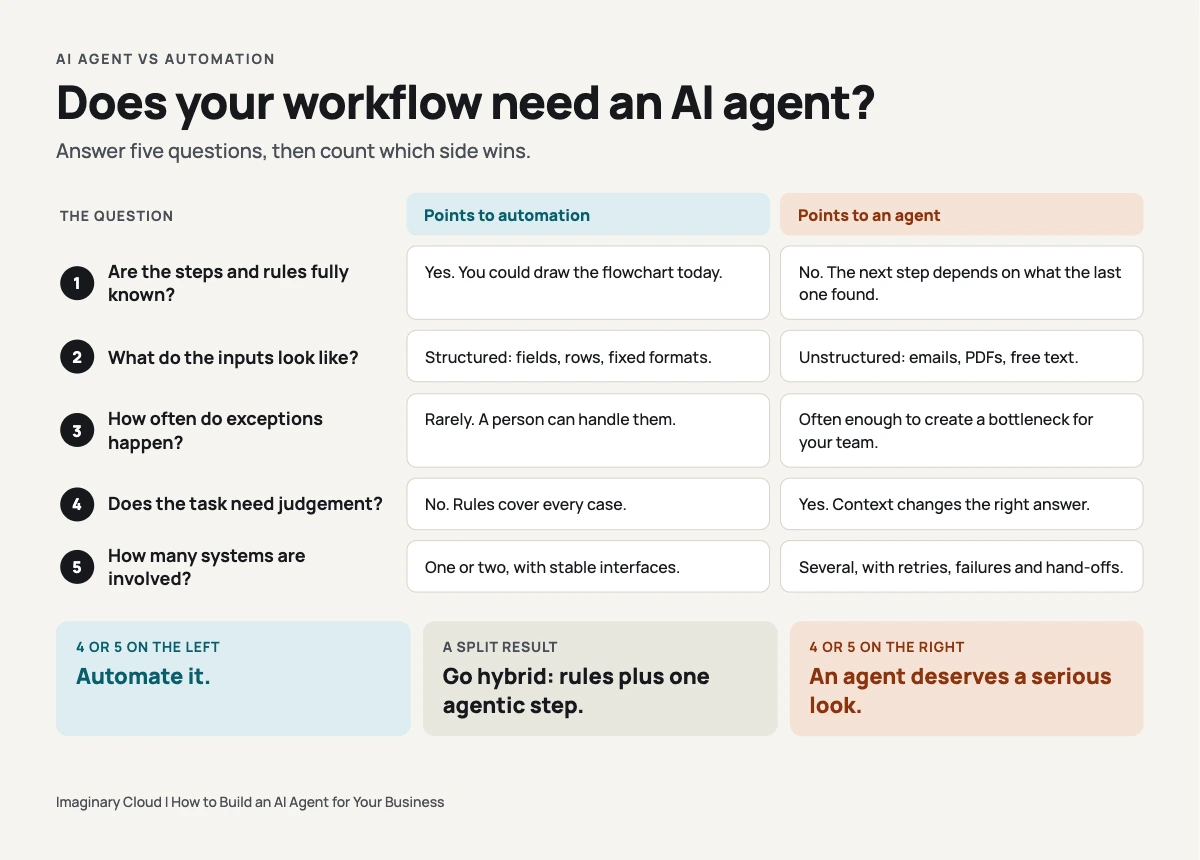
Score it simply. Four or five answers on the left: automate. Four or five on the right: an agent deserves a serious look. A split result usually points to a hybrid, with rules for the predictable parts and an agent for the messy ones.
Keep one more rule on a sticky note. AWS advises choosing the simplest solution that works, and asks you to weigh latency and the full cost of inference, infrastructure and human oversight against the benefit. Agents earn their keep when the extra flexibility is worth that bill.
Use an AI agent when the work is messy and needs judgement. Skip it when the rules are known and the data is structured, when answers must be guaranteed without human review, when speed is critical, or when the process is undocumented. There, an agent adds cost and risk without adding value.
The stakes are real: Gartner expects more than 40% of agentic AI projects to be cancelled by the end of 2027, citing escalating costs, unclear business value or inadequate risk controls. It also notes that many use cases sold as agentic do not need an agentic implementation.
Here are the four cases where simple automation wins:
Sedna, a maritime communications company, wanted to cut the cost of the Tray.io workflows behind its integrations. Imaginary Cloud optimised the legacy workflows, then migrated them to custom AWS Lambda functions. The published result: Tray.io costs down by 80%. No agent required.
Sedna runs two data-driven platforms, Stream and Pulse, for shipping and supply chain communication. Both depend on integrations that move and process data between external systems. Those integrations were built in Tray.io, and the cost of running them was the target.
The work ran in two phases. First came optimisation: improving the legacy Tray workflows and building new ones where needed. Then came migration to a custom solution hosted on AWS, with the Tray integrations converted into AWS Lambda functions (small pieces of code that run on demand in the cloud).
Along the way, the team set up a CI/CD process (automated pipelines that test and release code) for the data synchronisation plugins. They also built "auto taggers", custom logic that tags emails for Sedna's customers. One backend developer and one full-stack developer worked embedded in Sedna's team under a Managed Teams model. You can read the full Sedna case study here.
Now run that work through the five-question test. The integrations follow defined paths between systems, and even the email tagging ran on custom logic rather than open-ended judgement. On our reading, almost every answer lands in the left-hand column. (That is our analysis of the case, not a statement from Sedna.)
That is the lesson. When the route is known, the cheapest vehicle is the train. Adding a model to decide things the code already knows would have added per-run inference cost, latency and one more thing to audit.
An 80% reduction is a percentage, not a payback period, though. Which brings us to measuring return.
Measure agent ROI by comparing the monthly value it creates against its full monthly cost, including inference, integrations, oversight and maintenance. Set the baseline before launch. Then track time-to-value: how quickly a narrow pilot shows a measurable result, before you fund a wider rollout.
A simple version looks like this:
The baseline is what makes the Sedna example useful. A single cost line, measured before and after, gives you a number nobody can argue with. Agents need the same discipline, plus the extra cost lines that automation does not carry.
Time-to-value matters as much as payback. A narrow pilot that proves a result quickly gives you evidence to fund a wider rollout. A broad programme that shows nothing for a year does the opposite.
Ambition is not the problem. McKinsey's State of AI survey, published in August 2026, found that 40% of large organisations, those with more than $1 billion in revenue, are scaling agents in at least one function, up from 27% a year earlier. The organisations that join them with a clear baseline will be the ones still funding the project in 2027.
Buy when a packaged tool already covers your use case. Build in-house when you have engineers who can own an agent in production. Bring in a team when the workflow is specific to your business, touches several systems, or needs guardrails and audit trails your team has not built before.
Here is how the three routes compare:
Whichever route you choose, decide who owns the agent once it is live. Someone has to watch the logs, handle the exceptions and update it when your process changes. Without an owner, even a good agent decays.
Building an agent comes down to six steps: pick one narrow use case, map the process in detail, choose an architecture, select your stack, build the tools and reasoning layers, then launch in phases and monitor. Start small. Most failures come from scope, not code.
Each step ends with a gate: a check to pass before you move on.
Choose one workflow with a clear trigger, a clear owner and a measurable outcome. "Triage inbound supplier invoices" is a use case. "Improve operations with AI" is a wish.
Write down what success looks like in numbers before anything is built: hours saved, error rate, time to resolution. That is your baseline.
Gate: you can state the use case, the owner and the success measure in two sentences.
Walk the process end to end with the people who do it. List the tools they touch, the decisions they make and, above all, the cases that go wrong.
The top five exceptions matter more than the happy path. They tell you where the agent needs judgement, where it should stop, and when it must hand over to a person.
Gate: the top exceptions and the hand-over rules are written down.
You have three broad options. An agent orchestrated by a large language model (LLM) lets the model decide the sequence of steps. A workflow agent follows a fixed sequence with model calls inside it. A hybrid mixes both.
Start with a workflow and add agentic steps only where judgement is needed. Anthropic's guidance is to find the simplest solution possible and increase complexity only when it demonstrably improves outcomes, because agentic systems often trade latency and cost for better task performance.
Be wary of multi-agent designs, where several agents hand work to one another, until a single agent has proved itself. They add coordination, cost and new ways to fail. Start with one agent and one job.
Gate: you can explain why your chosen architecture is the simplest one that works.
Think in layers rather than brands. You need a model layer, an orchestration layer to manage steps and tool calls, an integration layer to connect your systems, and an evaluation and monitoring layer to tell you whether it works.
Model choice is a business decision as much as a technical one. Proprietary models usually get you started faster and are often more capable out of the box. Open-source models give you more control over hosting, cost and data, but you take on more of the engineering. Whichever you choose, keep the model swappable.
Privacy belongs here too. If the agent will see personal data, the GDPR applies. Decide what data the model may see, where it is processed and who can read the logs, and involve your security and legal teams before the build, not after.
Gate: data access, hosting location and logging are agreed with security.
Start with the tool layer: the integrations the agent will call to read or write data. Then build the reasoning layer that decides when to use them. Then spend real time on the edges, because that is where agents differ from demos.
Limit permissions from day one. OWASP's 2025 Top 10 for LLM applications lists both prompt injection and excessive agency as top risks. Give the agent the least access it needs, and require human approval for anything irreversible, such as payments, deletions or customer-facing messages.
Gate: the agent passes a test set of real cases, including the awkward ones.
Start with a trial run alongside your people, often called shadow mode: the agent produces answers, but nobody acts on them. Then route a small share of real cases to it, with human review. Widen only when the numbers hold.
Log every action and decision. The voluntary NIST AI Risk Management Framework is a useful backbone for this, organised around governing, mapping, measuring and managing risk.
Gate: the pilot numbers beat your baseline before you widen access.
The most common mistakes are starting with the tool instead of the problem, skipping the baseline, giving the agent too much access and launching without evaluation or monitoring. All four are avoidable, and all four are cheaper to fix before launch than after.
An AI agent is software that uses a language model to pursue a goal by choosing actions and tools itself, such as reading a document, querying a system and updating a record. A chatbot only answers questions. An agent can act across your systems, which is why it needs guardrails.
Buy if a packaged tool already covers your use case. Build if you have engineers who can run an agent in production. Bring in a partner if the workflow is specific to your business, touches several systems or needs audit trails. Many businesses start with a partner for their first agent.
It depends on how many systems the agent connects to, how clean your data is, whether it can only read or also write, and how many requests it handles. Remember the run cost: inference, oversight and maintenance continue after launch. A scoped estimate is more useful than a generic range.
A narrow prototype can be tested in a matter of weeks. A production system with guardrails, evaluation and monitoring takes longer, and scope is the biggest lever. Launching one focused use case first gets you to a measurable result sooner, and more safely, than building a general assistant.
For a narrow use case, yes. No-code platforms and a partner can get a pilot running without data scientists. Production is different: integrations, permissions, testing and monitoring need engineering skills, in-house or external. Treat no-code as a way to learn, not a way to skip safeguards.
Agents cope with messy inputs, such as emails and PDFs, better than rule-based tools do. They still need accessible, permissioned data and a set of real examples with known right answers, so you can test whether the agent is correct before it touches live work.
RPA repeats scripted steps across systems and breaks when the screen or process changes. An AI agent pursues a goal by choosing actions and tools, so it copes with variation. If the steps never change, RPA or plain automation is usually enough.
There is no single best builder. Judge options on how well they connect to your systems, how they handle permissions and logging, whether you can switch models, who owns your data and how hard it is to leave. Test two or three on one real use case before committing.
Two things to take away. Decide before you build: run your workflow through the five questions, and be willing to hear that traditional automation is the answer. Then measure from day one, with a baseline, so the number you report is one you can defend.
An agent is a means, not a goal. Sedna's 80% came from picking the right tool for a known route. Whatever you build, the best way to build an AI agent for your business is to be sure you need one first.
If you want a second pair of eyes on your use case, that is where our AI agent development services come in. We design and build AI agents and AI-powered automation tools. Want to see how we work on real projects? Browse our case studies, or book a call to run your workflow through the five-question test.
Alexandra Mendes is a Senior Growth Specialist at Imaginary Cloud with 3+ years of experience writing about software development, AI, and digital transformation. After completing a frontend development course, Alexandra picked up some hands-on coding skills and now works closely with technical teams. Passionate about how new technologies shape business and society, Alexandra enjoys turning complex topics into clear, helpful content for decision-makers.
People who read this post, also found these interesting: