Written by:


Last Published:
10 August 2026
•

The short answer: for most teams, Node stays. It has the deepest package ecosystem, the largest hiring pool, and more than a decade of production hardening. Deno wins where the sandbox matters, where TypeScript should work without a toolchain, and on greenfield services. Since Deno 2 added npm and package.json compatibility in October 2024, the two are no longer mutually exclusive, so the real question is not which runtime is better. It is which one your next service should start on.
Think of Node as a city that grew: roads laid before anyone knew where the traffic would go, now impossible to move without closing the district. Deno is the town planned afterwards, on the same land, by the same architect, who had the benefit of watching the traffic first.
At Imaginary Cloud we have built APIs, served frontends, and shipped microservices architectures on Node for over a decade. On FundSpace, a fund-reporting platform for small and medium enterprises, Node handled the integration layer that pulled fund data together, sitting alongside a Ruby on Rails core and a React front end. The redesign of that product cut decision-making time for fund managers and investors by roughly a factor of ten, and the platform went on to be selected for a Silicon Valley accelerator programme, work that saw us recognised as a Top Financial App Developer by Techreviewer.
That production experience is where the four tests below come from. A runtime comparison in the abstract is how these articles usually go, and it is why they rarely help. So we run a Deno versus Node decision through four tests instead, and each section that follows closes with what the difference actually means for a delivery team.
Node is a server-side JavaScript environment based on Google's V8 engine, created by Ryan Dahl in 2009 and heavily focused on event-driven HTTP servers. V8 is the same engine that runs JavaScript in Chrome. Node wraps it with file, network, and process APIs so the language can run outside a browser. It brought server-side JavaScript to the mainstream, and it was this "JavaScript everywhere" idea that let teams build web applications in a single language.
Then, in 2018, the architect went back and looked at his own city. Ryan Dahl gave a talk at JSConf EU titled "Design Mistakes in Node", better known as "10 Things I Regret About Node.js". In it he detailed his regrets about choices made during Node's development. When Node started, he pointed out, JavaScript was a much different language, and it lacked some of its now-standard features:
Many of those design decisions could not be reversed without rewriting the core of Node and dropping support for legacy applications. Closing the district, in other words. So Ryan introduced Deno instead.

First of all, it is not a fork of Node. It is a new implementation built on modern features of the JavaScript language, although the name is an anagram of Node. Deno is a secure runtime for JavaScript and TypeScript based on Google's V8, and its core is written in Rust, where Node's is in C++. It uses Tokio, a Rust library for asynchronous I/O, for its event loop.
Deno was announced in 2018 and reached 1.0 in May 2020, so it has been in public development for years rather than months. Deno 2 then brought backwards compatibility with Node and npm. The current stable line is Deno 2.9, which also introduced a long-term support channel for teams that want a slower cadence. Node, by comparison, has been shipping since 2009.
# macOS and Linux
curl -fsSL https://deno.land/install.sh | sh

# Windows (PowerShell)
irm https://deno.land/install.ps1 | iex

# Homebrew
brew install deno
For other installation methods, check the official documentation. Confirm your installed version with deno --version.
Deno ships as a single executable with no dependencies, and it comes with built-in tools that make the developer experience easier:
--inspect, --inspect-brk)deno info)deno doc)deno fmt)deno test)deno lint)All of these are maintained by the Deno team alongside the runtime, so they move in step with it. Recent releases have widened that surface further, with built-in OpenTelemetry and a linter plugin API landing in the 2.x line.
Being a single executable, Deno can also update itself:
deno upgrade                 # latest stable
deno upgrade --version 2.9.5 # a specific version
This fetches the specified version, or the latest if unspecified, and replaces your current executable. You can hold multiple versions with a version manager. For Node, version managers also handle installing and updating releases:
nvm install 24
nvm use 24
Note the version there. As of 2026, Node 24 "Krypton" is the Active LTS line, with Node 26 as the current release. Node 22 remains supported but is no longer the default you would reach for.
What this means for a delivery team: with Node you assemble and maintain a toolchain, each part with its own config file and its own upgrade path: linter, formatter, test runner. With Deno, that toolchain is the runtime. On a small team without a platform engineer, that is real time back.
Deno runs TypeScript out of the box. No compiler to install, no configuring, none of the tsconfig.json plus build-step arrangement Node once required. It ships sensible defaults and lets you override them in deno.json:
{
  "compilerOptions": {
    "strict": true,
    "lib": ["deno.window"]
  }
}
Since TypeScript is a superset of JavaScript, Deno runs plain JavaScript too.
interface Person {
  name: string;
  age: number;
}

function greet(person: Person): string {
  return `Hello, ${person.name}`;
}

console.log(greet({ name: "Ada", age: 36 }));
To run this, save it as greet.ts and run deno run greet.ts. Deno type-checks the file, produces JavaScript, and runs it.
Node has narrowed this gap. Current LTS releases strip TypeScript types and run .ts files directly without a separate transpile step, though full type-checking still needs a tool such as tsc. We have written before about when Next.js with TypeScript earns its place, and the same trade-off applies here.
What this means for a delivery team: if your codebase is already TypeScript, Deno removes a build step and a whole class of configuration bugs. If it is plain JavaScript, this is not a reason to move.
Security is Deno's headline design decision. Code runs in a sandbox that mirrors the browser's permission model. Unless you say otherwise, a script has no access to the filesystem, the network, or environment variables, and access must be granted explicitly on the command line.
// env.ts
const home = Deno.env.get("HOME");
console.log(home);
Run it without permissions and Deno stops you:
$ deno run env.ts
error: Uncaught (in promise) NotCapable: Requires env access to "HOME",
run again with the --allow-env flag
Add the flag to grant it:
deno run --allow-env env.tsPermissions can be scoped rather than granted wholesale, which is rather the point:
deno run --allow-env=HOME --allow-net=api.example.com server.tsThere is an option to allow everything, --allow-all or -A. It is not recommended.
Node, by contrast, is permissive by default. Any script you run has full access to the filesystem, network, and environment:
// env.js: runs with no flags, no prompt
console.log(process.env.HOME);
Node has since added an experimental permission model of its own, but it is opt-in rather than the default, which is the meaningful difference.
What this means for a delivery team: Deno's sandbox limits how far a compromised dependency can reach. On a service pulling in a long dependency tree, or one executing user-supplied code, that is a genuine reduction in risk. On an internal service already sitting behind your own network boundary, it is a smaller win than it first appears.
Deno uses ES Modules, the official standard format introduced in ES2015:
export function ping() {
  return "pong";
}
When Node was created, JavaScript had no module system of its own, so it used CommonJS:
const http = require("http");
module.exports = { ping: () => "pong" };
Node's ES Modules support is now stable rather than experimental, though mixing ESM and CommonJS in one project still needs care with "type": "module" and file extensions.
Deno also reads Node-style imports and resolves packages from npm directly, so the two module worlds are no longer separate:
import express from "npm:express@5";What this means for a delivery team: the module split used to be the strongest argument against Deno. It largely is not any more. Check your specific dependencies rather than assuming either answer.
This is the section that has changed most since older comparisons, so it is worth reading carefully.
Deno can load modules by URL, and it can act as both runtime and package manager without a centralised server. But the modern idiom is different from the old fully-qualified-URL approach. Deno now recommends JSR, the JavaScript registry, for its own standard library and for cross-runtime packages, and the npm: specifier for the npm ecosystem.
The most important update: the Deno standard library has moved to JSR. It is now published as modular @std packages, and the old https://deno.land/std URL is frozen at version 0.224.0 and receives only critical patches. Any comparison still teaching deno.land/std imports as the primary pattern is out of date.
Here is the current way to add and use a standard-library package:
deno add jsr:@std/http// server.ts
Deno.serve((_req) => new Response("Hello from Deno"));Run it with deno run --allow-net server.ts. Deno.serve is the built-in HTTP server, so for a simple case you do not even need the std import.
You can pin dependencies in an import map inside deno.json, which keeps specifiers out of your source files:
{
  "imports": {
    "@std/path": "jsr:@std/path@^1",
    "express": "npm:express@^5"
  }
}
Need a date utility rather than writing your own? Reach for a maintained package on JSR or npm instead of the old deno.land/x hosting service, which is now de-emphasised:
import { format } from "npm:date-fns@4";

console.log(format(new Date(), "yyyy-MM-dd"));
Deno 2 also creates and updates a deno.lock file automatically, so the manual --lock-write step from earlier versions is no longer needed. Modules are downloaded and cached once, globally, the first time a specifier appears, which keeps repeated installs offline-friendly and avoids the per-project duplication that makes node_modules folders balloon.
Node, by contrast, uses npm to install and manage packages listed in the npm registry, which makes dependency resolution fundamentally centralised. When you install a package with npm or Yarn, a package.json records the name and accepted versions, and the packages land in a node_modules folder inside your project.
Now for the update that changes the argument. Deno reads package.json, creates node_modules when a package needs it, and installs from npm with deno add npm:<package>. The old summary, "no package.json and no node_modules", no longer holds.
What this means for a delivery team: the migration question has changed shape. It is no longer "can we replace our dependencies?" but "do any of our dependencies use Node internals or native bindings that Deno's compatibility layer does not cover?" On the codebases we have checked, that comes down to a handful of packages. It is a list you can produce in a morning, by running the test suite under Deno and reading the failures.
Deno uses promises all the way down. Every asynchronous method returns a Promise, and top-level await works in the global scope without an async wrapper.
const text = await Deno.readTextFile("./hello.txt");
console.log(text);
Node also supports top-level await in ES modules. But long before promises or async/await, Node's asynchronous API was designed around callbacks, following the error-first convention:
const fs = require("fs");

fs.readFile("./hello.txt", "utf8", (err, data) => {
  if (err) throw err;
  console.log(data);
});
Node developers now have promise-based equivalents:
const fs = require("fs/promises");
const data = await fs.readFile("./hello.txt", "utf8");
The callback APIs remain, though, because Node maintains backwards compatibility. The old roads stay open. One notable difference: Deno exits immediately on an unhandled promise rejection, and current Node versions now terminate the process on unhandled rejections by default too, after years of only emitting a warning.
What this means for a delivery team: Node's backwards compatibility is a cost in API surface and a benefit in upgrade safety. Deno's cleaner API is pleasant to write against, and it leaves you less legacy to reason about.
Is Deno faster than Node? Not in any way that will decide this for you. Both runtimes execute JavaScript on the same V8 engine, so for CPU-bound work such as parsing, sorting, or arithmetic they sit close enough together that the difference rarely matters. The gaps appear elsewhere.
node_modules resolution. That matters most for short-lived processes: CLI tools, scheduled jobs, and serverless functions billed by the millisecond.What this means for a delivery team: benchmark your own service before letting performance decide anything. More often than not the runtime is not your bottleneck. The database is, or the network hop, or the serialisation. Performance is a good reason to choose Deno for edge and short-lived workloads, and a poor one for moving a service that already works.
Deno's team chose to use browser APIs wherever practical, so Deno provides fetch, localStorage, sessionStorage, location, Request, Response, and web streams as globals.
const res = await fetch("https://api.github.com/repos/denoland/deno");
const repo = await res.json();
console.log(repo.stargazers_count);
This means Deno programs written entirely in JavaScript that avoid the Deno namespace are isomorphic: the same code runs unchanged in a modern browser and on the server. Node has closed much of this gap too, shipping a global fetch and web streams in current releases. Browser storage APIs still need a polyfill or a small shim.
Node runs everywhere. Every major cloud, every container platform, every serverless product, every managed platform-as-a-service, with base images and buildpacks already in place. That ubiquity is itself a reason teams stay.
Deno runs in a container like any other binary, and it has first-party support on Deno Deploy along with several edge platforms. What it does not have is the same depth of third-party integration. Monitoring agents, APM tooling, and vendor SDKs assume Node first, so a Deno service can mean waiting for a Node-compatible agent, or instrumenting by hand.
What this means for a delivery team: check your observability and deployment stack before you check your application code. It is the most common place a Deno pilot stalls.
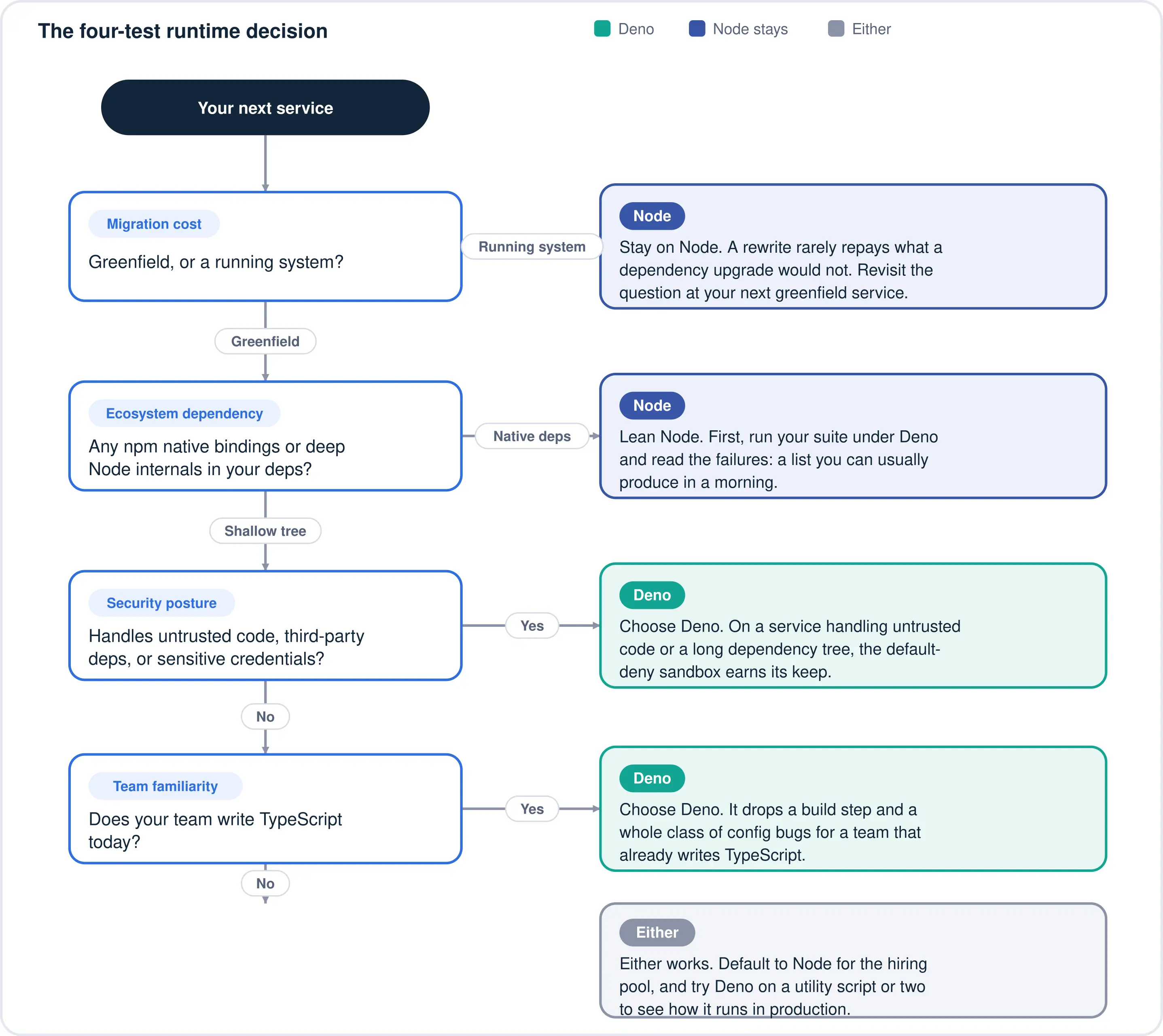
The technical comparison rarely decides this one. Four commercial factors do, and they are the same factors we weigh whenever a client asks us to review their software architecture.
Migration cost. Moving a running Node service to Deno is not really a port of application code. It is a re-validation of its dependency tree, its build pipeline, its observability agents, and its deployment target. For a service that works, that spend buys very little. Deno's case is strongest on new services, where the cost is close to zero.
Team ramp-up. A TypeScript team picks up Deno quickly, since the language is the same and most of what is new is the permission flags and module resolution. The cost is not learning Deno. It is running two runtimes in production, with two sets of base images, CI configurations, and on-call knowledge.
Hiring. Node's talent pool is the larger of the two by a wide margin. It has been a mainstream server technology since 2009 and sits near the top of every developer survey that asks what people actually use, while Deno experience is still scarce enough that you would be hiring TypeScript developers and training them. That transfer is genuine, because the skill that matters is the language rather than the runtime. Standardising on Deno narrows your shortlist. Using it on a service or two does not.
Ecosystem and vendor risk. Node is governed by the OpenJS Foundation, with multi-vendor investment behind it, and it is about to move to one predictable major release a year from Node 27 in October 2026, with every release becoming LTS. Deno is developed primarily by a single company, Deno Land Inc. Its runtime is open source and its adoption is growing, but concentration is a factor a CTO should weigh on a ten-year system. Weigh it alongside Bun, a third JavaScript runtime built on JavaScriptCore rather than V8, which competes for the same greenfield projects and shares Deno's single-vendor profile.
Where Deno earns its place today: utility and automation scripts that would otherwise be bash or Python, internal tools where the sandbox limits what a dependency can reach, edge and serverless workloads, and greenfield TypeScript services with a shallow dependency tree. Where Node stays: anything with a large existing npm surface, native modules, a mature deployment pipeline, or a team you are actively hiring into.
Deno is secure by default and runs TypeScript without a compiler, but it has a smaller ecosystem and a single primary sponsor. Node has the vast library ecosystem, the hiring pool, and the operational track record, at the cost of a permissive default security model and a longer legacy API surface. The goal of Deno was never to replace Node, but to offer an alternative, and the two have converged: Node has gained ES Modules, top-level await, and native fetch, while Deno has gained npm and package.json compatibility.
So, run the four tests. If security posture and TypeScript ergonomics dominate and your dependency tree is shallow, start on Deno. If ecosystem depth, hiring, or migration cost dominate, stay on Node and revisit the question at your next greenfield service. The city is not going anywhere. The planned town is worth a look for whatever you build next.
Neither runtime is decisively faster. Both run on V8, so raw JavaScript execution is comparable. The differences show up in I/O handling, HTTP server implementation, and startup time, and they vary by workload and by version. Benchmark your own service rather than trusting a general claim.
No. Node's install base, ecosystem, and governance make replacement implausible, and Deno's own team frames it as an alternative rather than a successor. The realistic outcome is coexistence, with each runtime adopting the other's better ideas. That is already happening.
Yes. Deno reads package.json, creates node_modules where a package requires it, and imports from npm with the npm: specifier. Packages relying on undocumented Node internals or native bindings can still fail, so test your specific dependency tree before committing.
It moved to JSR, published as @std packages you install with deno add jsr:@std/.... The old deno.land/std URL is frozen at 0.224.0 and receives only security patches, so new work should import from JSR.
Yes, for the right workloads. Deno is used in production for edge functions, internal tooling, and greenfield services, and the 2.9 line now has a long-term support channel. The caution is not stability but ecosystem depth, and the smaller pool of operational experience to draw on when something breaks at 3am.
Usually not. A working Node service rarely repays the cost of re-validating its dependencies, pipeline, and observability. Use Deno for the next new service instead, where the migration cost is close to zero and you find out what running it in production actually involves.
Yes, materially. Node has years of accumulated CVs behind it, while Deno experience is rare. The mitigation is that the transferable skill is TypeScript, not the runtime, so a strong TypeScript developer becomes productive in Deno far sooner than a language change would allow.
We have built APIs, frontends, and microservices on Node for over a decade, and we run this same four-test check whenever a client asks whether a newer runtime is worth it. If you would like a second opinion on your architecture or your runtime strategy, talk to our team. No pitch, just the trade-offs as they apply to your system.

Senior Developer at Imaginary Cloud, specialising in creating innovative software solutions, passionate about technology and coding excellence.
Alexandra Mendes is a Senior Growth Specialist at Imaginary Cloud with 3+ years of experience writing about software development, AI, and digital transformation. After completing a frontend development course, Alexandra picked up some hands-on coding skills and now works closely with technical teams. Passionate about how new technologies shape business and society, Alexandra enjoys turning complex topics into clear, helpful content for decision-makers.
People who read this post, also found these interesting: