Written by:

Last Published:
06 October 2026
•

The biggest mistake engineering leaders make isn't choosing the wrong modernisation path. It's choosing one without a framework, and burning 12–18 months discovering it.
Every CTO has faced this question: our legacy system is slowing us down. Should we refactor it, rebuild it, or migrate to something new? Each path looks reasonable until you're 6 months deep with 30% of your roadmap burned and no clear end in sight.
The real problem isn't that these paths are bad. It's that most teams pick their path first, then justify it—rather than diagnosing their bottleneck first, then picking the path that fits.
The framework: Start with diagnosis, not hope. Ask three questions:
1. Where is your bottleneck—performance, architecture, or technology stack?
2. How much runway do you have?
3. What's your team's capacity?
The answers point to a single optimal path. AppTweak faced platform slowness and architectural concerns, but careful diagnosis revealed the bottleneck was the frontend interface. Their 9-month selective refactoring delivered 80% load time reduction, rather than the 18-month, $2M rebuild they initially considered. The principle: diagnosis before commitment saves months and millions. This article gives you the decision tree to diagnose first and choose confidently.
Teams often default to a full rebuild because it feels cleaner: start fresh, no legacy baggage, everything modern. But a rebuild costs $500K–$2M and takes 12–18 months. A strategic refactor costs $150K–$400K and takes 6–9 months. When the right answer is refactoring, the wrong choice costs a fortune and burns runway.
The opposite trap is just as real: patching a system until it breaks. You spend 3 years adding workarounds, hiring specialists to maintain old code, and watching competitors move faster. By the time you admit you need modernisation, the debt is three times larger.
Here's what happens in practice:
Scenario 1: Over-engineering the solution. A company's mobile UX is losing users, so leadership decides to "rebuild everything in React." Two years later, the new system is twice as slow because nobody questioned whether the back-end logic actually needed rewriting. A 6-month refactoring of the front-end would've fixed the problem. Cost of wrong choice: $1.2M in engineering spend, 18 months of runway, opportunity cost of features not shipped.
Scenario 2: The sunk-cost trap. A team patches and patches for 4 years, afraid to "disrupt the running system." When they finally decide to rebuild, the project takes 20 months because they've forgotten how the original system works. A modernisation audit 2 years earlier would've cost $25K and saved millions. Cost of delay: 24 months of engineering effort on workarounds instead of growth.
Scenario 3: The Team Extension win. A team assesses their system, realises the bottleneck is the dashboard and API integration (not core architecture), and deploys specialist engineers for 9 months to refactor those layers. Load times drop 80%, feature velocity triples, and the company moves into new market segments. This is AppTweak's story. Cost of right choice: $250K, 9 months, transformative result.
The economics are plain: choose wrong and you burn time, money, and engineering morale. Choose right and you unlock growth without the risk of a full rewrite.
Use this framework to diagnose where your bottleneck lives, then follow the path that solves it.
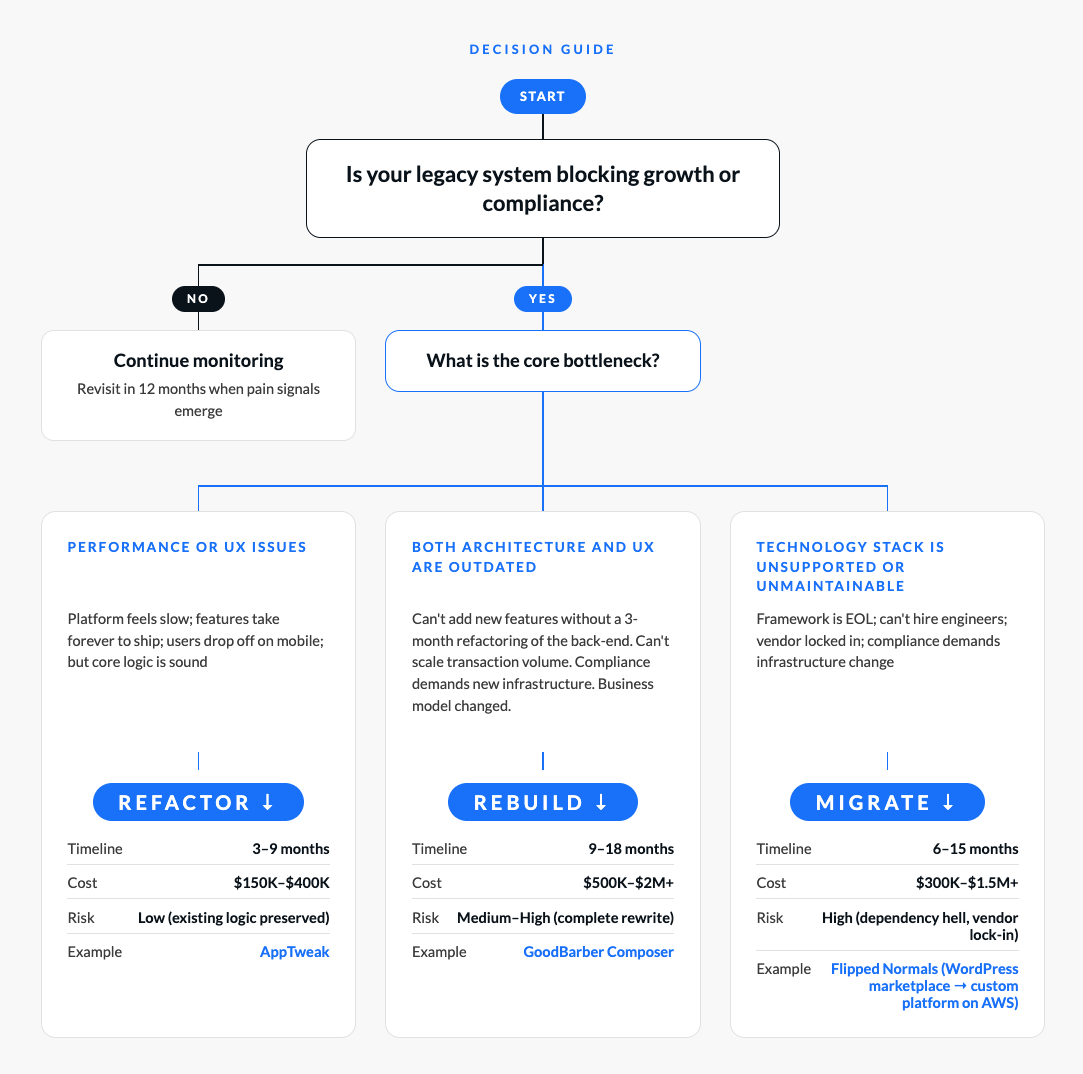
Start at the top: Is your system a bottleneck? If it's stable and serving users well, you don't need modernisation. If it's blocking growth, compliance, or hiring, move to the next question.
Find your bottleneck: This is the key diagnostic step. Is the problem that users experience slowness (performance/UX bottleneck)? Or can't you scale to the next level of business (architectural bottleneck)? Or can you not hire anyone to maintain it (technology stack bottleneck)?
Follow the path: Each path has a different risk, timeline, and cost profile. Pick the one that matches your bottleneck and your constraints.
AppTweak is a mobile analytics platform helping app teams optimise for growth. Their user base was growing; customer satisfaction was high. But the platform itself had become a constraint.
The homepage dashboard was slow. Features the data science team built were bottlenecked by frontend architecture. New insights couldn't reach users fast enough. AppTweak could have concluded: "Time to rebuild everything in React." Instead, they asked a smarter question.
Where is the actual bottleneck?
Assessment: Core API logic was solid; the company wasn't hitting architectural limits on transactions or scale. The bottleneck was the dashboard interface and how it integrated new data. They needed to refactor the frontend, not rebuild the entire platform.
Rather than a full rebuild, AppTweak engaged Imaginary Cloud through a Team Extension model. IC developers integrated directly into AppTweak's engineering squad (2 frontend developers + 1 product manager). The focus was surgical: refactor the React dashboard, modernise state management with Redux, and integrate data science insights.
Why this approach worked:
AppTweak's Vice President noted: "The new dashboard was completed on time. As a result, the client noticed an increase in terms of session time." Session time increase meant users were spending more time on the platform—a clear signal that performance improvements directly drove engagement. Read the full AppTweak case study
Before modernisation, AppTweak's product roadmap was constrained. New features from the data science team took weeks to integrate into the dashboard. Engineers spent time optimising workarounds rather than building new capabilities. Growth was limited not by user demand but by platform velocity.
After refactoring, the team could ship new data insights in days instead of weeks. Feature velocity tripled, reducing time-to-market from 8 weeks to 3 weeks. This architectural flexibility unlocked AppTweak's ability to enter new market verticals and serve enterprise customers with faster feature iteration. The engineering team moved from maintenance mode to growth mode—the difference between scaling a $5M revenue company and a $25M one.
Risk removed: By refactoring rather than rebuilding, AppTweak avoided a 18-month rewrite that would have frozen the product roadmap and risked customer churn. The assessment-first approach meant they made this strategic choice with data, not intuition.
The decision principle: Refactoring wins when your constraint is velocity, not capability. AppTweak proved that optimising the right layer (frontend, not back-end) can unlock strategic growth without the cost or risk of a full rebuild.
Selective refactoring unlocked growth without the cost or risk of a rebuild. AppTweak didn't need to throw away 10 years of proven logic. They needed to modernise the layer that was actually constraining them.
This is the bet refactoring makes: your architecture is sound; your interface isn't. When that bet is right, refactoring wins decisively. When it's wrong (your architecture really is the problem), you'll know within 3–4 months of starting.
Success signals: Session time increases, feature velocity triples, mobile adoption improves, customer satisfaction holds steady or improves.
Success signals: You can now onboard enterprise customers. Feature time-to-market drops from 3 months to 3 weeks. You hit the next million-transaction milestone. You attract investors or acquirers.
Success signals: You can finally hire senior engineers. Your cloud costs drop. You hit compliance checkboxes. Feature velocity finally improves because you're not fighting the infrastructure.
You don't need outside consultants to diagnose which path you're on. Run this 4-week assessment with your engineering and product leadership.
Timeline: 4 weeks total (1–2 weeks per step)
Interview 5–10 engineers and 3–5 product people independently. Ask these three questions:
Diagnostic clue: If 8 of 10 engineers say "the UI is slow and feature shipping is slow," you probably have a refactoring problem. If 8 of 10 say "the architecture doesn't support what we want to build," rebuild is likely right.
Diagnostic clue: If scaling limits are database-related, infrastructure-related, or API-related, you have an architectural problem. If scaling limits are "the UI takes 8 seconds to render," refactoring fixes it.
Diagnostic clue: If you can hire easily and your team is happy, your stack is fine. If hiring is impossible and people are leaving, migration or rebuild addresses a real hiring constraint.
Diagnostic clue: If you have limited budget and need fast results, refactoring wins. If you have budget and time, you can do a proper rebuild.
After these four steps, you'll know:
Map these to the decision tree. Your path will be clear.
Engineers love greenfield projects. A full rebuild in the latest framework sounds way more fun than refactoring jQuery into React. Leadership loves the narrative: "We're going to rebuild everything modern."
But full rewrites carry a higher risk of failure than phased modernisation. If your assessment says refactoring is the answer, push back on the rebuild impulse.
How to avoid it: Make the assessment transparent. If 8 of 10 engineers say "the architecture is fine, the UI is slow," that's data. Don't override it with intuition.
The worst time to modernise is when your system is on fire. By then, technical debt is three times larger. Customer satisfaction has dropped. You're in crisis mode, not strategic mode.
Run an assessment every 18–24 months. Don't wait for the crisis.
How to avoid it: Schedule a yearly or biannual modernisation audit. Budget $25K–$50K. Get ahead of the problem.
Leadership decides to rebuild. Engineering knows refactoring would win. Six months in, you realise the decision was wrong and pivoting is expensive.
Make the assessment a collaboration between engineering, product, and leadership. The team closest to the code should have the loudest voice.
How to avoid it: Form a working group. Run the assessment together. Document the decision so future leaders understand the reasoning.
You decide to rebuild in Rust because Rust is fast and elegant. But your team knows Go and Node. Hiring Rust engineers takes 6 months. Your project timeline extends by a quarter.
Choose your tech stack based on market talent availability, not ideals.
How to avoid it: Before choosing your rebuild technology, validate that you can hire for it in your market and timeline.
You start a rebuild project without clear executive support. Six months in, a business priority shifts and the project gets paused. Momentum dies.
Get explicit stakeholder alignment on timeline, budget, and expected outcomes before you start.
How to avoid it: Present your assessment and proposed path to stakeholders. Get their sign-off on timeline, budget, and what success looks like.
How do we know if our system is worth modernising at all?
If it's blocking growth (you're losing customers to faster competitors), costing engineering velocity (features take 3+ months to ship), or affecting customer satisfaction, yes. If it's stable and serving users well, monitor and revisit annually. Don't modernise for the sake of modernisation.
Should I refactor or rewrite my legacy application?
Refactor if the bottleneck is performance, UI responsiveness, or feature shipping speed. Your core logic works; the interface is slowing you down. Rewrite if you're hitting architectural walls—you can't scale, can't add the features your business demands, or your technology stack is unsupported. Unsure? Run the assessment framework in this article with your engineering team. Most teams discover the answer is refactoring because they haven't diagnosed their real bottleneck yet.
How do I assess whether my legacy system needs modernising?
Ask three diagnostic questions: (1) Are your users experiencing slowness or feature limitations? (2) Is your engineering team shipping slower than industry standard (features taking 3+ months instead of 2–4 weeks)? (3) Are you losing engineers to better tech stacks, or struggling to hire? If you answer yes to any, modernisation is worth evaluating. Run the 4-week assessment framework with your team to diagnose which path (refactor, rebuild, or migrate) fits your specific constraints. This costs $25K–$50K internally and prevents a $1M+ wrong-path decision.
Can we do a phased approach: refactor part, rebuild part?
Yes. AppTweak did exactly this. You can modernise in layers. Refactor the dashboard, keep the API. Rebuild the transaction layer, migrate the content layer to a CMS. You don't have to do everything at once.
How much does each path cost?
Refactoring: $150K–$400K (your team plus 6–9 months of focus).
Rebuilding: $500K–$2M+ (dedicated rebuild team plus 12–18 months).
Migrating: $300K–$1.5M+ (depends on complexity and vendor lock-in). These are ranges; your cost depends on system complexity, team size, and geographic location.
What if we start with refactoring and realise we need to rebuild?
This is common and it's fine. You'll know faster and with more data. A 3-month refactoring assessment will reveal whether rebuild is actually necessary. If it is, you've learned that lesson before you spend $1M on a rebuild; pivot is faster and cheaper.
Should we outsource the modernisation or use our internal team?
Hybrid works best. External team brings fresh perspective and specialisation (they've done this 20 times; your team has done it once). Internal team knows your system and can maintain it post-launch. The Team Extension model (external developers integrated into your team) is often the sweet spot.
What's the ROI on modernisation?
Varies widely, but measurable. AppTweak saw 80% load time reduction and 35% increased session time. GoodBarber Composer (a ground-up rebuild of the no-code platform's core app-building module) delivered 195 rewritten templates on a modern Python 3.13 and Django 5 foundation, cutting technical debt and improving scalability. Flipped Normals migrated its WordPress marketplace to a custom platform on AWS in two months and saw a 4% traffic increase after relaunch. Measure against your bottleneck: if you're bottlenecked on performance, measure load time improvement. If you're bottlenecked on feature velocity, measure time-to-market. If you're bottlenecked on hiring, measure engineering attrition and time-to-hire post-modernisation.
How do we justify the cost of modernisation to leadership?
Lead with business metrics, not engineering metrics. Don't say "our code is old." Say "we're shipping features 3 months slower than competitors, losing market share, and engineering attrition is 30% above industry average." Quantify the cost of delay, then show how modernisation fixes it.
What happens to our data during migration or rebuild?
That's the scary question. Data migration is the riskiest part of any modernisation project. Best practice: run the old and new system in parallel; validate data integrity before cutover; plan for rollback. This is why migration projects take longer than rebuilds—data integrity takes time.
Refactor if: Performance/UX is the bottleneck (users experience slowness; engineers can iterate but slowly)
Rebuild if: Architecture and business model changed (you're constrained by what the system CAN'T do, not how fast it is)
Migrate if: Tech stack is unsupported (can't hire, vendor lock-in, compliance forces change)
Modernisation isn't magic. It's a diagnosis followed by a targeted intervention. Most teams skip the diagnosis and default to the most exciting-sounding path (rebuild in React). Teams that assess first almost always make a smarter choice.
If your legacy system is slowing you down, you now have a framework to:
AppTweak didn't need to rebuild. They needed to refactor strategically, and it worked. GoodBarber's Composer module needed a ground-up rewrite, and it worked. Flipped Normals needed to escape WordPress, and migrating worked. The difference wasn't the path. It was choosing the path that matched the problem.
Book a Free 30-Minute Legacy System Assessment
Not sure which path is right for your legacy system? Imaginary Cloud specialises in diagnosing legacy system bottlenecks and recommending the modernisation strategy that minimises risk and maximises growth.
Schedule your free assessment, no obligation.
Alexandra Mendes is a Senior Growth Specialist at Imaginary Cloud with 3+ years of experience writing about software development, AI, and digital transformation. After completing a frontend development course, Alexandra picked up some hands-on coding skills and now works closely with technical teams. Passionate about how new technologies shape business and society, Alexandra enjoys turning complex topics into clear, helpful content for decision-makers.
People who read this post, also found these interesting: