Written by:

Last Published:
19 November 2026
•
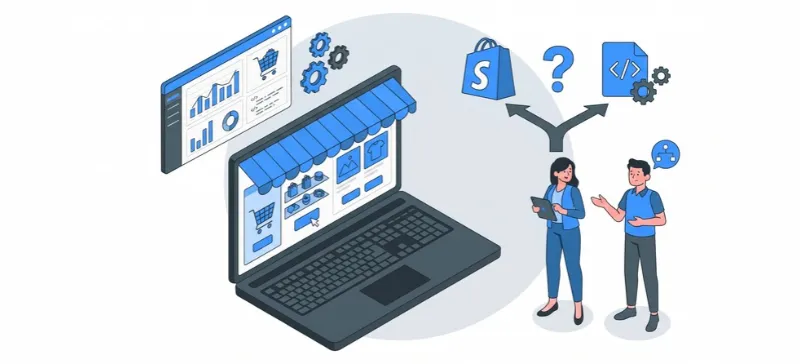
Should you invest in custom ecommerce development or stay on Shopify? For most businesses, stay. Choose custom ecommerce development only when a core part of how you sell cannot run on a hosted platform, even with apps, extensions and a custom storefront on top.
The Shopify vs custom ecommerce platform question looks like a technology debate. It is really a question about where your margin comes from.
Full disclosure: we build custom software for a living, so we have a horse in this race. We still tell most teams to keep a hosted platform. Our rule of thumb is simple: rent the commodity, build the differentiator.
Below you will find the criteria we use, what each option costs over three to five years, how to frame the decision for your board, a migration example from one of our own projects, and the Imaginary Cloud Build-or-Buy Checklist. It is an engineering perspective, not a benchmark study, and we say where the evidence stops.
Custom ecommerce development is building the commerce software that runs your store, instead of renting it from a platform. Catalogue, pricing, cart, checkout and order management are written for your business and owned by you. It ranges from a bespoke storefront on a hosted backend to a platform built end to end.
Two terms come up in every conversation about it, and they are not the same thing.
Headless commerce means the storefront (what customers see) is separated from the commerce engine (what handles products, carts and orders). The two talk through APIs, so you can rebuild one without touching the other.
Composable commerce means assembling the engine itself from separate best-of-breed services, such as search, cart, payments and content, instead of buying one suite. A headless storefront can sit on a single platform. A composable one sits on several.
You have three realistic paths. Stay on a hosted platform such as Shopify and extend it with apps, keep Shopify as the engine and build your own storefront, or build a platform you own end to end, checkout included. Each one trades speed and safety for control.
Think of it as renting, renovating and building. Renting a flat gets you in by Friday, and the landlord fixes the boiler. Renovating lets you knock through a wall, within limits, while building a house means every pipe is yours. (So is every leak.)
Most Shopify vs custom ecommerce platform comparisons go wrong because they pit the first against the last, and forget the middle exists. We come back to it below.
Shopify is the right ecommerce platform when your catalogue, pricing and fulfilment fit a standard retail model, your team is small, and speed to market matters more than owning every layer. The platform handles hosting, checkout and security patching, so your engineers can spend their time on what only you can build.
In practice, Shopify tends to win when:
On that last point, Shopify says its ecosystem includes more than 21,000 apps. Remember that is the vendor describing its own shop window.
There is a hidden benefit as well. When the checkout is somebody else's problem, so is a long tail of unglamorous work: uptime, patching, payment methods, tax updates. Shopify makes the same argument in its own build or buy guide. It sells the thing, so read it accordingly, but on this point the reasoning holds up.
Custom ecommerce development starts to pay off when a core buying workflow cannot be modelled on a hosted platform without constant workarounds. The key word is core. If the awkward part is a side feature, extend. If it is how you price, configure or fulfil orders, that is the signal to look harder at building.
These are the triggers we look for:
Here is how a custom ecommerce platform vs Shopify comparison looks on the criteria that usually decide it, with indicative thresholds.
| Criterion | Stay on Shopify (or another SaaS) when... | Look at custom when... |
|---|---|---|
| Catalogue and pricing | Pricing fits discounts, price lists and Shopify Functions | Price depends on customer, contract or configuration, and several rules interact |
| Time to market | You need to launch in under three months | A launch of six months or more is justified by the business case |
| Integrations | Up to two or three systems, synced in minutes or hours | Four or more systems of record must update the storefront in real time |
| Team | Fewer than five engineers can be dedicated to commerce | A standing team of five or more is funded for three to five years |
| Security and compliance | You want the platform to carry the checkout burden | You have the expertise and a reason to own it |
| Ownership | Renting is fine | Code, data model and roadmap are strategic |
| Scale | You stay well below documented limits | You regularly approach them (see below) |
Apart from Shopify's documented limits, these thresholds are our rules of thumb, not industry standards. Treat them as a starting point for your own numbers.
Hosted platforms hit ceilings in documented, measurable places, mostly around volume and integration. Shopify's API limits page lists rate limits that work like a bucket filling with each request and draining over time. It also caps input arrays at 250 items and paginated results at 25,000 objects.
There is a resource limit too: once a store has 500,000 product variants, it can create at most 10,000 new variants a day (this does not apply to Shopify Plus stores). Most stores never touch these numbers. Catalogues with huge variant counts, heavy bulk updates or many connected systems might.
Shopify Plus lifts some limits, but not all of them. Check the current limits page against your own volumes before assuming an upgrade solves the problem.
Performance rarely settles the argument by itself. Core Web Vitals are Google's measures of loading speed, responsiveness and visual stability, and the targets (loading in 2.5 seconds or less, interaction within 200 milliseconds, layout shift of 0.1 or less) are reachable with careful engineering on any of the three paths. Judge the team and the architecture, not the label on the box.
Open-source platforms such as Magento Open Source, Adobe Commerce and WooCommerce sit between hosted and fully custom. You get access to the code and a large extension ecosystem, but you or your host typically run, patch and secure the platform. They suit teams that want ownership without writing a commerce engine from scratch, and that have engineers to maintain it.
WooCommerce runs on WordPress, which makes it a natural fit when content drives your sales. Adobe Commerce is built for larger catalogues and more complex B2B needs. In both cases, the trade-off is the same as with custom: more control, and more of the running costs land on your side.
Over three to five years, total cost of ownership is lowest for the option with the least work you must do yourself. Hosted platforms charge subscriptions, apps and fees, but carry infrastructure and security for you. A custom build removes the subscription and adds build, maintenance and compliance costs that never stop.
Published agency estimates, such as those from Elogic and Madgeek, put a typical custom mid-market build in the six-figure range, with a wide spread. Those are agency estimates, not independent benchmarks. Madgeek names the three things that move the number: catalogue complexity, pricing logic and integration depth.
The build is only the first bill. Keeping a custom platform alive takes a standing team of engineers, and over three to five years that running cost can rival the build itself.
Here are the line items to price on each side:
Two items are the lines business cases most often underestimate.
A custom platform is a living codebase. Every shortcut taken to hit a launch date is a loan with interest, and the interest is paid in slower releases.
Once you handle card data yourself, you take on responsibility under the PCI DSS standard, the security standard for card payments. A hosted payment provider can reduce that scope but not erase it. Hosted platforms take most of that weight off you.
Shopify's own comparison page claims that on a custom platform even a simple update can be expensive and take months. That is a vendor claim, so treat it as one. But the direction matters: custom gives you freedom, and freedom is billed monthly in engineering time. Every security patch, upgrade and new payment method that a hosted platform ships for you becomes a ticket on your own backlog.
Is the subscription then the cheap option? Not always. A store loaded with paid apps, heavy workarounds and agency retainers can end up paying a custom-level bill for a non-custom result.
Frame it as a choice between two regrets. Overbuilding locks capital and engineers into software that a subscription could have replaced. Underbuilding leaves you paying a workaround tax on the one workflow that earns your margin, until you are forced into a migration anyway.
A board-ready business case needs five inputs, none of which is a technology preference:
If the annual value of the unsupported workflow is smaller than the extra yearly cost of owning the platform, stay. If it is larger, and stays larger over the horizon, the build starts to make sense.
Here is how that rule looks with placeholder units. These are not prices: swap in your own numbers.
Say a hosted platform costs 100 units a year all in (subscription, apps, fees, agency time). A custom build costs 300 units to build and 90 units a year to run. Over four years, hosted costs 400 units. Custom costs 300 plus 360, so 660 units.
The gap is 260 units, or 65 units a year. In this example, the workflow you cannot run on the hosted platform needs to be worth more than 65% of your yearly hosted bill, every year, for the build to pay back. If it is worth less, stay. If it is worth much more, the build is the cheaper option.
A custom build means you are running a software product, not a website. That needs a product owner, a technical lead, front-end and back-end engineers, testing, and someone who owns security, deployment and on-call. The team does not disappear after launch, because upgrades, fixes and new features are continuous.
This is the hidden driver in most total cost of ownership comparisons. Salaries and rates vary by region (our guide to the cost of hiring a software developer by region breaks that down), and hiring takes longer than most plans allow. If you cannot staff the team for the next three to five years, a hosted platform is the safer choice.
For a CFO or CEO, this is a run-rate, not a project. A standing team is a fixed cost that continues whether or not you ship, and it concentrates knowledge in a few people. Ask what happens to the platform if two of them leave in the same quarter.
Partners can carry part of the load, from a managed team to a mixed model with your own engineers. What you cannot outsource is ownership of the roadmap and the decisions behind it.
Headless commerce is the middle path: keep a hosted platform for catalogue, checkout and operations, and build your own storefront on top. It suits teams that need a distinctive front-end experience but not a new commerce engine. It adds engineering work, because you now run two things.
Shopify's own headless toolkit, Hydrogen, sits on a framework such as React Router or Next.js and talks to Shopify through its Storefront API. You choose the framework and host the storefront. Shopify keeps running the commerce back end.
What it solves: a bespoke interface, faster experimentation on the front end, freedom from theme constraints. What it adds: a separate codebase, a team to maintain it, and more moving parts to monitor. If your pain is in the back end (pricing logic, order handling, integrations), a headless storefront will not fix it.
Before you go all the way to composable, check the back end first. Shopify also lets developers change platform logic with Shopify Functions: custom discount types, payment and delivery options, checkout validation and order routing.
At the far end sits composable commerce, often described as MACH (microservices, API-first, cloud-native SaaS and headless), a model promoted by the MACH Alliance. It gives enterprises the most freedom, and the most integration work and vendor management.
A migration is mostly a data and risk exercise, not a design one. You restructure how products, customers and content are stored, keep your search visibility intact, and keep the business trading while the engine changes. The technology choice is the easy part.
Here is what that looked like in practice. Flipped Normals is a marketplace for 3D assets and training courses, with more than 28,000 products and customers on five continents. Its WordPress platform was holding back growth, and the client needed the move done fast.
We restructured and migrated all product and user data into a new data model and moved the platform to AWS. The new platform runs Next.js on the front end and keeps the existing Ruby on Rails back end. The full migration took two months, project milestones were delivered on time, and traffic rose by 4% after relaunch, as reported on the project page.
That last point is the one to hold on to. A migration of that size ended with traffic up, not down, which is the outcome you are paying to protect. One honest limit: this is a marketplace that went from WordPress to custom, not a Shopify store, and we do not have a public Shopify case to show you.
Replatforming risk is mostly about what you lose on the way across: search visibility, data quality, integrations and operational know-how. It rarely comes from the new technology itself. The cost of a migration moves with the same drivers as a build: how much data you have, how many systems connect to it, and how much organic traffic you have to protect.
Whichever direction you migrate, the same risks come up:
Price these into the business case from the start. A migration that looks cheap on paper often turns expensive in the redirect map and the data clean-up. For the wider framework on when to migrate, refactor or rebuild a system, see our guide to legacy system modernisation.
The Imaginary Cloud Build-or-Buy Checklist: answer yes or no to each question. Zero to three yes answers means stay on a hosted platform; four to six means look at headless or a hybrid; seven or more, including at least one of questions 1, 2 or 4, means scope a custom build. It is a rule of thumb, not a statistical model.
For most businesses, use Shopify: it is faster to launch, cheaper to run in engineering terms, and handles checkout and security. Build your own only when a core workflow, such as pricing, configuration or deep integration, cannot run on a hosted platform without constant workarounds.
Published agency estimates put a typical custom mid-market build in the six-figure range, before ongoing engineering, hosting and security costs. Shopify replaces most of that with subscription, app and fee costs. Compare both over three to five years, not at launch.
When a core buying workflow no longer fits, and extending the platform with apps, Functions or a headless storefront has not solved it. If the pain is only the front end, go headless first. If it is pricing logic, order handling or deep integration, a custom back end may be justified.
Shopify Plus lifts some documented limits, such as the daily cap on new variants once a store passes 500,000, but API rate limits, input array caps and pagination limits still shape bulk work. Check Shopify's current limits page against your catalogue size, update frequency and number of connected systems before deciding.
Migration cost depends on three things: how much data you move, how many systems connect to it, and how much organic traffic you must protect. Price the redirect map, data clean-up, integration rework and a parallel-running period, not just the new platform. A short discovery gives you a defensible number.
The main risks are lost search visibility, messy data, broken integrations and a team that is not ready on day one. All four are manageable if planned before the switch. Map URLs and redirects first, clean data early, rebuild integrations in order of importance and rehearse the cutover.
Often, yes, when you need customer-specific pricing, quote-to-order flows, approval chains or account hierarchies that a hosted platform models badly. If your B2B needs are closer to a wholesale price list and a login, check whether a hosted platform covers them before you build.
Sometimes. Adobe Commerce or WooCommerce suit teams that want code ownership without building an engine, composable stacks suit enterprises with many channels and large engineering teams, and custom suits a workflow nothing off the shelf models. Match the platform to your catalogue, pricing, team and integrations, not to a ranking.
Yes. Moving to a hosted platform is a data and integration project like any other migration, and some teams do it once the cost of owning a platform outweighs the control. Plan URL redirects, data mapping and integrations before you switch.
Stay on a hosted platform unless a core part of how you sell cannot live there. If it cannot, build that part, with a clear business case, a team that will own it and a three-year maintenance plan. Rent the commodity, build the differentiator, and start with a short discovery.
If you are weighing a build, a short discovery will tell you more than a long debate. Talk to our team about custom ecommerce platforms and web development, or start with a scoping session to turn your requirements into a clear roadmap. Weighing up build partners? Here is how we compare the top ecommerce development companies.
Curious what a platform move looks like in practice? Read the Flipped Normals case study, where we migrated a 28,000-product marketplace from WordPress to a custom platform in two months.
Last reviewed: November 2026. We review this guide quarterly.
Alexandra Mendes is a Senior Growth Specialist at Imaginary Cloud with 3+ years of experience writing about software development, AI, and digital transformation. After completing a frontend development course, Alexandra picked up some hands-on coding skills and now works closely with technical teams. Passionate about how new technologies shape business and society, Alexandra enjoys turning complex topics into clear, helpful content for decision-makers.
People who read this post, also found these interesting: