Written by:

Last Published:
01 October 2026
•
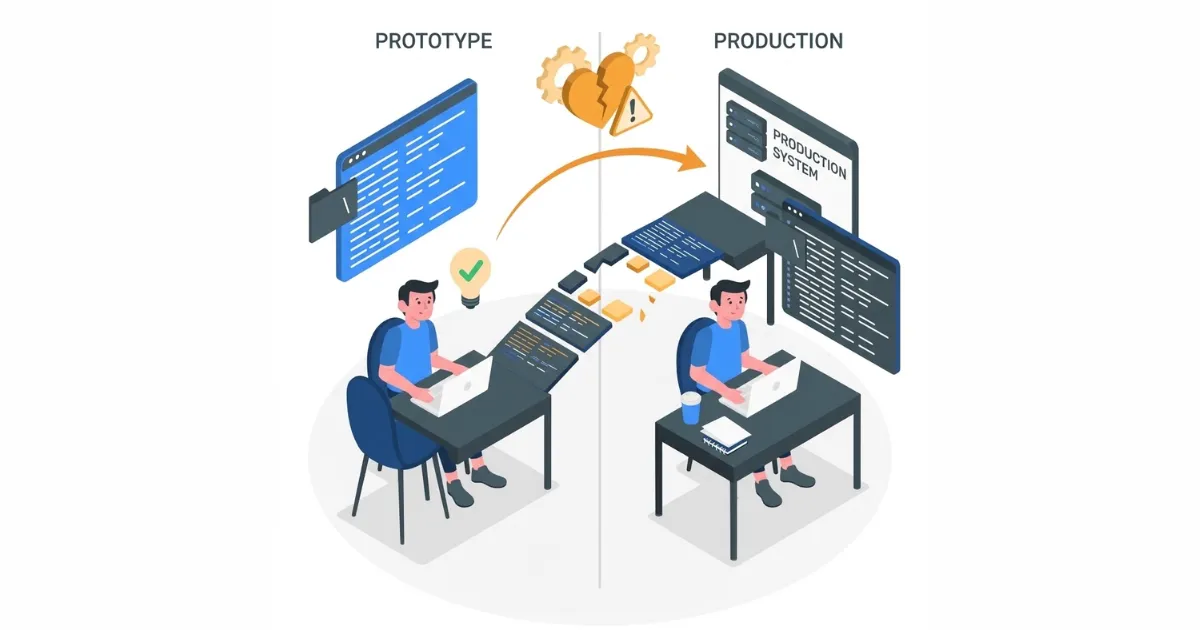
Is vibe coding bad? The short answer is no, but vibe-generated code shipped directly to production almost always is.
Vibe coding is a way of building software in which a person describes what they want in plain language and an AI tool generates the code, with the result judged by running it rather than reading it line by line.
For a CEO, CTO, or COO, this is more than a technical question. The gap between a working prototype and production software is a budget and delivery-risk exposure: commitments made on a demo that still needs most of its engineering can push timelines, costs, and compliance obligations well past what was planned.
You generated a working feature in 20 minutes. It even compiles. Your CTO looks at it and says: "Now start over." Here's why.
Vibe coding has a credibility problem, not because it doesn't work, but because "working" means different things depending on who's using the word. A designer sees a feature that looks right and functions. An engineer sees incomplete scaffolding (auto-generated structural code that outlines a feature without implementing its logic): no error handling, no security layer, no audit trail, no testing. Both are correct. But they're describing different things.
Adoption is not the issue. In the Stack Overflow 2025 Developer Survey, 84% of developers said they use or plan to use AI tools, yet 46% said they distrust the accuracy of the output, against 33% who trust it.
The mistake is treating a prototype as production code. Vibe coding is effective for rapid ideation and stakeholder alignment. Vibe-generated code is incomplete until it's been engineered for production. The confusion between those two things is where teams get into trouble, and where the real debate sits.
This article draws a clear boundary: what vibe coding does well, what it doesn't do at all, how vibe coding compares with agentic coding, and exactly when to use vibe coding for production work without creating a debt crisis downstream. It includes a decision matrix you can apply to your own projects, and it is written for CTOs, COOs, and founders who decide how vibe coding is used on their teams and in vendor proposals.
Vibe coding excels at UI flows, rapid iteration, and "does this idea work?" validation. It collapses the ideation-to-mockup timeline from weeks to hours. That speed is the entire point.
Here's what you can do with vibe coding in a single day that would traditionally take weeks: generate three competing payment flow variants, test them with stakeholders, get feedback, refine one variant, and have a concrete prototype your team can interact with. No wireframes. No ambiguous descriptions. Something real.
The confidence this creates is genuine. Stakeholders stop guessing. Designers can see actual states (loading, error, success). Developers understand the interaction pattern without abstract specifications. The decision "do we build this?" becomes informed instead of theoretical.
Vibe coding also eliminates the design-to-engineering handoff friction. Instead of handing a design to engineers and waiting for them to interpret it, you have working code that engineers can use as a reference. Even if they rewrite it entirely (which they often should), they're rewriting something concrete instead of guessing from Figma.
The real power isn't in shipping the generated code. It's in validating ideas at speed. Our work on Orizion shows where AI tooling helps and where engineering still decides.
The challenge. Orizion began as an effort to digitise a traditional executive coaching journal and grew, mid-project, into a habit-tracking companion app with daily, weekly, monthly, and cyclical reviews. Imaginary Cloud was the product and technical partner, working to a tight timeline while the scope kept evolving.
What we did. Engineers used AI coding assistants such as Cursor, together with the Figma MCP server (a Model Context Protocol server, which lets AI tools read design files and other data sources directly), to translate designs into code and map data structures. The team also tried Figma Make for early brainstorming but scaled it back, because it suited high-level ideation better than pixel-perfect, production-ready design.
The result. We delivered a fully functional MVP web application with a new brand identity and design system, now live in a soft launch.
The lesson. AI tooling sped up the move from design to code, but it didn't replace engineering judgement. All of the code went through strict manual review, and QA relied on custom scripts with seeded users to test the app's time-bound cyclical features on staging (a test copy of the live environment), which also avoided triggering real Stripe costs for the client. That review and testing phase is what our AI Prototype to Production service covers.
Even so, fast generation creates an assumption that's almost always wrong: "If the prototype works, the production version is mostly done." It's not. We'll explore why next. For more on what vibe coding looks like in practice, see Vibe Coding Meaning: Examples and Use Cases.
Vibe-generated code solves the visual and logical problem. Production software must solve security, performance, maintainability, compliance, and reliability problems that don't appear in prototypes. These aren't optional. They're load-bearing.
What generated code usually lacks is not the feature itself but everything around it: input validation, error handling, logging and audit trails, tests, and monitoring. A prototype shows the part users see. Production software is judged on the parts they never see until something breaks.
A typical failure pattern is the demo that works in front of the room and nowhere else. A form accepts whatever is typed into it, so the first person who pastes HTML into it turns it into an XSS vector (cross-site scripting, where an attacker injects malicious script into a page other users load). The data backs this up: Veracode's 2025 GenAI Code Security Report tested more than 100 large language models on 80 coding tasks and found that 45% of AI-generated code samples introduced security vulnerabilities. Add authentication flows without proper token refresh logic, API endpoints without rate limiting (capping how many requests a client can make in a given time), and unaudited dependencies, and it becomes a breach-exposure question for the board: IBM's Cost of a Data Breach Report 2026 puts the global average cost of a breach at $4.99 million.
The second pattern appears under load and over time. A component that flows smoothly with 10 sample records on a designer's machine can crash with 1 million in production, and database queries that suffer from the N+1 problem (fetching related records one at a time in a loop, rather than in a single efficient query) turn into slow pages and lost users. Six months later, with no comments, cryptic names ("data_arr_temp"), vague errors ("Error: 500") and no tests, a new engineer cannot change the code safely, so every feature costs more than the last. With no error recovery, the system cannot degrade gracefully: when one component fails, the whole feature breaks instead of carrying on in a reduced form. And with no monitoring either, the first sign of failure comes from customers, not from dashboards.
The third pattern is the one that stops a launch. Generated code is rarely built with regulatory evidence in mind, so the gap is usually found late, by a compliance team or an auditor, when it delays certification or launch. The next section covers what each framework expects.
These frameworks are binding, and all of them expect evidence: proof that systems protect data, and a record of who did what, and when.
GDPR requires data protection by design and by default (Article 25), appropriate security of processing (Article 32), and records of processing activities (Article 30). A personal data breach must be reported to the supervisory authority without undue delay and, where feasible, within 72 hours (Article 33). The most serious infringements can bring fines of up to €20 million or 4% of worldwide annual turnover, whichever is higher (Article 83).
PCI-DSS applies wherever cardholder data is stored, processed, or transmitted. It sets requirements for secure software development, restricted access, and logging and monitoring of access to systems and cardholder data.
SOC 2 is an independent audit report on controls measured against the AICPA Trust Services Criteria: security, availability, processing integrity, confidentiality, and privacy. A Type II report covers how those controls operated over a period of time, so evidence such as logs and access records has to exist for that whole period.
HIPAA requires administrative, physical, and technical safeguards for electronic protected health information, including access controls and audit controls.
An AI tool builds what the prompt describes. Few prompts ask for an audit trail, a retention policy, or role-based access, so they are missing unless someone asks for them, and the model does not know which regulation applies to your data. Generated code also pulls in dependencies that nobody has reviewed, and as the Veracode result above shows, security flaws in generated code are common. The outcome is code that can pass a demo but cannot produce evidence for an auditor.
Phase 2 of the IC Prototype-to-Production Review maps the regulations that apply to the data in scope. Phase 3 then builds the controls in: an audit trail recording who did what and when, role-based access control, encryption in transit and at rest, managed secrets, retention and deletion rules, dependency scanning, and tests that prove the controls work. An independent code audit shows which of these are missing before a release date depends on them.
The gap between "this works" and "this is production-ready" is large, and most teams underestimate it. A working prototype shows the feature. It does not show the security, testing, logging, compliance evidence, and monitoring that still have to be built. We have not found a reliable industry benchmark for how much of the work remains, so we don't quote a percentage, but in our experience it is usually the larger share of the effort, and it varies by project.
The danger: A non-technical founder sees a vibe-coded feature, assumes it's close to shipping, and makes commitments based on that assumption. Engineering discovers it requires substantial rework, timelines slip, and trust erodes. The prototype-to-production gap becomes a team problem, not a technical one.
Vibe coding is human-directed AI assistance for specific outputs (a component, a form, a page). Agentic coding is autonomous AI systems that take goals and produce multi-system solutions with less human direction. Both require production engineering. The difference is upstream, not downstream.
The key difference: With vibe coding, you maintain tighter visibility into what was generated. With agentic coding, you have less control, which is actually riskier when shipping to production. The "black box" problem is more acute. An agentic system might make architectural decisions you'd never have chosen.
For production use, vibe coding is actually safer because you understand the outputs. Agentic coding is more efficient for complex multi-system tasks, but it's harder to audit. Both, however, require the same production engineering work afterwards. Neither eliminates the security, performance, compliance, and testing phases. The difference is in how much refactoring is needed, not whether it's needed.
Use vibe coding for prototyping, ideation, and time-sensitive UI work. Use traditional engineering for core systems, security-critical flows, and anything with compliance requirements. The boundary is clear if you define it upfront.
Before reaching for vibe coding, ask yourself these five questions:
If you're validating an idea ("will this concept work?"), vibe coding is a good fit. If you're shipping to customers, vibe coding is the prototype phase. You'll need the engineering phase afterwards.
If it handles customer data, payment processing, healthcare records, or regulatory requirements, don't ship vibe-generated code directly. Use it to understand the flow. Engineer the real version. The cost of a security breach or compliance failure far exceeds the time saved by shipping vibe code.
Load-bearing code is the infrastructure that affects your whole system: core business logic, payment systems, authentication, database queries. If it breaks, how many customers are affected? As a rule of thumb, if it's more than 10% of your user base, engineer it properly. If it's fewer than 1%, vibe coding is acceptable (with review). These thresholds are a rough guide, not a standard.
Early stage, few users, fast iteration cycles? Higher tolerance for vibe-generated code (with review). Mature product, thousands of users, stability beats speed? Vibe coding for prototyping only; engineer for production.
As an illustration, a vibe-coded feature plus 40 hours of engineering to production-ready is worth it. A vibe-coded feature plus 1 hour of cleanup is not enough. The engineering phase is where production readiness lives. Time investment is the real constraint.
Use this table to sort any piece of work before a line is generated. Find the scenario closest to yours, then read across to the call we would make.
| Scenario | Right Call |
|---|---|
| Prove this idea works | Vibe coding, 2-day prototype |
| Ship a landing page variant | Vibe coding plus engineer for scalability |
| Payment processing flow | Design it with vibe coding; engineer it fully |
| Admin dashboard | Vibe coding acceptable; engineer if high user load |
| Mobile app core feature | Use vibe coding to prototype; engineer production version |
| Internal tools | Vibe coding is fine; lower review bar |
The key phrase: Vibe coding is prototyping. Production is engineering. Don't confuse the two.
Vibe coding gives you speed on generation, but it often defers cost to the engineering phase. If you understand and plan for that cost, great. If you assume the cost is paid, you'll be surprised.
For an executive, the question is not how fast the first version appears. It is how wide the gap is between the planned delivery date and the real one, and how much unbudgeted cost and delivery risk sits in that gap. Three illustrative timelines show the variance:
Read side by side, Timeline 1 promises 3 days, Timeline 2 lands at nearly 5 times the plan, and Timeline 3 lands at more than 17 times the plan. The hours in each step are illustrative, but the variance comes from review and rework that nobody budgeted, not from the generation itself. Timeline 3 is the one that puts a launch date, a budget line, and a compliance commitment at risk at once.
Vibe coding doesn't eliminate the engineering phase. It shifts it downstream. If you know that, you can plan for it. If you don't, you create false expectations and timelines that slip.
The cost-benefit calculation changes by team size. Based on our project work, teams typically recover 20-30% of ideation time on smaller products, which is less on complex, multi-system builds. Small team, fast iteration? In our experience, vibe coding saves an estimated 20-30% of development time (worth it). Large team, complex systems? We typically see 5-10% (review overhead is high; gains are marginal). These figures are Imaginary Cloud estimates drawn from our own client engagements, not industry benchmarks. Prototyping for stakeholder alignment? That is where vibe coding pays off most, because a working demo replaces weeks of written specification.
Use vibe coding strategically. Understand the prototype-to-production gap. Plan the engineering phase. Review ruthlessly. Ship with confidence.
This is the IC Prototype-to-Production Review: the four phases we apply when vibe coding enters a client engagement.
Generate multiple rapid prototypes. Validate the idea with stakeholders. Assess feasibility. Get alignment on direction. Use vibe coding liberally; it's fast and cheap. This is where you answer "will this concept work?"
Review generated code for architecture fit. Assess security implications. Identify performance concerns. Map compliance requirements. Plan the engineering handoff.
This phase is non-negotiable. It's where you answer "can this be production code, or do we need to rewrite?" A code audit is the fastest way to get an independent answer.
Use vibe-generated code as a reference, not as production code. Rewrite for security, performance, maintainability, testability. Add proper error handling, logging, monitoring.
Test thoroughly - unit, integration, load, security testing. Document why decisions were made. This is where production software is built, and where AI Prototype to Production support fits.
Deploy with feature flags (a toggle that lets you enable or disable a feature without redeploying the application), so if something breaks, you can disable it quickly.
Monitor performance, errors, and user experience. Have a rollback plan. Gather real-world usage patterns. Feed insights back into architecture.
Three anti-patterns to avoid:
That's not QA; that's wishful thinking. Our position: a generated feature is a first draft, and QA is proofreading, not writing. QA finds bugs in production code. It doesn't turn prototypes into production code. Timeline 3 above shows where this ends: architecture issues found at review, a partial rewrite, and 52+ days to market.
Never. Our position: security is a design input, not a finishing step. Bolting it on afterwards creates gaps and rework. In Timeline 3, missing audit logging flagged late by the compliance team added 8 hours of rework on its own.
Only for non-critical features with active monitoring. Our position: iterate after the engineering, never instead of it. High-stakes systems require engineering before shipping. Timeline 1 assumed exactly this: generated on day one, shipped on day three, with no review in between.
The mindset: Treat vibe coding as a power tool: effective in the hands of someone who knows where it cuts, and dangerous when used as a shortcut around engineering.
Vibe coding becomes a management question as soon as more than one team uses it. Three decisions set the policy.
Prototypes, design validation, and internal tools with a lower review bar. Anything else needs the Phase 2 review first.
Anything that touches customer data, payments, authentication, or regulated data must pass a technical review and be engineered, not just generated.
If a proposal relies on AI-generated code, ask three questions: how is that code reviewed before release, who signs off on security and compliance, and what documentation and tests come with the handover?
No, but vibe-generated code is. There's a crucial difference. Vibe coding (the process) is excellent for rapid prototyping and ideation. Vibe-generated code (the output) is incomplete until it's been engineered for production. The mistake is shipping the latter thinking it's the former.
Only for non-critical work, such as an internal tool or a low-traffic admin page, and only after a review. For anything touching customer data, business logic, or revenue, our answer is no. The review and engineering phase isn't optional; skipping it creates technical debt and security risk.
No. Vibe coding changes who can build a prototype, not who is accountable for production software. Designers and product managers can use it to validate ideas faster, but someone still has to design the architecture, secure the system, meet compliance obligations, and own reliability. Engineers use vibe-generated code as a reference and rewrite it for production. That division of labour, not replacement, is where the real speed comes from.
Vibe coding is human-directed (you prompt, AI generates a specific output). Agentic coding is autonomous (you define a goal, AI autonomously plans and executes). For production, vibe coding is actually safer because you maintain tighter control. Agentic coding might produce more complete solutions, but the "black box" problem is more acute. Both require the same production engineering work.
No, and we would push back on any proposal that says otherwise. Core systems (payment processing, authentication, data storage) have non-negotiable requirements: security, audit trails, compliance, performance. These must be engineered, not generated. Use vibe coding to prototype the architecture and user flows, then engineer the actual systems.
The ROI is speed and clarity, not free production code. Vibe coding gets you to a tangible prototype in days instead of weeks. That prototype proves the concept, aligns stakeholders, and provides a reference for engineering. The engineering phase still happens, but it starts from a working prototype instead of guesswork, which is where most of the return comes from.
Yes, when vibe-generated code ships without review. It typically lacks tests, documentation, consistent naming, and proper error handling, so every shortcut becomes a cost later. The debt stays manageable when vibe-generated code remains in the prototype phase and is rewritten during the engineering phase of the IC Prototype-to-Production Review. It compounds when teams build new features on top of unreviewed generated code.
Not by default. Vibe-generated code usually has no audit logging, access controls, or data-handling safeguards, which GDPR, PCI-DSS, SOC 2, and HIPAA require. The risk is highest in payments, healthcare, and any flow that touches personal data. Treat vibe-generated code in these areas as a reference only, and engineer the compliant version with logging and review built in from the start.
Stop once the prototype has proved the idea and stakeholders agree on direction, and always before the code touches real customer data, payments, authentication, or a meaningful share of your users. Other signals: you spend more time fixing generated output than prompting, nobody on the team can explain how a part of the code works, or a security or compliance review has been raised. At that point, bring in an engineer and move to Phase 2 (Technical Review) of the framework above.
Common vibe coding tools include Cursor, GitHub Copilot, Claude Code, Lovable, Bolt, and v0. The tool matters less than the review. Before generated code goes near production, run a static security scan, audit its dependencies, add unit and integration tests, and have an engineer review it against the Phase 2 criteria: architecture fit, security, performance, and compliance.
Is vibe coding bad? Not as a prototyping tool, but it is not a production strategy either: vibe-generated code is incomplete until it has been engineered, which is why we apply the four-phase IC Prototype-to-Production Review (ideation, technical review, engineering, and deployment with monitoring). Vibe coding is also safer for production than agentic coding, because a human directs each step and can audit the output, although both need the same engineering work afterwards. The return is real but bounded: we estimate that vibe coding saves roughly 20-30% of ideation time on smaller products and 5-10% on large, complex builds, and these are Imaginary Cloud estimates, not industry benchmarks.
Orizion shows the pattern from our own work: AI coding tools sped up the move from design to code, and strict manual review plus staging tests made the app ready to launch. Decide up front which code is a prototype and which is load-bearing, and engineer the second kind before it ships. Our rule at Imaginary Cloud is simple: vibe-code to decide, engineer to ship.
If your teams or vendors are delivering on vibe-coded prototypes, an independent technical review shows the production risk before it becomes a budget or delivery problem. Imaginary Cloud offers AI Prototype to Production and Code Audit services to assess vibe-generated code for security, performance, scalability, and compliance. We give CTOs, COOs, and founders a clear view of what can ship, what must be rebuilt, and what it will take, so you can commit to dates with confidence.
Alexandra Mendes is a Senior Growth Specialist at Imaginary Cloud with 3+ years of experience writing about software development, AI, and digital transformation. After completing a frontend development course, Alexandra picked up some hands-on coding skills and now works closely with technical teams. Passionate about how new technologies shape business and society, Alexandra enjoys turning complex topics into clear, helpful content for decision-makers.
People who read this post, also found these interesting: