Written by:


Last Published:
06 August 2026
•

A micro frontend architecture splits a browser application into independently built and deployed slices, each owned end to end by a single team. One codebase that every team queues to change becomes several that each team ships on its own pipeline. The frontend stops being the bottleneck behind a microservices back end.
That is the whole promise. It is not free. You gain independent deployment, per-slice technology choices and smaller bundles; you take on a shared platform to maintain, a design system to police across teams, and a coordination cost that only a handful of teams can absorb. Below three or four autonomous teams, the overhead usually costs more than the monolith it replaces.
So is the question whether micro frontends work? No. The question is whether your organisation is at the point where they pay off. This post covers what a micro frontend is, how the architecture sits over microservices, the gains and costs as they actually land in delivery, what the platform costs to run, and a three-gate readiness check you can put your own estate through before committing.
A micro frontend is composed of several small, autonomous, modular components. The modules are self-contained, and other pages can reuse them. You can write those components in any programming language: JavaScript and JavaScript frameworks are the popular choice, but anything that compiles and packages into a JavaScript bundle can be imported and composed by the rest of the frontend.
Think of a shopping centre. One roof, one entrance, one car park, shared signage, and behind each shopfront a different team fitting out its own space on its own schedule. Shoppers experience a single place; the shops are run by whoever knows that trade best.
In micro frontend architecture, that is exactly the arrangement. You break the monolithic application into smaller pieces and code, test and deploy each fragment separately, so cross-functional teams can develop each component, from a database to a user interface, independently. What keeps the seams hidden is the shell and the shared design system: the shell renders every slice into one page with one navigation and one session, and the design system gives them the same components and the same styling.
The pattern was named and catalogued at micro-frontends.org, and Martin Fowler's team published the canonical write-up of the micro frontends pattern, including the integration styles we get to further down.
Here are a few well-known companies that use micro frontends:
Treat that list as evidence the pattern scales, not as a reason to adopt it. Every company on it runs dozens of frontend teams. That is the condition the architecture is answering.
The goal of a micro frontend is to give you what microservices gave the back end, without the drawbacks that come with a big frontend monolith.
To see why it works, we need to be precise about two things: what microservices actually changed on the server side, and what stayed stubbornly unchanged on the client side. We saw both sides of that line rebuilding Eurofound's front-end and back-end integration, where a modular back end still had to meet a single front end.
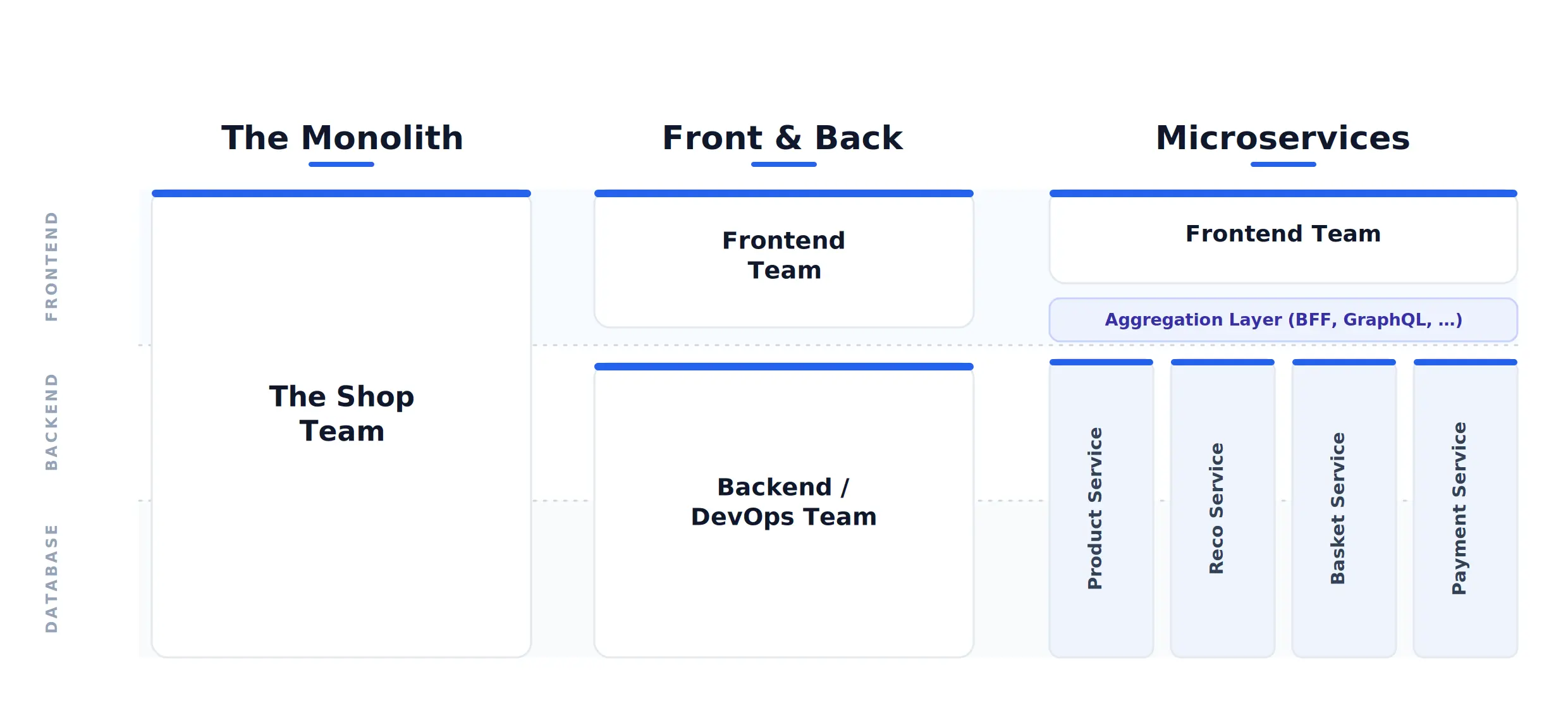
Microservice architecture is a design pattern in backend development. Where a monolithic architecture ships as one unit, microservices are several independently deployable components, separated by business domains and connected by APIs.
What that buys a business is narrower than the usual list of adjectives suggests, and worth stating plainly:
Those four are also, precisely, the properties a frontend monolith does not have, however modern the back end behind it is. Our guide to software architecture sets out where the trade sits at different team sizes.
A frontend monolith is the client side of a web application built from a single codebase. Plenty of products still run one, including products whose back end is fully decomposed. The server side is modular; the frontend stays whole.
For one or two teams, that is the right shape. Truth be told, it is usually the right shape for longer than people expect. The symptoms show up as the number of teams touching that codebase grows, and they are specific enough to check for:
A frontend monolith, in other words, restricts the independent delivery you adopted microservices to get. That is the gap micro frontends close. And it is worth being blunt about the nature of that gap: it is organisational. If the delay lives in review culture or in a change board rather than in the codebase, splitting the codebase will not move it.
Independent deployment only helps if the delivery process behind it is disciplined, which is where the best agile practices earn their place.

With a micro frontend, companies can:
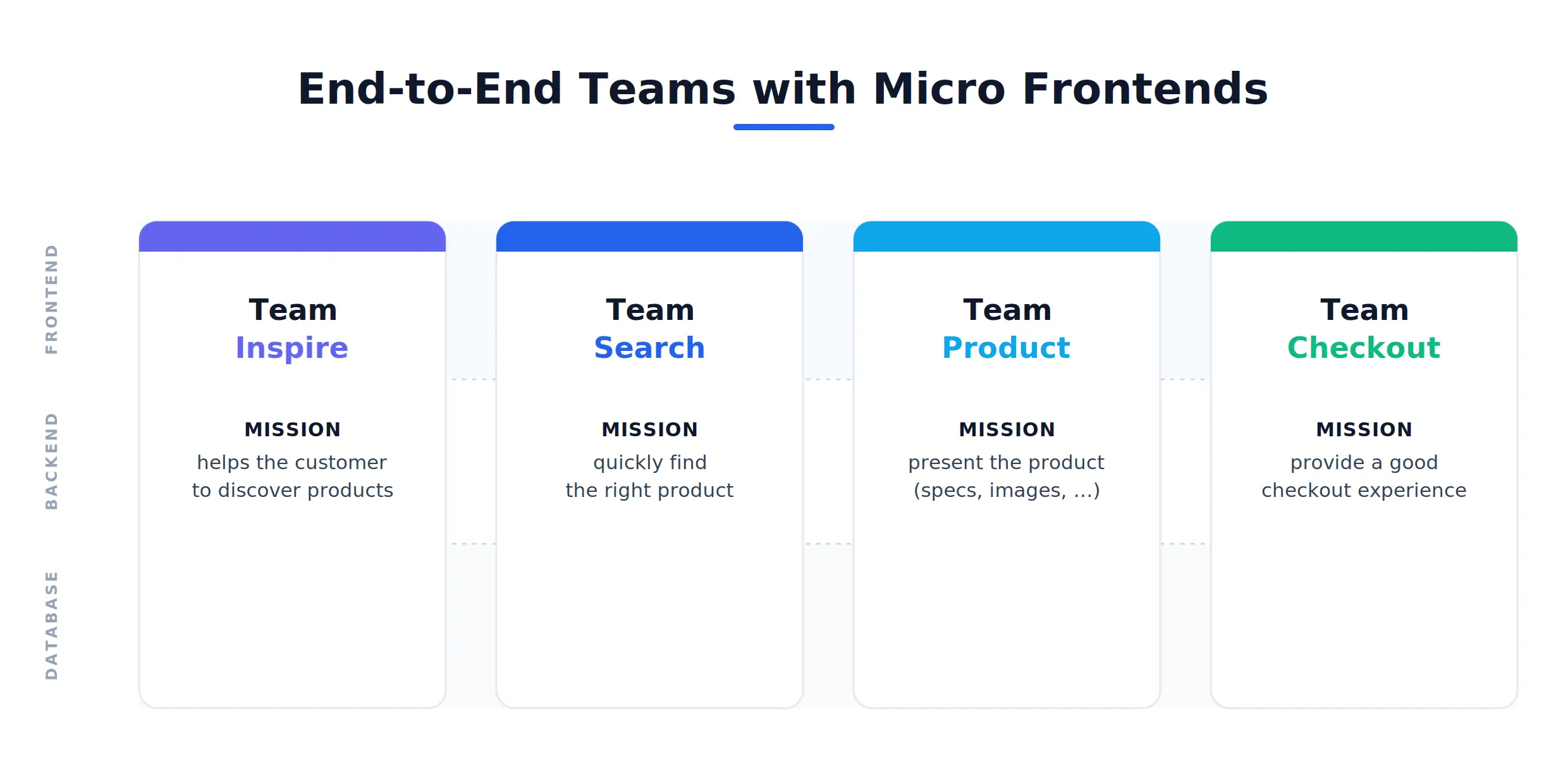
This suits teams that already run independent delivery on the back end. The gains are real, and every one of them has a cost attached in the next section.
The published benefit lists for this architecture run long. In delivery they collapse into four gains, each with the mechanism behind it and the condition it depends on.
The costs are those same four properties read from the other side. None is a reason to avoid the architecture. All of them need an owner before you start.
The two architectures answer different problems. This is the trade at a glance — read it as "which constraint are you actually under?", not "which is better".
| Dimension | Monolithic frontend | Micro frontend |
|---|---|---|
| Codebase | One shared repository everyone changes | Several independently owned slices |
| Deployment | One shared pipeline / release train | Per-slice pipeline, deploy on demand |
| Team fit | One or two teams | Three or four-plus autonomous teams |
| Release cadence | Gated by the slowest change in the batch | Each slice ships when it is ready |
| Blast radius | A regression can take down the whole frontend | Contained to one slice |
| Technology | Shared framework and versions; an upgrade is a whole-product project | Per-slice choice; an upgrade is proven on one slice first |
| Bundle size | One payload, no duplication | Only the code a page needs — but risk of duplicated framework copies |
| Testing | Simpler end-to-end: one unit to test | Slices test in isolation; the assembled product needs its own e2e suite |
| Standing platform cost | None beyond the application itself | Shell + composition + design system + e2e suite (≈ one engineer plus a design-system owner) |
| Best when | Release contention is not your bottleneck | Several autonomous teams queue to deploy the same codebase |
The commercial case is a trade between coordination cost and delivery speed, and it only clears at a certain scale. The figures below are indicative rather than universal. The shape of the trade matters more than the numbers.
Micro frontend architecture has real advantages, and it is not a one-size-fits-all solution. Not every web application suits this style, and the deciding factors are organisational as much as technical.
Before adopting micro frontends, we put a candidate through three gates. Fail any one of them and the monolith is still the better answer, with that gate as the work to do first.
Two supporting conditions matter too. Separate technology stacks for different modules should be a genuine requirement rather than a preference, and the budget has to carry the standing platform cost set out above.
If you are unsure whether micro frontends suit your project, walk the three gates through with someone who has run the migration before. In the end it depends on the specifics of your business plan, not on the architecture's merits in the abstract.

Splitting the frontend is the easy half. What decides whether the result holds together sits in four concerns no single slice owns, and each needs a decision before the first migration rather than after it.
Utility components that manage state or talk to the application environment, rather than rendering anything, can be loaded on demand like any other slice. They usually carry no UI, which makes them easy to overlook when you decide who owns what.
You can integrate micro frontends in two ways: at build time, or at run time.
The container installs each slice as a library, much as you would install a package from npm, the Node.js package registry. This is how most code is written today, and it is the simplest thing that works.
The drawbacks are why most teams move past it. Multiple versions of shared libraries have to be kept in sync, and build issues follow when they are not. Combining several technologies is difficult. The final package carries every dependency, so it is large. And because any change to a dependency means rebuilding and redeploying the container, the container and all its slices stay tightly coupled. Which is the coupling the architecture exists to remove.
Run-time integration composes the page from independently deployed slices while it is being served, or after it loads, so a slice can be released without rebuilding the container. Compositions come in three types:
@module-federation/nextjs-mf plugin only ever supported the older Pages Router, never the default App Router, and its maintainers have flagged it for end-of-life around the end of 2026. For App Router projects, Vercel's first-party @vercel/microfrontends package — built on a Multi-Zones model rather than runtime chunk-stitching — is now the supported path. single-spa remains the main alternative where slices are built with different frameworks.A micro frontend is one slice of a web application's user interface, built and deployed on its own by the team that owns it. Instead of a single frontend codebase everybody changes, the page is assembled from several independent slices at build time or in the browser. Each team ships without waiting for the others.
Choose the monolith unless release contention is your actual bottleneck. A single frontend codebase is simpler to build, test and reason about, and it stays the right answer for one or two teams. Micro frontends earn their cost once several autonomous teams are queueing to deploy the same codebase, and the queue, not the code, is what slows you down.
Beyond the teams themselves, budget for a standing platform cost: the shell, the composition layer, a shared design system and an end-to-end test suite. On the engagements we see, that is around one engineer's continuous capacity plus a design system owner, and it persists after launch. The saving that offsets it is cycle time, not headcount.
Three or four autonomous frontend teams is the usual threshold, and autonomy matters more than the count. If every release still routes through one lead or one change board, splitting the frontend removes a bottleneck that was never the constraint. One team adopting micro frontends gets the operational cost of a distributed system with none of the organisational benefit.
Three recur. Shipping a copy of the framework with every slice, so the page ends up slower than the monolith it replaced. Leaving the design system unowned, so the interface visibly drifts between slices. And letting versions skew across independently deployed slices, which only shows up in production. All three are governance failures rather than technical ones.
They can go either way. Splitting the application means the browser downloads only the code a page needs, which helps. Duplicated dependencies across slices push in the opposite direction and can leave the total payload larger than before. Which effect wins depends on whether shared dependencies are managed deliberately, so measure page speed per release rather than assuming it.
Yes, and it is the lower-risk route. Put a shell in front of the existing monolith, carve out one vertical with clear boundaries, and give it to a team to own end to end. Each subsequent slice follows the same path. Expect the migration to run over quarters rather than sprints, and keep the option of stopping partway.
Micro frontends give the frontend what microservices gave the back end, independent delivery, by trading coordination cost for delivery speed. That trade only clears at scale: the platform carries a standing cost, and the failure modes are organisational rather than technical. So run the three gates first: team count and autonomy, domain separability, deployment maturity. If one fails, fixing it is the higher-value work, and the monolith remains the better answer for now.
We have built, maintained and migrated both micro frontends and monoliths, and we are happy to walk your estate through the three gates, including when the answer is to stay put. Get in touch and we will take a look.
Alexandra Mendes is a Senior Growth Specialist at Imaginary Cloud with 3+ years of experience writing about software development, AI, and digital transformation. After completing a frontend development course, Alexandra picked up some hands-on coding skills and now works closely with technical teams. Passionate about how new technologies shape business and society, Alexandra enjoys turning complex topics into clear, helpful content for decision-makers.
Your everyday web developer who likes to hide in the backend. Javascript and Ruby are my jam. I still fumble with Docker and my builds break quite often.
People who read this post, also found these interesting:
















.webp)