Written by:

Last Published:
14 October 2026
•
.webp)
Search for the best AI coding assistants and you will find hundreds of rankings, mostly feature lists. A good share are written by the vendors being ranked, which is a bit like asking the baker which bread is best.
So here is the answer we would give a friend. GitHub Copilot, Cursor, Claude Code and OpenAI Codex are all good, and none of them wins everywhere. Copilot fits teams that live in GitHub, Cursor fits teams that want agents inside the editor, and Claude Code fits teams that live in the terminal.
The better question is what happens after the tool writes the code. Engineering teams don't buy features. They buy a review burden, because every line an assistant writes still lands in a pull request that a senior engineer has to read and sign off.
This guide compares the four from the seat of a team that ships production software, and says where each one helps and where it demands senior review.
An AI coding assistant is software that uses large language models to suggest, write, explain or change code. In 2026 the category has split in two: assistants that suggest while you drive, and agents that take a goal and work towards it. Gartner now evaluates the second group separately, as enterprise AI coding agents.
Think of an inline assistant as a satnav. It suggests the next turn and you keep your hands on the wheel. An agent is a taxi: you name the destination and judge the route when you arrive. Both get you there, but the insurance is not the same.
Adoption is no longer the debate. Stack Overflow's 2026 Developer Survey found that 66% of respondents use coding assistants or agents, and 73% of those users use them daily. Trust is the debate: 48% said they trust AI output only when they can easily verify it, and just 6.6% would trust it for important decisions.
We judged each tool on four things that matter to a team rather than an individual: where it saves real time, where it demands senior review, what controls an administrator gets, and how the bill behaves under heavy use. That is the lens a technical lead needs when choosing between the best AI coding assistants.
Our public AI practices page lists Cursor as our primary environment, with Claude, GitHub Copilot and Gemini alongside it. Where assistants save time and where they demand review depends more on the task than on the tool, so those two criteria get their own sections below. The table below shows which entries come from our stack and which from documentation, analyst reports and published research. This is a practitioner's comparison, not a lab benchmark, so check each vendor's pricing and terms before you sign anything.
GitHub Copilot, Cursor, Claude Code and OpenAI Codex all sit in the top tier, and none wins everywhere. Choose by where your team already works, how much autonomy you will allow, and what your security reviewers will accept. Those three constraints decide the best fit, not the feature list.
Gartner's May 2026 Magic Quadrant for Enterprise AI Coding Agents named Anthropic, Cursor, GitHub and OpenAI as Leaders. Leader status tells you a vendor is serious. It doesn't tell you whether it fits your team.
GitHub Copilot is the lowest-friction option for teams whose repositories, pull requests and CI already run on GitHub. It sits inside the workflow people use anyway, which shortens rollout. The trade-off is cost visibility, because billing has moved from request counts to metered usage.
GitHub says it has been named a Gartner Leader for the third year running. Since 1 June 2026, premium request units have been replaced by GitHub AI Credits, and Copilot code review also consumes GitHub Actions minutes. One reviewer bot, two meters. In our stack Copilot is a first-line reviewer, but a bot reviewing a bot's output tends to share its blind spots.
Cursor is an AI-native editor built around agents, and it is our primary environment at Imaginary Cloud. It earns that place on design-to-code work. It also carries a 2026 procurement footnote, because its ownership changed in August and your data terms deserve a second read.
On Orizion, our engineers used Cursor with the Figma MCP server (the Model Context Protocol, an open standard that lets AI tools connect to other software, here Figma's design files) to turn designs into React components and API requirements, with strict manual code review throughout. The team scaled back Figma Make, which proved better for ideation than for production-ready design.
Now the footnote. SpaceX completed its acquisition of Cursor's parent company, Anysphere, on 14 August 2026. That doesn't make Cursor a poor choice, but it is a sensible moment to reread your data terms. Cursor says Privacy Mode can be enforced by an administrator with zero data retention terms behind it, though its security hardening guide notes that personal API keys and models with provider-side retention fall outside those commitments.
Claude Code is Anthropic's coding agent, available in the terminal, IDE, desktop app and browser. It suits teams that want an agent they can script and run inside existing workflows. Its administrator documentation covers managed settings, policy enforcement and usage monitoring.
Anthropic's documentation notes that it can run through Anthropic's own API or be hosted on AWS or Google Cloud, which matters if procurement already holds a cloud agreement. Claude models are part of our stack, but this entry rests on documentation and Gartner's assessment rather than a test of our own.
OpenAI's Codex is the fourth vendor Gartner named a Leader in May 2026, and it belongs in your pilot if you already hold an OpenAI enterprise agreement. This entry draws on documentation and analyst reports, not our own delivery work. Windsurf, and the AWS and Google offerings, are worth a look if your cloud strategy points that way.
In its 2026 report, Gartner places AWS and Google among the Challengers, a reminder that category definitions shift almost as fast as the products.
Cursor vs GitHub Copilot comes down to editor versus ecosystem, and Claude Code vs Copilot comes down to a terminal agent versus a GitHub-native assistant. Cursor vs Claude Code is mostly a question of where your engineers prefer to work. Choose by workflow first, then check data terms.
AI coding assistants help most where the answer is easy to verify: boilerplate, test scaffolding, refactors with strong test coverage, and explaining unfamiliar code. They help least where correctness depends on context nobody wrote down, such as business rules, permissions and data migrations.
Developers seem to know this. In Stack Overflow's data, people use AI mostly for familiar code (67%) and debugging (61%), and only 20% use it for deploying, operating or troubleshooting production systems. Orizion shows the pattern: the team wrote a design backlog and Figma documentation with behavioural notes, so both developers and AI tools had something explicit to work from. Scripts that loaded test accounts pre-filled with data then exercised the time-bound features on staging, without triggering real Stripe costs.
If you are still at the prototype end of this spectrum, our piece on whether vibe coding is bad for production software covers the gap between a demo and production.
AI-generated code needs senior review wherever a mistake is expensive or invisible: authentication, payments, permissions, data migrations, dependency changes and anything touching regulated data. Code that compiles and passes its own tests is not necessarily safe, because those tests are often written by the same assistant.
Veracode's 2026 GenAI Code Security Report found that generated code failed security tests about 44% of the time without security-specific guidance, even though syntax success was close to perfect. (Veracode sells security testing and tested raw models, so read this as "unsupervised", not "doomed".) DORA's 2025 research, from Google's long-running DevOps Research and Assessment programme, calls AI an amplifier: adoption now correlates with higher delivery throughput, and still with higher instability.
The best-known speed number has aged badly too. METR's 2025 trial, run by an independent AI research nonprofit, found that 16 experienced developers took 19% longer with AI while believing they were 20% faster, and METR now treats that as historical, because its 2026 follow-up data was unreliable. Nobody can hand you a trustworthy single figure. Be wary of anyone who does.
So what should a team do? Climb what we call the Review Ladder: the higher the cost of being wrong, the more senior the reviewer.
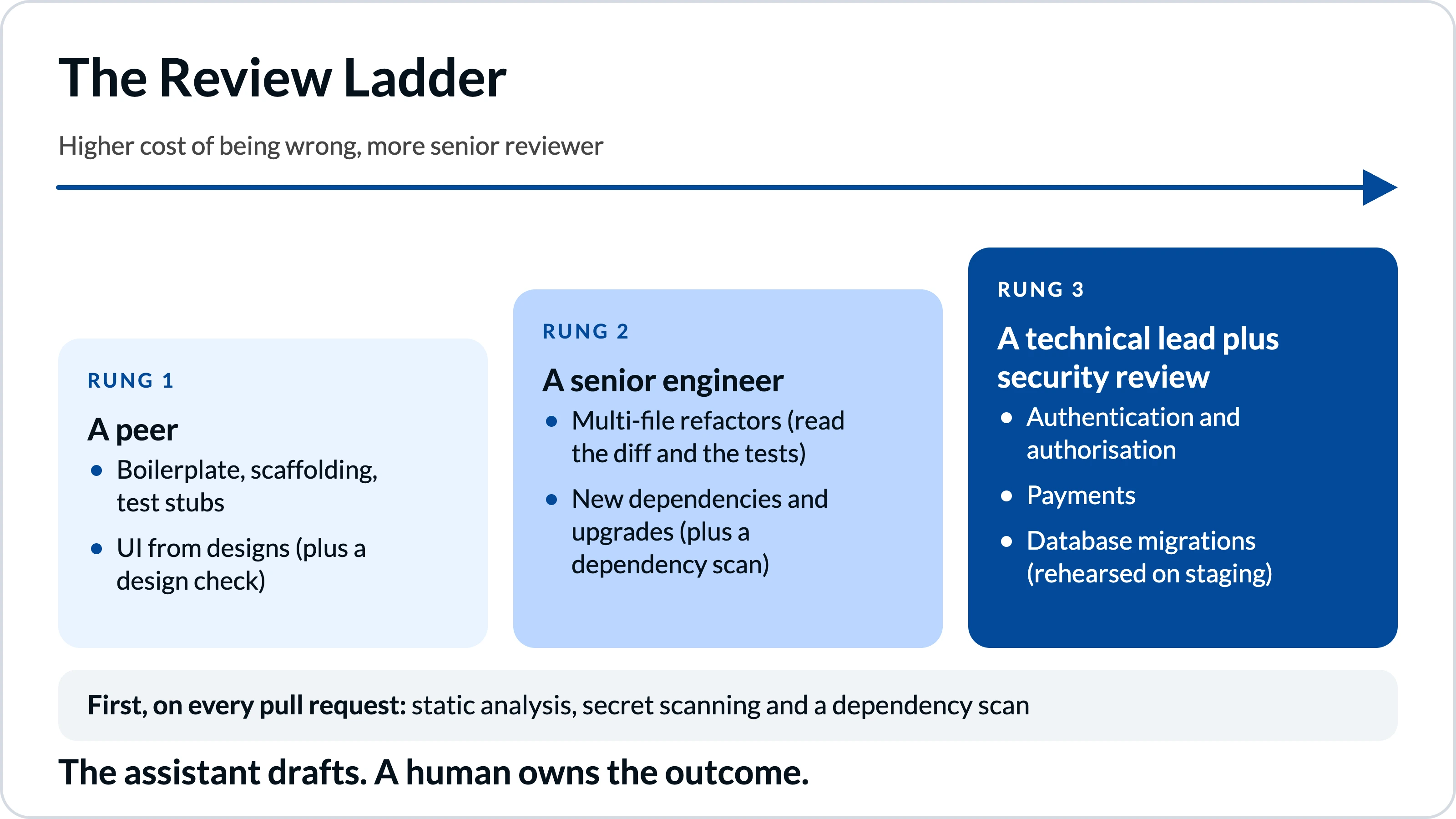
Adjust the Review Ladder to your own risk. The principle holds either way: the assistant drafts, a human owns the outcome.
A workable gate has three parts: automated checks before a human looks, a reviewer who understands the system, and a named person accountable for what merges. Speed comes from the first part. Safety comes from the other two, and neither can be handed to the assistant.
On our own delivery, no code reaches production without a merged pull request, and that merge needs explicit approval from a Technical Lead. They check security compliance, architectural alignment and complex business logic for every agent-generated pull request, and the same gate sits behind our AI-enabled custom development work. If you are building your own gate, four habits pay off quickly:
AI code review tools, such as Copilot code review and Cursor's Bugbot, work best as a first pass that catches obvious defects before a human reads the pull request. They don't replace the reviewer, and they add a cost line of their own.
Use AI code review tools to make human review faster, not to decide whether human review happens.
Choose the best AI coding assistants for your team by constraint, not by benchmark, then manage them like any engineering change: pilot with a small group, write the policy down and measure outcomes you already track. Licences without that give you speed you cannot safely use.
Four questions narrow the field faster than any feature table:
Run a four-week pilot with one or two volunteer squads on real tickets, give each tool the same three tasks, and record what reviewers had to correct. That record becomes your policy and your training material. Governance is the heart of any enterprise security review of AI coding tools, and only 24% of developers said their organisation had published approved tools or an official AI policy.
In regulated industries, treat an AI coding assistant like any supplier that touches your code: ask for its SOC 2 report, retention terms, audit logs and data residency options, and put regulated data on the strictest rung of the Review Ladder. Then plan for model changes, because the model behind your assistant can change.
Ask each vendor how much notice you get before a model is retired or replaced, and re-run your three pilot tasks after any major change. If an output suddenly needs more review, you want to learn that in a pilot, not in production.
The real cost of an AI coding assistant is seats, usage, vendor dependency and reviewer time, and reviewer time is the line most budgets forget. Return on investment therefore depends on whether faster drafting survives your review capacity, not on how quickly the tool writes code.
Licences are the visible line. Usage credits, code review minutes and the senior hours spent reading AI-generated pull requests are not, and since 1 June 2026 Copilot's bill has been metered. Be sceptical of any payback figure, and measure your own: track lead time, change failure rate and rework rate before and after the pilot. If throughput rises and failures stay flat, you have a business case, and if both rise, you have bought speed with instability.
Then price an incident in your own terms, from engineer hours to customer impact and audit exposure, and compare it with a year of licences before deciding how much review capacity to fund. On dependency, avoid contracts longer than your planning horizon and know how quickly you could switch.
To take this to a board or procurement committee, keep the case to one page: the problem, a four-week pilot with the delivery metrics above as success criteria, the cost including review capacity, the exit plan and a decision date. That also answers time-to-value: a go or no-go within a month, not a year.
There is no single best one, because the right choice depends on where your team works. GitHub Copilot suits teams built around GitHub, since it sits inside issues, pull requests and Actions. Cursor suits teams that want agents inside the editor, and Claude Code suits terminal-first teams that want scriptable agents. Pilot two on real work for a month, then decide on review load, data controls and cost.
Neither is better across the board. Copilot sits deeply inside GitHub issues, pull requests and Actions, while Cursor is an editor built around agents. Teams standardised on GitHub often start with Copilot. Check ownership and data terms for both.
They have different shapes: Claude Code is a scriptable agent, while Copilot is an assistant with agents built into GitHub. Choose by workflow and administrator controls, and pilot both if you can.
No independent test crowns one for your codebase. Veracode's 2026 security benchmark put one OpenAI model at 68%, while six of the 11 models listed clustered between 50% and 53%, with wide variation by language. Give each tool the same three real tasks and compare the review effort.
Yes, if your review capacity can match the extra code. A small team has fewer reviewers to absorb the output. Start with one tool, keep pull requests small, and measure change failure rate and rework over a four-week pilot before expanding.
No. Veracode's 2026 testing found about 44% of generated code failed security tests without security guidance, and DORA links AI adoption with higher delivery instability. Use AI review as a first pass, then keep a named human accountable for every merge.
Enforce the vendor's privacy controls organisation-wide, read the exceptions, and write a policy. Cursor, for example, lets administrators enforce Privacy Mode, but personal API keys and some models fall outside its zero data retention terms.
Seat prices are only part of it. GitHub moved Copilot to usage-based billing on 1 June 2026, so heavy agent use can exceed a plan's credit allowance. Budget for your heaviest users and code review, and recheck pricing quarterly.
The best AI coding assistants are the ones your reviewers can still keep up with. GitHub Copilot, Cursor, Claude Code and OpenAI Codex all deserve a pilot, and the right one depends on where your team works, what data may leave your network and how much autonomy you will allow. The evidence says AI speeds up drafting, not judgement: generated code still fails security tests, delivery instability rises, and nobody has a reliable productivity number. So climb the Review Ladder, pilot two tools for four weeks, measure your own results and write the policy down.
Do that, and the assistant becomes a genuine force multiplier. Skip it, and you have moved the bottleneck to the people you can least afford to slow down.
If your team is merging more AI-generated code than anyone has time to read, a code audit is the quickest way to find out what is really in production. Imaginary Cloud's Code Audit looks at code structure, quality, security vulnerabilities, scalability limits and technical debt, and gives you a clear path to fix what matters first. It sits within our wider Technical and UX Audit service. Book a call and we will tell you where to look.
We have done similar work before: a code audit for TeachTutti, and code standardisation and architectural documentation for GoodBarber.
Alexandra Mendes is a Senior Growth Specialist at Imaginary Cloud with 3+ years of experience writing about software development, AI, and digital transformation. After completing a frontend development course, Alexandra picked up some hands-on coding skills and now works closely with technical teams. Passionate about how new technologies shape business and society, Alexandra enjoys turning complex topics into clear, helpful content for decision-makers.
People who read this post, also found these interesting: