Ask ten people what digital design is and you will get ten answers, most of them half right. It is one of those terms everyone uses and few can pin down. In plain terms, it is design made for screens: the visuals and the interactions of websites, apps and other digital products. Simple to define, then. Much harder to do, because the screen it lives on has features and demands that paper never had.
Here is our position, and the rest of this piece is an argument for it: digital design earns its budget when it changes what users do, not when it looks accomplished. We can put a number on that. When we ran a UX audit and interface redesign for Learninghubz, a corporate learning platform, active users rose 20% in the three months after launch, in-app time went up 15% on desktop and 50% on mobile. Nothing in the underlying content changed. The same videos, the same catalogue, a different interface.
So let's walk through it. What digital design actually is, how it differs from the older kind, its types, when it is worth commissioning. And, just as usefully, when it is not.
Design is functional art. It is made with a job in mind: to improve usability, shape experience, create identity, promote engagement and generate impact, depending on the medium it uses. You find it everywhere, from furniture construction to branding and advertisements, built in wildly different materials and settings.
Digital design is the branch that exists only on a screen. It is made to be viewed and interacted with there, and nowhere else. That sounds like a small distinction. It is not, because living on a screen means it can do things paper simply cannot — chiefly, it can watch what happens next and be changed accordingly.
It is dynamic, interactive and malleable by nature, and it pulls in disciplines well beyond graphic design: programming, multimedia, data analytics. Digital designers work shoulder to shoulder with developers during build, and with the marketing team throughout, because the work has a measurable impact and should be planned with specific targets from the start.
Here is where most people trip up. All design is done on computers now, so surely all design is digital? No. The difference is not the tools. It is the deliverables they produce, the mediums they use, and the kind of relationship they strike up with the people on the other side.
Think of a printed poster. Once the ink dries, it is finished: it says the same thing, the same way, to everyone who walks past, for as long as it hangs there. A digital design is the opposite kind of object. It watches how people respond and rearranges itself accordingly, and it can be improved next week in a way the poster never can.
Print designers usually work for analogue mediums, mostly paper-based or similar. A few examples of print design:
Digital designers create digital deliverables, such as:
But the deeper split is in the idioms they use. Print design works mainly the visual aspect. Digital design is inherently a dynamic, interactive experience that uses programming languages to generate motion and embed other media in the final result. Here is the paradox worth sitting with: digital design is the more intangible of the two, and also the one we touch the most.
Digital design pays close attention to how people relate to their screens: how they read, how they react, what they decide. That behaviour comes back as data, and the data feeds the thinking behind the next iteration, which makes the design more effective each time round.
Good design can nudge a split-second decision and move someone towards the goal you had in mind. Bad design just misses them. A button with an ineffective size or colour can blunt the impact of a call to action; a poorly built layout can leave users unable to make sense of what is in front of them.
The Learninghubz audit is a good illustration of how mundane those failures usually are. The content was there and the customers were there. What the audit found was ordinary: weak navigation, poor readability, dated interface patterns, visuals that did not carry authority. Responsiveness, documentation and in-product help were also dragging, though less severely.
None of that is glamorous. The remedy was not glamorous either: established UI patterns rather than invented ones, navigation conventions users already knew, a clearer text hierarchy, consistent visual treatment, and a genuine onboarding flow instead of dropping people into a catalogue. The 50% jump in mobile in-app time is the detail we found most instructive: mobile users were not uninterested, they were being obstructed.
Effective design is always built on behavioural insight, and in the digital world that insight arrives as data. You can analyse how people navigate, where they linger, how they find their way around. Then you test a new version against the old one, compare, tweak, and even tailor the design to a specific audience. A roadside billboard does not get that second chance.
We have touched on a few of the defining traits already. Let's break down the core ones properly.
Digital designs live across a sprawl of screens and devices, so they have to fit each one at the highest possible quality and adapt to how people use it. Remember when video was always shot in panoramic view? Users' habits and devices end up writing the rules for digital design, more often than not.
When people picture design, they picture colours, shapes, typography. Digital design adds motion and change to that list. Most websites lean on techniques like parallax, the effect where background and foreground move at different speeds, or shift colour on active elements. For navigation, they use shape-shifting objects too, like the hamburger menu that unfolds into a list when you tap it. Unlike print, a digital designer can hand items dynamic behaviour.
Interactivity is the whole point of digital content. It began with hyperlinks, where a word or phrase could carry you off to another page. That, really, is where digital design started, back when nobody fussed much over typography or layout beyond making the thing work (both were awfully basic in the early web, truth be told).
Suddenly an element had a job to do. The fix was to underline the linked words and colour them blue. The principle has not changed since. The visual possibilities, though, have gone from a handful to effectively limitless.
Does a digital designer need to write code? Not exactly, but they cannot ignore it either. Print design assumes a printing mechanism and a surface; digital design uses code to materialise. So a digital designer needs CSS and HTML for the visuals, and once you add interactivity, JavaScript earns its place too.
The stack shapes what is realistic, which is why our designers sit with the developers rather than throwing files over a wall. On Learninghubz the front end was Angular, with TypeScript and Node.js running a microservice for image handling and .NET behind it. A design decision that ignores that context is a decision someone else has to renegotiate later.
You do not have to be an expert programmer. You do need to know how to turn a static mockup into a live product, and what is technically possible when you want to try something new.
Here is what paper never offered: you can measure whether the design works. More than catching the eye, digital design has to hold attention and then lead it, smoothly, to the intended action. Heatmaps, click reports, navigation treemaps and similar tools let designers build several versions and put them head to head through A/B testing.
A caution from experience: pick the metric before the redesign, not after. Active users, in-app time and completion rate can move in different directions from the same change, and a team without an agreed number ends up arguing about taste. Our own UX audit process starts there for exactly that reason.
Digital design is something we use and interact with, and that is exactly why it carries a different weight from print. We are not called users by accident. The work is made to be functional and to lead somewhere specific.
The digital design umbrella is a wide one: digital banners and ads, newsletters, online presentations, ebooks, and the small stuff too, the icons and logos that turn up inside everything else. The three that consume most budgets are web, app and UX/UI, and they are not interchangeable.
Every company needs a website, which makes this the most popular type of digital design by some distance. Web designers and developers shape the layout and behaviour of sites, and how they look and work across different devices.
Landing page design is a specialised corner of web design, focused on pages built to trigger one action: sign up for a conference, subscribe to a newsletter, buy a product, download a freebie. Landing pages are a marketing department's favourite, because you can tailor them to a specific product, audience and intended action.
Choose it when the job is to inform, persuade or convert, and the visit is short. The trade-off: breadth over depth. A site optimised for a first-time visitor rarely serves a daily user well.
Apps are built around a single function and stand on their own. We do a lot with them: shop, listen to music, check the weather, follow a plan, take notes, order food, book a car. Apps are made to perform, where webpages mostly inform. So the thinking behind an app is its own discipline, mostly mobile, which means very specific technologies and environments.
Choose it when the same person returns repeatedly to complete a task, and the experience benefits from device capabilities a browser handles badly. The trade-off: cost and commitment. You are signing up for release cycles, store review and platform-specific work, indefinitely.
Two of the fastest-growing fields in digital design are UX, or user experience, and UI, or user interface. They are close cousins, but their jobs are different.
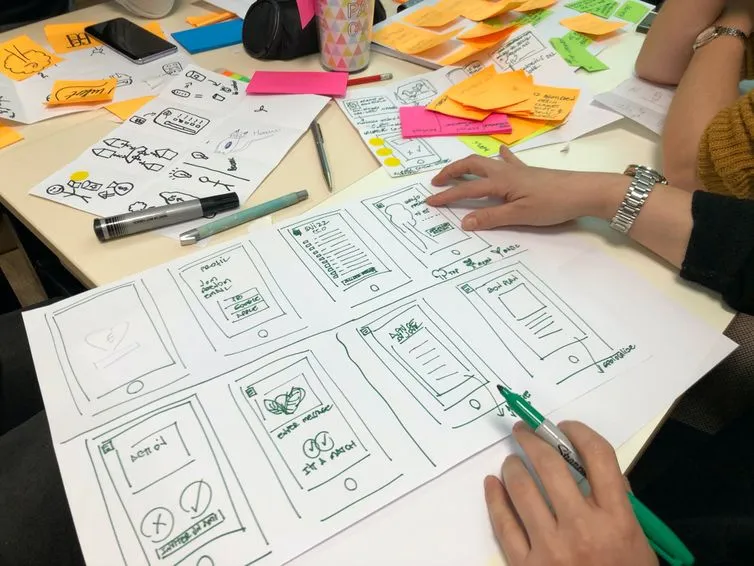
UX is about how someone interacts with the product, making sure it is accessible and genuinely enjoyable to use. UX designers produce wireframes, user flows and prototypes to map the journey and improve it through research and testing at every stage.
UI is about how the product looks and feels. UI designers build the style of the thing, making sure layout, colours, shapes and typography pull in the same direction to create identity and back up what UX found. They also produce the style guides and libraries that keep the look consistent across every platform.
Choose it when you already have users and they are not behaving as you hoped. For example,the Learninghubz situation exactly. The trade-off: it is diagnostic work, so it can conclude that your problem is not design at all.
Most agencies will not tell you this, so here it is. There are projects where a dedicated design phase is the wrong purchase.
We built the Economy Database interface for Eurofound, the EU agency for living and working conditions, with no designer allocated at all. One developer, six weeks, Django on the back end and Azure for deployment, delivering 280 initiatives through twelve filtering options. The developer worked to Eurofound's existing style guide and checked UX decisions with designers in the studio as questions came up.
That was the right call, and it turned on three conditions. There was a mature style guide, so identity was already settled and a design phase would have re-litigated a solved problem. The interface was a known pattern (a filtered, searchable listing) with well-established conventions to follow rather than invent. And the deadline was six weeks, which is not enough runway for research, ideation, execution and technical assessment done honestly.
Take away any one of those and the answer changes. No style guide, and a developer is now improvising your brand. An unfamiliar interaction model, and convention has nothing to offer. A longer horizon, and skipping research just moves the cost downstream.
The general rule: buy design when the problem is behavioural or the identity is unsettled. Skip it when the pattern is known, the guidelines exist and the constraint is time. Paying for a design phase to produce screens your style guide already dictates is paying twice for the same decision.
Digital design has two faces. It is a portrait of the organisation behind it, and it is the surface users actually touch. A digital designer has to serve both at once.
For the organisation, three values do the heavy lifting:
Print design already knew those three. Digital design adds a second set, because it also cares how users move through the thing:
For the business itself, none of this is decoration. Identity and consistency protect your brand on every screen a customer meets, which lowers the risk that a confused experience quietly costs you a sale. A clear journey shortens the path to conversion. And as Learninghubz showed, the gain can arrive without adding a single feature. The audience was already there, the interface was simply in the way.
Digital design is a wide field, stitched together from user experience, typography, data analysis and data visualisation. Unlike anything printed, it is never quite finished on delivery: even a trivial change can shift the outcome, so auditing the impact is what turns a beautiful design into a beautiful and effective one.
Two things worth carrying away. Decide what number should move before anyone opens Figma: a redesign without a metric is a matter of opinion, and opinions are hard to settle. And be honest about whether design is what you actually need, because sometimes a clear style guide and a developer who respects convention will get you there in six weeks.
Digital design is design made for screens and experienced only there. It goes past the visual dimension of graphic design and adds motion, interactivity and code, so the result responds to the user instead of sitting still like a printed page.
A digital designer plans and builds the visuals and interactions of digital products such as websites, apps and landing pages. They work closely with developers and marketing, and use behavioural data to test and improve each version against specific targets.
It is not the tools, it is the deliverables and the medium. Graphic design works mainly the visual aspect and often ends up in print. Digital design is dynamic and interactive by nature, uses programming languages to generate motion, and can be measured and improved after it ships.
The most common are web design, app design and UX/UI design. Web design suits short, persuasive visits; app design suits repeat tasks on mobile; UX/UI design suits products that already have users who are not behaving as expected. The wider umbrella also covers banners and ads, newsletters, online presentations, ebooks, icons and logos.
It can, and the effect is measurable. After a UX audit and interface redesign of the Learninghubz learning platform, active users rose 20% within three months, with in-app time up 15% on desktop and 50% on mobile — with no change to the platform's content.
When the interface follows a well-known pattern, a mature style guide already exists, and the deadline is tight. We delivered Eurofound's Economy Database interface — 280 initiatives, twelve filters — in six weeks with one developer and no designer allocated, because all three conditions held. Remove any one of them and a design phase earns its cost again.
If you are looking to improve your digital presence, Imaginary Cloud provides web development, mobile development, UX audit and UX/UI design services to help users reach their goals.
And yours, too.

Content Writer and Digital Media Producer with an interest in the symbiotic relationship between tech and society. Books, music, and guitars are a constant.

Young UX/UI designer passionate about details and human behaviour who loves to learn something new every day.
People who read this post, also found these interesting: