Written by:


Last Published:
11 August 2026
•

Async logic does not belong in a Redux reducer. Reducers are pure functions, so every API call, every timer and every subscription has to live somewhere else, and in Redux that somewhere is middleware. Redux Thunk is the default starting point. For most teams, it is also the finishing point.
What follows is drawn from a large React and Node.js application we migrated off an ad hoc state layer. The first half covers the decision and what it costs; from "How to implement Redux Thunk" on, it is implementation. If you only need the decision, stop at the selection criteria.
When we needed to define a stack for this project, React was the obvious choice for the front end, given how much visual presentation and 3D modelling the work involved.
What we did not define was a strategy for state management. As the project evolved, that became an issue, so the team moved all the state management logic into a Class implemented as a Singleton: a single shared instance that every component reads from and writes to. It handled state-related storage and events well enough.
Well enough, for a while. It eventually outgrew its usefulness, and we set a plan in motion to find a better alternative. It came in the form of Redux, helped by the introduction of Redux Toolkit, previously known as Redux Starter Kit.
The Singleton was never the plan. Nobody chooses one. That is the point worth taking from this article, because unmanaged state is rarely a technical problem first. It shows up as delivery cost.
Picture a whiteboard in a shared office that anyone can write on, with no names and no timestamps. The board always tells you what the current state of things is. It never tells you who changed it, or when, or why, so working out how a value got there means asking every person who walked past.
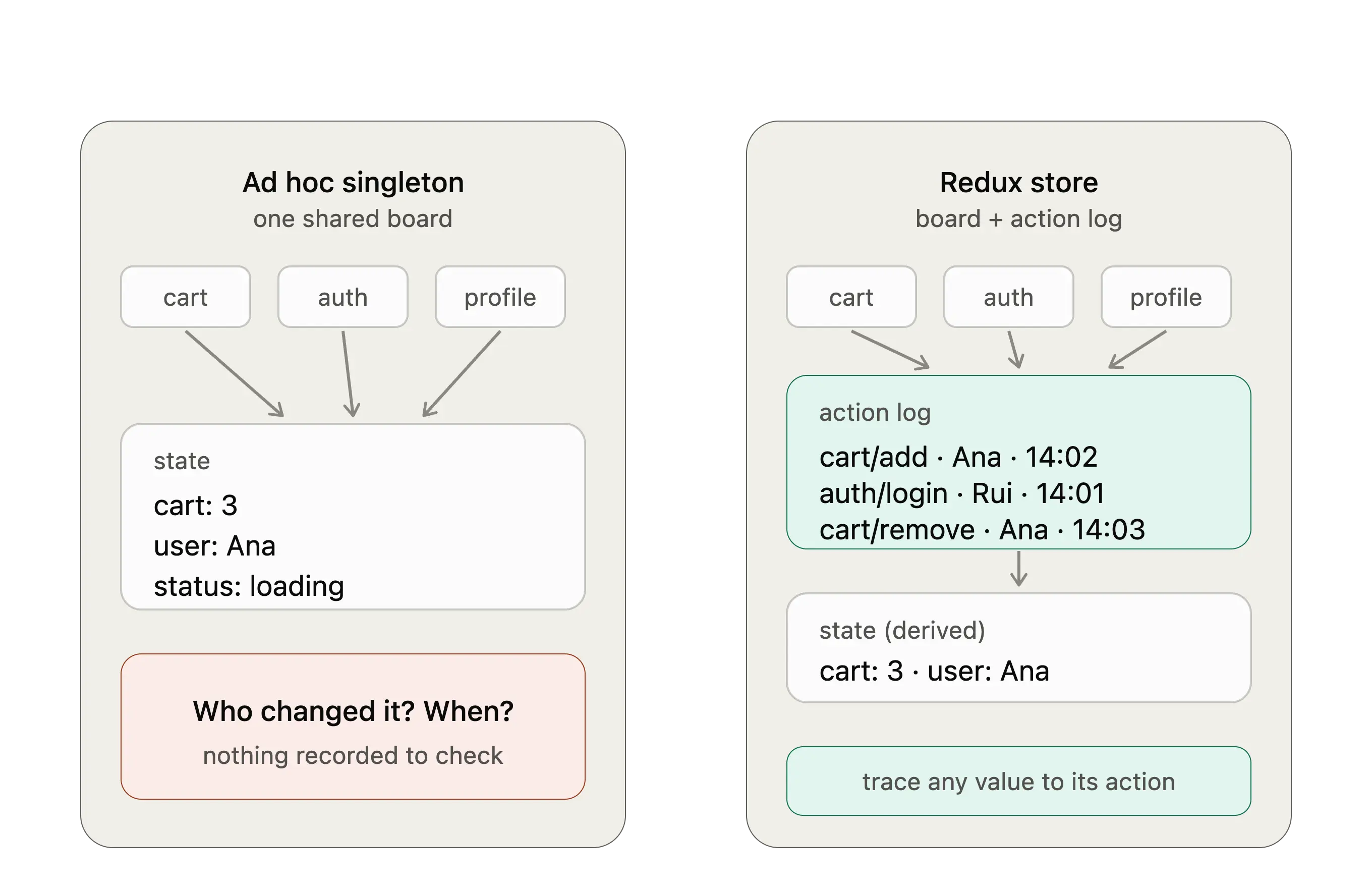
That was our Singleton, and the cost landed in three countable places. Debugging took longer, because tracing one bad value meant reading every writer by hand. [Author to confirm: how many developer hours per sprint the team was spending on that tracing before the migration.] Onboarding took longer, because the shared instance had no contract a new developer could read, so the only way to learn the state model was to read every component that touched it. [Author to confirm: how long a new developer took to become productive on the state layer, before versus after.] And every new feature carried a small tax, because someone had to work out by hand which parts of the shared object were safe to touch.
Redux did not make the application faster. It made the state layer legible. Actions are named, mutations are recorded, and the history is inspectable while testing, so the time we were losing to "where did this value come from" largely went away. If you are weighing a migration like this one, that is the return to measure: not runtime performance, but the hours your team currently spends reconstructing state by hand. It is the same return we look for when we run a code audit on an existing codebase.
Redux is a state container for JavaScript applications that lets you circumvent the natural React unidirectional data flow. It holds a single source of truth you can consult anywhere in your application, without having to drill state down as a prop to other components.
It also lets you alter that state through predefined actions, while keeping a history of those actions and mutations that can be consulted while testing. Named writers, timestamped. The whiteboard, finally, with a logbook attached.
When Facebook presented React to the world, it was already evident to them how props could become a major hurdle at a certain level of complexity. To mitigate this, they introduced a concept alongside React called Flux, which describes how a store should work in conjunction with React. Redux, as we know it today, stems from a proof of concept Dan Abramov built while tinkering with Flux principles for React Europe.
Redux is used in large scale applications where an interaction with one component might propagate changes to the entire page. Rather than creating callbacks at the top level of the application and threading them down, you just consult the store.
In my project, it made sense because the application had escalated to a point where state-related props were being passed down through several layers of components. That made the code hard to read and even harder to debug. (The same reasoning carries over to mobile. If you are wiring Redux into React Native, we walk through the setup in our React Native with Redux guide.)
Redux made an immediate difference when we started migrating old code to it. The code became easier to follow, the team picked it up quickly, and the number of props floating around the application dropped sharply.
But it was not perfect. The very nature of reducers poses a problem the moment you try to encompass the fetching of information in them, and that is something the Redux community has been tackling for a very long time.
Reducers, in theory, are pure functions, according to the documentation itself.
Given the same arguments, it should calculate the next state and return it. No surprises. No side effects. No API calls. No mutations. Just a calculation.
So where should you apply async calls in Redux?
The Actions should be the immediate answer, but the basic implementation of an action is nothing more than a plain JavaScript object you use to pass information to your store. So the community came up with middlewares: functions that sit between dispatching an action and the reducer receiving it, like a sorting room between the letterbox and the filing cabinet. Post arrives, someone opens it, chases what needs chasing, and only then is anything filed. They wrap the logic into functions and mimic the natural behaviour of the store.
As with everything in programming, there is no one size fits all solution, so research which middleware fits your problem best. The first solution suggested by the documentation is Redux Thunk. A thunk is a function that returns another function, which defers the work until something calls it, and in Redux that something is dispatch. This middleware allows you to create Actions as more than plain objects: they can dispatch other Actions, dispatch other Thunks, and perform async operations inside them.
Others have gained traction since. Redux-Saga models async flows as sagas, which are generator functions: functions that pause at each step and hand control back to an engine that decides what happens next. Redux-Observable models the same flows as RxJS streams, where every action is an event on a stream you can filter, combine and cancel using the RxJS library's operators. Different use cases, and a caveat worth knowing before you commit: Saga is still actively maintained with a large community, while Redux-Observable is stable but now in maintenance mode, so weigh that against a long-lived codebase.
A fourth option sits alongside them rather than competing directly. RTK Query is Redux Toolkit's data fetching layer: you declare your API endpoints and it generates the fetching, caching and loading logic for you, so there is no async action left to write by hand.

"Do your research" is not advice. On client work we choose between the four options against three criteria, in this order.
In practice this resolves to Thunk or RTK Query on most of the projects we run, and the two coexist comfortably in the same store. [Author to confirm: how many of our recent React projects landed on each option, over what period, and one project where criterion one was genuinely complex and the answer came out as Saga or Observable.] If your answer to criterion one is genuinely complex, have that conversation before you write the code, not after.
For anyone signing off the work rather than writing it, those three criteria come down to something you can put against a plan. Adopting Thunk on an existing Redux codebase is days of work, because it is ordinary async JavaScript your team already writes. Adopting Saga or Observable is weeks, and the cost recurs: every developer you hire onto that codebase has to learn generators or RxJS before they can safely touch a data flow, which lengthens onboarding for the life of the project.
Reversing the choice is the expensive part. A year in, async logic written as sagas is spread across the codebase, and unpicking it is a migration rather than a refactor, of roughly the scale of the Singleton-to-Redux move described above.
That asymmetry is the whole argument for starting with the simplest option that meets the requirement. Moving up from Thunk later is additive, since the two can run side by side in the same store. Moving down is not.
Out of all the popular solutions to this issue, Redux Thunk is the easiest one to understand. It is fairly accessible in technical terms and, at the time of writing, it is the approach the Redux documentation suggests for hand-written data fetching.
The walkthrough below uses a fresh app and a public dog API, so the code stays short enough to read in one go. What matters is not the steps, though. It is the two judgements buried inside them: what belongs in the store and what stays in the component, and why the longhand version exists at all.
We start here:
npx create-react-app doggos --template reduxThat gets you a fresh new app using React with all the Redux modules we needed for this short tutorial. We will also be working with the WoofBot API service.
The judgement first. Only the breed data and the request status go into the store, because more than one part of the application needs them. Anything that is true of a single component while it is on screen, such as which breed is selected in a dropdown, stays in that component. Skip that question and your store becomes a dumping ground, which is a debugging problem of exactly the kind Redux was meant to solve.
A slice is a Redux Toolkit bundle that holds one section of the store together with the reducers and actions that change it. This one keeps everything related to your dog API response.
// doggosSlice.js
import { createSlice } from '@reduxjs/toolkit';

const initialState = {
  breeds: [],
  images: {},
  loading: 'waiting',
};

export const doggosSlice = createSlice({
  name: 'doggos',
  initialState,
  reducers: {
    uploadBreeds: (state, action) => {
      state.breeds = action.payload;
    },
    uploadBreedImage: (state, action) => {
      state.images[action.payload.breed] = action.payload.image;
    },
    loadingState: (state, action) => {
      state.loading = action.payload;
    },
  },
});

export const { uploadBreeds, uploadBreedImage, loadingState } = doggosSlice.actions;

export const selectBreeds = (state) => state.doggos.breeds;
export const selectBreedImage = (breed) => (state) => state.doggos.images[breed];
export const isLoading = (state) => state.doggos.loading === 'request';

export default doggosSlice.reducer;
We have our Actions:
uploadBreeds: will be used as a dump of all the payload information regarding the dog breeds.uploadBreedImage: will be used to upload specific images for certain breeds, if needed.loadingState: will be used to update the status of the request.And our Selectors, the functions that read a value out of the store so components never reach into its shape directly:
selectBreeds: returns an array of all the breeds in store.selectBreedImage: returns the image for a specific breed.isLoading: returns the status of the request.How would you normally implement this back and forth between the API and the store? I would fit it all into a useEffect hook, similar to this one:
useEffect(() => {
  dispatch(loadingState('request'));

  fetch('https://dog.ceo/api/breeds/list/all')
    .then((response) => response.json())
    .then((data) => {
      dispatch(uploadBreeds(Object.keys(data.message)));
      dispatch(loadingState('waiting'));
    })
    .catch(() => {
      dispatch(loadingState('error'));
    });
}, [dispatch]);
What are we doing here?
Alternatively, we might receive an error from the API, which stops the flow at step 4 and sets the Loading State to Error.
This works, and that is fine. It also has several downsides. Mainly, it puts too much logic in the component: it is not reusable, and if you want this information somewhere else, you will always need to make sure this component loaded first.
The component logic looks like this:
useEffect(() => {
  dispatch(fetchBreeds());
}, [dispatch]);
We need to create a new fetchBreeds action that looks very similar to the logic we previously had in the component:
export const fetchBreeds = () => async (dispatch) => {
  dispatch(loadingState('request'));

  try {
    const response = await fetch('https://dog.ceo/api/breeds/list/all');
    const data = await response.json();

    dispatch(uploadBreeds(Object.keys(data.message)));
    dispatch(loadingState('waiting'));
  } catch (error) {
    dispatch(loadingState('error'));
  }
};
This simple change of location fixes most of the issues we had. We have abstracted code out of the component and made this specific piece of logic reusable throughout the entire code base. The information is no longer bound to mounting the component, so you can issue a new fetchBreeds action anywhere and the data will be loaded.
export const fetchBreedImages = () => async (dispatch, getState) => {
  const breeds = selectBreeds(getState());

  for (const breed of breeds) {
    const response = await fetch(`https://dog.ceo/api/breed/${breed}/images/random`);
    const data = await response.json();

    dispatch(uploadBreedImage({ breed, image: data.message }));
  }
};
This also enables us to chain Thunks, dispatching one from inside another when the logic in our actions gets more complicated. We can access the state directly through getState, instead of needing selectors. You will still want the selectors, though, so that any change to the shape of your Redux state does not break your Thunks.
Everything above is written longhand as a teaching device. It shows what a Thunk actually is: a function you dispatch, which gets handed dispatch and getState. In a project using Redux Toolkit, you would not write it that way. createAsyncThunk generates the pending, fulfilled and rejected actions for you, so the loading state you just watched us dispatch three times becomes something the reducer handles once.
import { createAsyncThunk } from '@reduxjs/toolkit';

export const fetchBreeds = createAsyncThunk('doggos/fetchBreeds', async () => {
  const response = await fetch('https://dog.ceo/api/breeds/list/all');
  const data = await response.json();
  return Object.keys(data.message);
});

extraReducers: (builder) => {
  builder
    .addCase(fetchBreeds.pending, (state) => {
      state.loading = 'request';
    })
    .addCase(fetchBreeds.fulfilled, (state, action) => {
      state.breeds = action.payload;
      state.loading = 'waiting';
    })
    .addCase(fetchBreeds.rejected, (state, action) => {
      state.loading = 'error';
      state.error = action.error.message;
    });
}Two things the tutorials usually skip. The same two things that break in production.
Errors. A rejected Thunk should put a message in the store, not just a status. action.error.message above is the minimum. On real projects we keep the failed request's own error payload, using rejectWithValue, so the component can tell a 404 apart from a network failure and say something useful to the user.
Cancellation. The fetchBreedImages loop above will keep running after the component unmounts, and a slow response arriving after a newer one will overwrite it. createAsyncThunk gives you a signal you can pass to fetch for the first problem, and a condition option to stop a duplicate request from starting for the second. Need more than that? Cancellation is exactly the criterion that points at Saga or Observable.
Thunks are testable precisely because they are plain functions, and this is the practical reason to prefer them over logic buried in a component. No component to render. No hook to simulate.
For a handwritten Thunk, call it with a fake dispatch and a fake getState, then assert on what was dispatched and in what order:
it('dispatches request, then breeds, then waiting', async () => {
  const dispatch = jest.fn();
  global.fetch = jest.fn().mockResolvedValue({
    json: () => Promise.resolve({ message: { husky: [], beagle: [] } }),
  });

  await fetchBreeds()(dispatch, () => ({}));

  expect(dispatch.mock.calls.map(([action]) => action)).toEqual([
    loadingState('request'),
    uploadBreeds(['husky', 'beagle']),
    loadingState('waiting'),
  ]);
});
For a createAsyncThunk there are two separate things to test, and it is worth keeping them apart. The thunk itself is tested by dispatching it against a real store and asserting on the resulting state, which exercises the pending and fulfilled path end to end. The reducer is tested as a pure function, by calling it with a fetchBreeds.rejected action and checking the error lands where you expect:
it('records the error message when the request is rejected', () => {
  const action = { type: fetchBreeds.rejected.type, error: { message: 'Network error' } };
  const state = doggosReducer(initialState, action);

  expect(state.loading).toBe('error');
  expect(state.error).toBe('Network error');
});
The rejected path is the one teams forget to test. It is also the one users see.
A Thunk that calls getState reads the whole store, and that is a coupling worth managing early. Read through a selector, as fetchBreedImages does, and the Thunk depends on the selector's contract rather than on the shape of your state tree. Reshape the slice later and you change the selector once, instead of hunting through every Thunk that reached into it.
The second issue arrives with size. A selector that derives a value, filtering breeds or building a lookup, runs on every store change and returns a new object each time, which makes components re-render even when nothing they display has changed. Redux Toolkit ships createSelector for this: it memoises the result, meaning it caches the last output and recomputes only when the inputs genuinely change.
import { createSelector } from '@reduxjs/toolkit';

export const selectBreedsWithImages = createSelector(
  [selectBreeds, (state) => state.doggos.images],
  (breeds, images) => breeds.filter((breed) => images[breed]),
);
Plain selectors for direct reads, memoised ones for anything derived. On a small store the difference is invisible. On the store this project ended up with, it is the difference between a page that answers a dispatch and one that stutters.
If the state you are fetching is owned by a server rather than by your client, RTK Query removes the code above entirely. You declare the endpoint, and the generated hook handles the request, the caching, the loading flags, the deduplication of simultaneous requests, meaning two components asking for the same data at once produce one network call rather than two, and the invalidation on write, meaning a successful update automatically marks the affected cached data as stale and refetches it.
No Thunks to write. No loading state to dispatch. The Redux documentation now teaches RTK Query as the default approach for data fetching, and the dog breeds in this article are server state, so on a real project this is what we would reach for first.
Here is the argument in short. Reducers must stay pure, so async work belongs in middleware. Redux Thunk is the right default, because it adds no new programming model and covers the request-succeeds-or-fails case that most applications are made of, and createAsyncThunk is how you should write it. If the data belongs to a server, use RTK Query instead and skip the Thunk altogether. Reach for Saga or Observable only when your flows need cancellation, coordination or scheduling that the first two cannot express, and only when your team can still carry that model a year from now.
For the problems I have faced most recently, Thunks were more than enough to satisfy every edge case. Start there. Then let a concrete requirement, not a preference, be the thing that moves you off it.
No. Reducers must be pure functions: given the same arguments they return the same next state, with no side effects and no API calls. Async work goes in middleware, which sits between dispatching an action and the reducer receiving it. Redux Thunk is the standard middleware for this.
A Thunk is a plain function that receives dispatch and getState, so it is just async JavaScript you already know. A Saga is a generator function, and Redux-Saga is an engine for running those generators, which gives you cancellation, debouncing, retries and coordination between concurrent flows as first-class features. Thunk is simpler. Saga is more capable for complex flows and costs more to learn and maintain.
Use createAsyncThunk. It generates the pending, fulfilled and rejected actions for you, standardises the error shape and gives you cancellation support through signal and condition. Write a Thunk by hand only when it dispatches no request at all, for example one that reads state and dispatches a plain action conditionally.
Less often than teams assume. If the state you are managing is a cache of server data, RTK Query or a data-fetching library covers it, and if it is local to a small component tree, React context or component state is usually enough. Redux earns its place when a lot of client-owned state is shared across distant parts of a large application and you need the traceability of named actions and an inspectable history.
Catch the failure inside the Thunk and dispatch it into the store as data, not just as a status flag. With createAsyncThunk, return rejectWithValue(error) so the rejected action carries the API's own error payload, then handle .rejected in extraReducers. That way a component can tell a validation error apart from a network failure and show the user something specific.
Most of the state problems we are called in to fix started the same way ours did. No decision was made, and something ad hoc grew into the state layer by default. If that sounds like your application, our teams can look at what your state is actually costing you in debugging and onboarding time before recommending anything. Talk to us about it, see how we approach delivery on our software engineering and code audit pages, or browse our case studies, including our React and Redux work for Elephants Don't Forget, to see the process in practice.
Your everyday web developer who likes to hide in the backend. Javascript and Ruby are my jam. I still fumble with Docker and my builds break quite often.
Alexandra Mendes is a Senior Growth Specialist at Imaginary Cloud with 3+ years of experience writing about software development, AI, and digital transformation. After completing a frontend development course, Alexandra picked up some hands-on coding skills and now works closely with technical teams. Passionate about how new technologies shape business and society, Alexandra enjoys turning complex topics into clear, helpful content for decision-makers.
People who read this post, also found these interesting: