Written by:


Last Published:
1 August 2026
•

For most mobile products the tech stack decision comes down to three routes. Build native in Swift and Kotlin when performance, hardware access and platform integration decide whether the product works. Build cross-platform in Flutter or React Native when one codebase across iOS and Android is worth more than the last ten per cent of performance. Pair either with a managed backend such as Firebase when the backlog is on the product, not the infrastructure.
The stack is the foundations you pour before anyone sees the building, and none of it moves independently later. Get it wrong and it does not fail loudly: it surfaces eighteen months on as performance you cannot fix, developers you cannot find, and a rewrite nobody budgeted for. Here are the options, the framework we use to choose between them, and the costs that rarely make a comparison table.
A mobile app tech stack is the combination of programming languages, frameworks, libraries and tools used to build both the frontend and the backend of an app. Four layers, in practice.
Front-end: the user interface and the client-side code that runs on the device. Technologies like Swift, Kotlin, Flutter or React Native.
Back-end: the server-side code and the database. Node.js, Django or Firebase, plus a database management system such as MySQL or PostgreSQL.
Platform: the operating system and the development tools that come with it, iOS or Android. That means the iOS SDK or the Android SDK, and languages such as Objective-C, Swift, Java or Kotlin.
Hosting: whatever runs the server-side code and serves the app to users. Linux, Apache, Amazon Web Services.
The consequences of getting this wrong are specific, and they arrive in a predictable order.
The performance ceiling arrives first. A cross-platform framework can render a list, a form and a checkout as well as native can. What it cannot always match is sustained 120Hz animation, real-time video processing or on-device machine learning. You tend to discover this when the feature is already designed and half built.
The hiring problem arrives next. Every stack has a market, and that market has a price and a waiting time. A stack that takes three months to staff will slip your roadmap by three months, whatever the day rate says.
Then the integrations. Biometrics, Bluetooth peripherals, health data, payment SDKs, enterprise identity: each one either has a maintained plugin for your framework, or it does not. Where it does not, you are writing a native module, which is platform-specific code written to expose a device capability to a cross-platform framework. Congratulations. You now carry the maintenance burden of native development inside the project you chose specifically to avoid it.
The migration lands last and costs the most. Frameworks reach end of support on the vendor's schedule, not yours. Microsoft's Xamarin cut-off in May 2024 is the clearest recent example, and every .NET mobile team that had not planned for it paid in unbudgeted engineering time.
------
Here are some things to consider when choosing a tech stack for your mobile app:
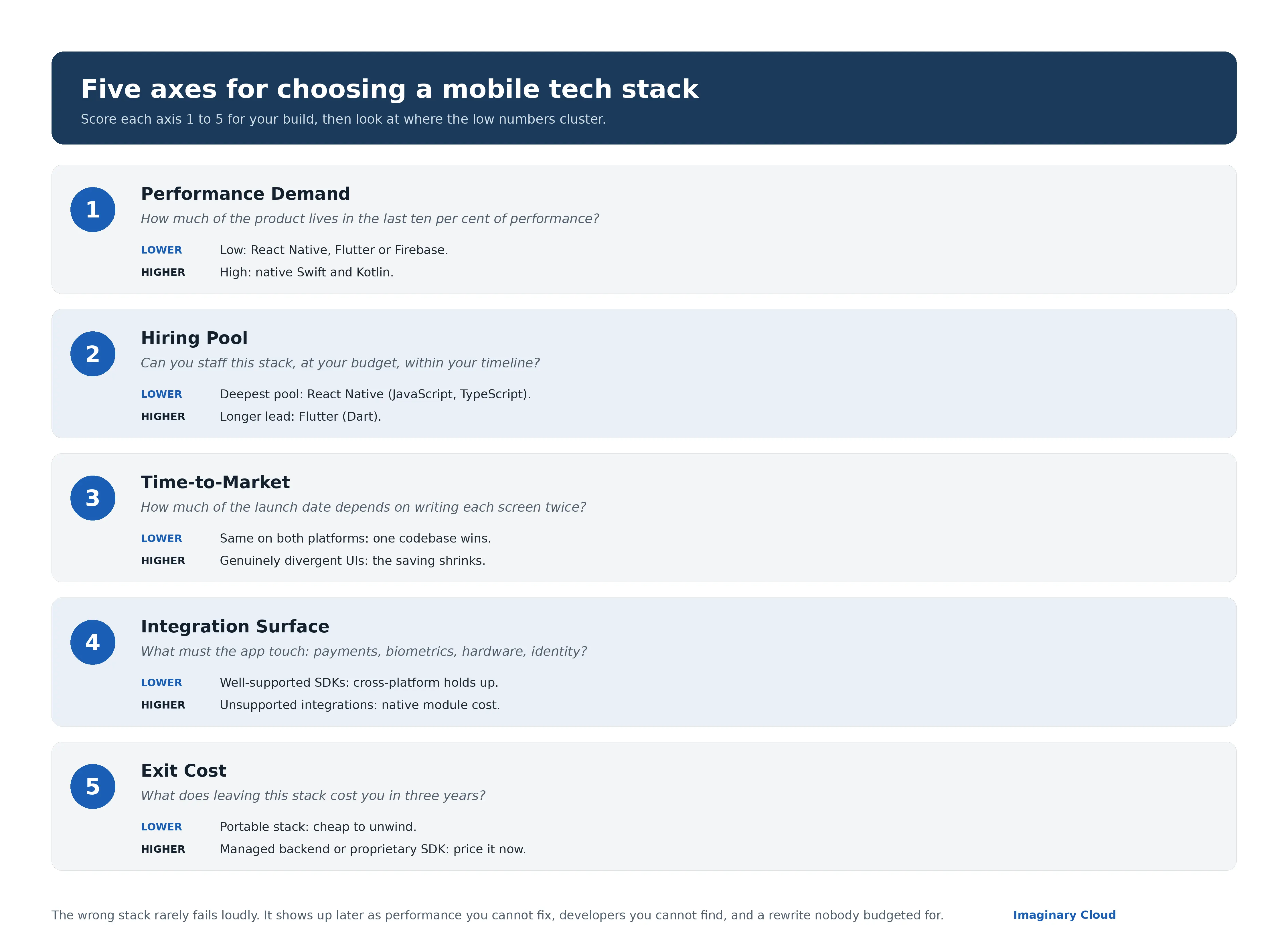
Most comparison guides rank frameworks. That is not the useful exercise, because the same framework is the right answer for one product and the wrong one for another. What we score instead is the fit between a stack and a specific build, across five axes. Score each from 1 to 5 for your project, then look at where the low numbers cluster.
How much of your product lives in the last ten per cent of performance? Real-time video, continuous location tracking, on-device machine learning and heavy custom animation all push this high. A form-and-list app does not.
Define your core features before you choose, not after. A content-led app or an MVP (a minimum viable product, the smallest version that proves the idea) scores low here, and React Native, Flutter or Firebase will serve it well. A feature-rich, performance-intensive product scores high, and native stacks are the honest answer. Real-time chat, geo-tracking and heavy animation sit in the middle. That is the band where the decision is worth arguing about rather than assuming.
Can you recruit or contract this stack in your market, at your budget, within your timeline? A stack your team cannot staff is a stack you will rewrite.
More often than not, the most efficient stack is the one your team already knows. A JavaScript team makes React Native or Node.js a natural fit. A Python team makes Django a strong backend choice. With no in-house team, the question shifts: which stack do your development partners actually staff? The Stack Overflow Developer Survey is the usual public check. JavaScript and TypeScript sit near the top of its most-used list year after year, which is why React Native has the deepest pool of the routes here. Dart remains well down the same list, which is why Flutter hiring takes longer in most markets.
How much of your delivery date depends on writing the same screen twice? One codebase compresses the schedule most when the product is genuinely the same on both platforms.
Cross-platform stacks are faster to build and cheaper to maintain from a single codebase. Native development takes longer and costs more, and buys performance and platform-specific features in return. If your launch date is fixed but your scale is still speculative, starting on Flutter or Firebase and evolving later is a defensible sequence. Provided you price the eventual move, rather than assuming it away.
Count what the app must touch: payment providers, biometrics, Bluetooth peripherals, health data, camera pipelines, enterprise identity. Every item on that list is a point where a cross-platform layer either has a maintained plugin, or costs you bridging work, the glue code that connects a framework to a platform API it does not cover natively.
Here is what that bridging actually looks like. This is the house-standard shape we reach for when a React Native app needs a biometric check that no maintained plugin covers: a typed TurboModule spec on the JavaScript side, and the native half we then own outright.
// NativeBiometrics.ts: Imaginary Cloud house TurboModule spec
import type { TurboModule } from 'react-native';
import { TurboModuleRegistry } from 'react-native';

export interface Spec extends TurboModule {
  // true only if the device has enrolled biometrics
  isAvailable(): Promise<boolean>;
  // prompts Face ID or fingerprint, then resolves on success
  authenticate(reason: string): Promise<boolean>;
}

export default TurboModuleRegistry.getEnforcing<Spec>('NativeBiometrics');// NativeBiometrics.swift: the native half you now own and maintain
import LocalAuthentication
@objc(NativeBiometrics)
final class NativeBiometrics: NSObject {
@objc func authenticate(_ reason: String,
resolve: @escaping RCTPromiseResolveBlock,
reject: @escaping RCTPromiseRejectBlock) {
let context = LAContext()
context.evaluatePolicy(.deviceOwnerAuthenticationWithBiometrics,
localizedReason: reason) { success, error in
if let error = error {
reject("biometrics_failed", error.localizedDescription, error)
} else {
resolve(success)
}
}
}
}That Swift file is now yours to keep current against every iOS release, inside the very project you chose to avoid native work. One integration, one native module. Multiply by the list above and you can see how the surface, not the framework, sets the real cost.
This is also where architecture pays off. Modular architecture lets you develop and test individual features or services independently, which improves scalability and simplifies debugging. Teams working in modular codebases can refactor one feature without regression-testing the whole app, that is, without re-running the full test suite to confirm the change broke nothing elsewhere. That is what makes scaling a team possible, rather than just scaling a server.
What does it cost to leave this stack in three years? Managed backends and proprietary SDKs are cheap to adopt and expensive to unwind. Ask the question before you sign, not during the migration.
Long-term support is the same question wearing different clothes. Active repositories, clear documentation and a large community mean a bug you hit has usually been hit before, which is the difference between a day of searching and a week of it. A framework with a single corporate maintainer and a thin community is a framework whose end-of-support date becomes your problem.
Here is the trap, and it is a common one: a stack that scores well on time-to-market and badly on integration surface. Fast for two months. Then slow for two years.
Three further checks, none of which shows up in a framework comparison:
Mobile development keeps evolving, and the list of serious options keeps shrinking. Here is where each one stands in 2026, whether you are building native or cross-platform.
Native development means building separate apps for iOS and Android using platform-specific tools. It costs more. It delivers the highest performance ceiling and the closest fit to each platform's conventions.
Languages: Swift (or Objective-C)
Frameworks: SwiftUI, UIKit
IDE: Xcode
Swift remains the dominant language for iOS development, on the strength of its safety features and performance.
Where it earns its cost: performance-heavy products such as fintech, AR/VR and health apps, where deep integration with Apple's ecosystem is a requirement rather than a preference. You get Apple-native components, day one access to new APIs, and the strongest tooling and documentation of any mobile platform. You pay for it by shipping to iOS only, and by running a second Android project on its own timeline if you need both.
Languages: Kotlin (or Java)
Frameworks: Jetpack Compose, Android SDK
IDE: Android Studio
Google has designated Android development Kotlin-first since 2019, and its own APIs and documentation now lead with Kotlin.
Where it earns its cost: Android-first audiences, custom interfaces, and anything that talks to hardware. Full access to the Android APIs and Kotlin's concise syntax make it productive. The trade is the same as on iOS: one platform per codebase, and higher maintenance the moment you deploy to both.
Cross-platform frameworks let you build for both iOS and Android from a single codebase. Faster and more cost-effective for most business cases, which is why they win the majority of them.
Language: Dart
Framework: Flutter SDK
IDE: Android Studio, VS Code
Flutter renders its own UI components rather than mapping to platform widgets. That is what gives it identical output across platforms, and it is why design-led products keep choosing it. Performance sits close to native for most interface work, and Google backs the ecosystem: the current stable release is Flutter 3.44 with Dart 3.12 from Google I/O 2026, and the team has committed to a full 2026 roadmap. The costs are real but narrow: larger app binaries than the native equivalent, a smaller library ecosystem than the older frameworks, and the hiring lead time that comes with Dart.
Language: JavaScript or TypeScript
Framework: React Native
IDE: VS Code, WebStorm
React Native suits apps with straightforward interfaces and a tight launch date, and it draws on the whole React ecosystem, so web developers get productive quickly. Its New Architecture, built on the JSI interface that replaced the old asynchronous bridge, became the default in React Native 0.76. Version 0.82 then removed the legacy bridge altogether, so every current release, 0.85 and later through 2026, runs bridgeless by default. That has closed off most of the framework's earlier performance criticism, though complex, animation-dense interfaces still find its limits. And integrating a capability with no maintained plugin still means native module work, which ages faster than anything else in the codebase.
Language: Kotlin
Framework: Kotlin Multiplatform, optionally Compose Multiplatform for shared UI
It shares business logic, networking and data layers across iOS and Android. JetBrains declared the core stable for production in late 2023, so the foundations have been solid for a while. The bigger recent shift is the interface layer: Compose Multiplatform for iOS reached stable in May 2025, with feature parity, type-safe navigation and VoiceOver accessibility, so you can now share the UI too rather than leaving each platform's UI fully native. Truth be told, it is still the option most teams have not looked at properly, and it now fits two cases: teams that want native interfaces without writing the same domain logic twice, and teams happy to share one Compose UI across both platforms while dropping to native only where they must.
Language: C#
Framework: .NET MAUI
The supported successor to Xamarin for .NET teams. Microsoft ended support for Xamarin in May 2024, so any .NET mobile work now starts here.
Some names still appear in comparison articles long after they stopped being live options:
Every mobile app needs a backend to handle business logic, user authentication, data storage and the rest. The usual candidates:
Languages and frameworks are only half of it. Modern mobile development runs on build tools and automation pipelines.
Xcode is the primary IDE and build toolchain for iOS apps, while Gradle is widely used for building Android apps.
Tools like Fastlane streamline beta distribution, screenshots and release automation.
CI/CD (continuous integration and continuous deployment) pipelines keep quality consistent, shorten release cycles and simplify collaboration.
A good deal of mobile delivery time disappears into exactly this. Code signing, provisioning (issuing the certificates and profiles Apple and Google require before a build can run on a real device or reach a store) and store submission are not incidental tasks. A stack your pipeline already supports will ship more often than one it does not.

The build is the part everyone budgets for. The cost of ownership is the part that decides whether the decision was any good. Four components, all worth pricing before you commit.
Build cost. Two native codebases cost more than one cross-platform codebase for the same feature set, because the interface layer and much of the state handling get written twice. Our own estimating heuristic, drawn from scoping mixed native and cross-platform builds rather than from a published benchmark, puts the gap at roughly 1.5 to 1.8 times for a UI-heavy consumer product. Treat it as a bracket for a first budget conversation, not a quote. It narrows as the share of shared backend work rises, and widens as interface complexity does.
Hiring cost and availability. Ask your market two questions, not one: what does this role cost, and how long does it take to fill? A slightly cheaper stack with a three-month time to hire is more expensive than a pricier one you can staff in three weeks.
Migration and rewrite cost. Frameworks get retired, and the bill lands with the people using them. Xamarin's end-of-support date in May 2024 forced a migration on every .NET mobile team that had not already moved. Assume one such event in any five-year horizon, and ask what it would cost you.
Vendor lock-in. Managed backends are the clearest case. Firebase removes months of backend work at the start, and its data model, authentication and functions are not portable, so the exit is a rebuild rather than a migration. For an MVP proving an idea, that is a perfectly good trade. For a product with a known five-year life and a compliance requirement that may shift, it is a much harder one. Price the exit at the point you adopt.
Back to the foundations. The cheaper they are to pour, the more carefully you should check what it costs to dig them up.
Mobile app design and stack choice usually get treated as separate decisions, made by separate people, in separate meetings. They are not separable. Each stack imposes its own relationship between the interface and the platform.
Native gives you the platform's own components, so an iOS app looks like iOS and an Android app looks like Android, down to every gesture, transition and accessibility behaviour your users already expect. Choose native and your design system inherits two sets of conventions.
Flutter draws its own widgets, so the same design renders identically on both platforms. Exactly what you want for a strong brand identity. Exactly what you do not want if platform-native feel is the priority.
React Native maps to platform components, which keeps the app feeling native but asks your design system to tolerate two slightly different renderings of the same screen.
So the practical consequence for design is one question, asked early: should the product feel like the platform, or feel like the brand? Agree that with your designers before the first screen. The answer eliminates at least one of the three routes, and it is far cheaper to settle at the wireframe stage than after the build.
Three scenarios, showing how the five axes resolve for businesses with different goals, scale and audience.
Use Case: A wellness startup wants to launch a guided meditation app for both iOS and Android with limited resources and a 3-month go-to-market window.
Chosen Stack:
Scorecard: performance demand low, hiring pool adequate, time-to-market critical, integration surface small, exit cost high and knowingly accepted.
Why It Works: Flutter's single codebase saves development time and budget, while Firebase handles authentication, cloud storage and analytics without the need for a full backend team. The lock-in is real, and for a product still proving demand it is the right trade. If the app works, the rebuild is a funded problem. If it does not, the exit cost never arrives at all.
In practice at Imaginary Cloud: for GrainFox, FarmLink's farm-wealth platform, we built the mobile app from a single Flutter codebase running on both iOS and Android. After the interface rebuild, the app's usage nearly tripled and user stickiness doubled, with the full feature set kept consistently available. That is the single-codebase economics of this scenario, measured on a shipped product rather than assumed.
Use Case: A financial services firm is building a native mobile app for investment tracking, real-time market data and secure logins.
Chosen Stack:
Scorecard: performance demand high, integration surface high (biometrics, secure hardware, market data feeds), exit cost must be low for compliance reasons, time-to-market secondary.
Why It Works: Native stacks give direct access to biometric APIs and to the secure enclave, the isolated hardware component where Apple and Android devices store keys and biometric data, from day one. No dependency on a third-party plugin keeping pace with platform security updates. The cost is two codebases, and in a regulated product that cost buys something specific.
In practice at Imaginary Cloud: the same native-for-sensitive-data logic drove Jinga Life, a Dublin family digital-health platform handling personal medical records. We built native on iOS with Swift, backed by Node.js and Ruby on Rails microservices, to launch quickly on a solid, secure foundation rather than route health data through a cross-platform abstraction. The rebuilt interface was the team's headline win, making the app's key features far clearer to use. It is a health product rather than fintech, and iOS-first rather than dual-platform, but the reasoning for going native is identical.
Use Case: A growing e-commerce platform needs a mobile app with robust product filtering, messaging and payment integrations.
Chosen Stack:
Scorecard: performance demand moderate, hiring pool deep, time-to-market high, integration surface concentrated in well-supported SDKs, exit cost moderate.
Why It Works: React Native allows code reuse and a consistent user experience across platforms, and the team was already writing React on the web. Django handles the complex business logic and API management, while Stripe, Twilio and Algolia each ship maintained React Native SDKs. That last point is what keeps the integration surface from turning into native module work.
In practice at Imaginary Cloud: for obé Fitness, a subscription platform with thousands of on-demand classes, we built the app in React Native and TypeScript against a Ruby on Rails API, with Stripe and app-store billing, Fastlane and Bitrise for release automation, and native integrations for Apple TV, Chromecast and HealthKit. The backend was Rails here rather than Django, but the shape is the one this scenario describes: a React Native content app where the integrations that matter arrive as maintained SDKs, not hand-written native modules.
Facebook uses a native tech stack for its main iOS and Android apps, with separate codebases written in Objective-C, Swift, Java and Kotlin. The apps also use native frameworks such as UIKit (iOS) and the Android SDK, alongside React Native and GraphQL, both of which Meta created.
Airbnb built much of its app on React Native, then publicly moved back to native in 2018, citing the cost of maintaining a hybrid codebase across two platforms. It is the most useful public case study on this decision, because the team wrote up what the trade actually cost them. Read it in context, though: the write-up reflects React Native as it stood in 2017, and the framework has changed a great deal since.
Uber uses a native tech stack for its main iOS and Android apps, with separate codebases written in Objective-C, Swift, Java and Kotlin, plus libraries such as RxJava and Retrofit. Its engineering blog documents the architecture in detail.
Instagram uses a native tech stack for its main iOS and Android apps, with separate codebases written in Objective-C, Swift, Java and Kotlin, and native frameworks such as UIKit and the Android SDK.
X (formerly Twitter) uses a native tech stack for its iOS and Android apps, with separate codebases written in Objective-C, Swift, Java and Kotlin.
These are summaries of publicly described architectures, and large apps change them. Read them as evidence that the native route holds up at scale, not as a specification to copy.
The stack that suits your app depends on what your product actually demands, and the five axes are how you find out: performance demand, hiring pool, time-to-market, integration surface and exit cost. Score your build against each. The low numbers will point at the answer more reliably than any ranking of frameworks ever will.
Is there a one-size-fits-all solution? No, of course not. The teams that get this wrong are almost always the ones who chose on a single axis. Fast to build is not the same thing as cheap to own.
There is not a single best technology, because it depends on your app's goals. For cross-platform apps, Flutter and React Native are the leading choices in 2026. For high-performance native apps, Swift (iOS) and Kotlin (Android) are the strongest picks. The right choice also depends on your team's expertise and budget.
Mobile banking apps typically use a native tech stack for security and performance:
They often include integrations with APIs for fraud detection, KYC (know your customer, the identity verification banks are required to perform), and secure messaging.
The best framework depends on your development strategy:
It depends on the platform:
Choose a language that aligns with your team's skill set and app complexity.
Mobile DevOps is the practice of integrating development and operations workflows for mobile apps. It includes continuous testing, monitoring and release automation using tools like CI/CD, Fastlane, and platform-specific build tools (Xcode, Gradle). It improves release speed, code quality and collaboration across teams.
No. Microsoft ended support for Xamarin on 1 May 2024. .NET MAUI is its supported successor, and existing Xamarin apps should be scheduled for migration rather than extended.
On our own estimating heuristic, building the same feature set natively for both platforms runs roughly 1.5 to 1.8 times a comparable cross-platform build for a UI-heavy consumer product, because the interface and much of the state handling are written twice. It is a scoping bracket rather than a published benchmark, and the gap narrows as the share of shared backend work rises.
If you are weighing these options and want a second opinion before you commit, we can help. From architecture planning to full mobile development, our team works through the same five axes with you and puts a cost on each route before any code is written.
.webp)
Alexandra Mendes is a Senior Growth Specialist at Imaginary Cloud with 3+ years of experience writing about software development, AI, and digital transformation. After completing a frontend development course, Alexandra picked up some hands-on coding skills and now works closely with technical teams. Passionate about how new technologies shape business and society, Alexandra enjoys turning complex topics into clear, helpful content for decision-makers.
Inês Silva is a Project Manager with over four years of experience writing about software delivery, agile methodologies, and tech leadership. Because she started her career as a developer, Inês brings a real, deeply technical understanding to the management side of things. She loves bridging the gap between big-picture business strategy and day-to-day engineering execution, and she's passionate about sharing practical tips that help teams collaborate better and ship great products.
People who read this post, also found these interesting: