Written by:


Last Published:
11 August 2026
•
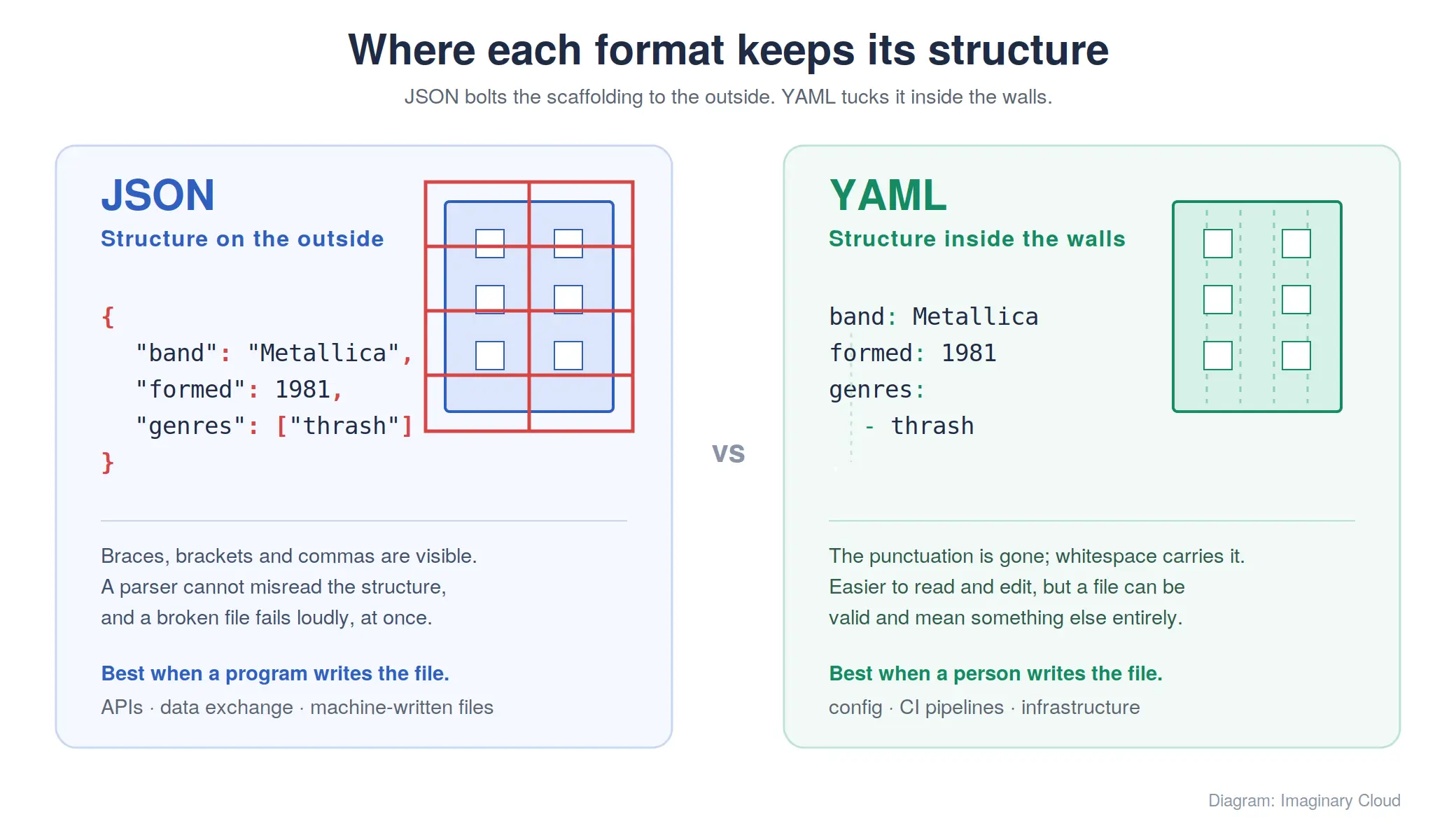
The short answer: JSON is the safer bet for machine-to-machine data exchange; YAML is the safer bet for configuration that people edit by hand. It comes down to one design decision: where each format keeps its structure. JSON bolts the scaffolding to the outside, in braces and brackets you can see. YAML tucks it inside the walls, in whitespace you cannot. Both are data serialisation formats doing the same job, which is why the choice so often gets made by habit rather than on purpose, and why so many teams end up maintaining both. Here is how to decide.
JSON means JavaScript Object Notation, and as the name suggests it derives from JavaScript data formats. It is an open standard: lightweight, text-based, with a deliberately limited set of data types. Short syntax, simple structure, very easy to read.
It is used to send data to a server and back to the client, like an envelope holding the data as it passes between correspondents. Programmers reach for it in mobile apps, in document databases such as MongoDB (which stores a binary, JSON-like format called BSON), in message queues and log pipelines, and in user-facing REST APIs as a friendlier alternative to XML. It is the default payload format for REST APIs, and every browser parses it natively.
According to JSON's developer, Douglas Crockford, a language using the same principles was already in use at Netscape in 1996, but JSON only became established as a mainstream syntax around 2001. It is language-independent, so it works with any programming language, and that portability is most of the reason it spread the way it did.
A .json file is a plain-text file carrying a single JSON document, saved with the .json extension and readable in any editor. It uses a short list of data types: strings, numbers, objects, arrays, boolean and null. The syntax borrows conventions familiar to programmers of the C-family languages, C, C++, C#, Java, JavaScript, Perl, Python and the rest. As the official JSON website puts it, an object is an unordered set of name/value pairs that opens with a left brace and closes with a right brace, with each name followed by a colon and pairs separated by commas.
The working grammar fits on that one page at json.org: not a summary of the specification, the specification. The format is also formally standardised as ECMA-404 (2nd edition, 2017) and IETF RFC 8259 (2017), but the grammar those documents pin down is the same compact one. Hold on to that when the YAML spec turns up later.
The same data, first in JSON, using some information about the heavy-metal band Metallica:
{
  "band": "Metallica",
  "formed": 1981,
  "origin": "Los Angeles, California",
  "genres": ["thrash metal", "heavy metal"],
  "active": true,
  "members": [
    { "name": "James Hetfield", "role": "vocals, rhythm guitar", "joined": 1981 },
    { "name": "Lars Ulrich", "role": "drums", "joined": 1981 },
    { "name": "Kirk Hammett", "role": "lead guitar", "joined": 1983 },
    { "name": "Robert Trujillo", "role": "bass", "joined": 2003 }
  ],
  "disbanded": null
}
Curly braces delimit the object and the arrays; every item is quoted; a colon separates each name from its value, and a comma separates one pair from the next. All the scaffolding, right there on the outside where you can count it.
It works because the syntax is compact and human-readable, the markup is minimal, parsing is fast in every language, and support is close to universal.
It falls short on three counts. The data types stop at strings, numbers, objects, arrays, boolean and null, so anything richer has to be encoded as a string and decoded by hand at the other end. There is no support for namespaces, comments or attributes, and the missing comments are the ones you feel in a configuration file. And the structure is deliberately simple, so complex configuration tends to grow conventions on top of it.
YAML used to mean Yet Another Markup Language, until the meaning changed to YAML Ain't Markup Language to put the emphasis on data rather than documents. It is a very human-readable, lightweight format, used most often to store configuration for DevOps tools like Elasticsearch, Docker, Kubernetes, Prometheus and Ansible.
As the official website, itself written in YAML, puts it, YAML is a human-friendly data serialisation language for all programming languages. It is a data serialisation language, though it is just as often used for configuration files. We will look at it through the data-serialisation prism.
YAML was first publicised in 2001. Its founding members are Ingy dot Net, Clark Evans and Oren Ben-Kiki, who joined forces to build something simpler than XML. Since then it has become the default configuration format across most of the DevOps toolchain, which means the choice has often been made for you before you arrive.
A YAML file is a plain-text file, saved as .yaml or .yml, holding one or more YAML documents. One file can carry several documents separated by a line of three hyphens, which is how a Kubernetes manifest bundles a deployment and a service together. It supports comments, and that alone makes it pleasant to edit.
YAML is a superset of JSON: any valid JSON document is also valid YAML, so a YAML file can contain JSON objects and a YAML parser reads a .json file unchanged. It handles complex data types happily, nesting objects as deep as you care to go. That same flexibility is why some systems restrict which YAML features they will accept.
#).|) keeps line breaks, the greater-than sign (>) folds them into one line.The same data again, now in YAML:
band: Metallica
formed: 1981
origin: Los Angeles, California
genres:
  - thrash metal
  - heavy metal
active: true
members:
  - name: James Hetfield
    role: vocals, rhythm guitar
    joined: 1981
  - name: Lars Ulrich
    role: drums
    joined: 1981
  - name: Kirk Hammett
    role: lead guitar
    joined: 1983
  - name: Robert Trujillo
    role: bass
    joined: 2003
disbanded: null
Three differences jump out. The braces and brackets are gone, with indentation carrying the hierarchy. The quotation marks are gone too, because YAML infers the type from the value. And the members are a sequence of hyphens rather than a comma-separated array, so adding a fifth one is a new block rather than an edit to the punctuation around it.
Tidier, yes. But look again at where the scaffolding went. In the JSON version it is stated. In the YAML version it is inferred from whitespace, a very different promise.
It works because the syntax reads easily, indentation denotes structure without punctuation, comments are supported, complex structures are expressible, and anchors let a block be reused rather than copied. That reuse is one reason YAML describes infrastructure, Kubernetes stacks for instance, where the same settings recur across dozens of objects.
It falls short exactly where that flexibility lives. Incorrect indentation or spacing generates validation errors, or worse, a file that parses cleanly into something you did not mean. Its declarative nature makes debugging harder: there is nothing to step through, so the error only surfaces when the file is parsed or applied. And type inference has its traps, the famous one being the alpha-2 country code for Norway, NO, read as the boolean false unless you quote it. Strictly, that behaviour belongs to YAML 1.1: the current specification, YAML 1.2, revision 1.2.2 (October 2021), narrows booleans to true and false only. The trap survives in the wild because a great many parsers still default to 1.1 semantics, so in practice you quote NO and move on.
YAML and JSON are two popular formats, similar in structure and usability. Their differences in design, syntax and functionality make the choice between them a matter of purpose.
| Feature | JSON | YAML |
|---|---|---|
| Syntax | Braces, brackets, quotes and commas | Indentation, colons and hyphens |
| Comments | Not supported | Supported with # |
| Data types | Strings, numbers, objects, arrays, boolean, null | The same, plus dates and timestamps |
| Parsing speed | Faster: a small, unambiguous grammar | Slower: a far larger specification |
| Human readability | Good, once you read past the punctuation | Better for hand-editing, worse for spotting structure |
| Reuse | None | Anchors and aliases |
| Tooling support | Native in browsers and nearly every standard library | Requires a library in most languages |
| Typical use | APIs, data exchange, machine-written files | Config files, CI pipelines, infrastructure |
One split sits underneath all of that. JSON was designed for machines to write and read, so it states its structure and leaves a parser no room to misread it. YAML was designed for people, so it moves that structure into whitespace, and the file ends up looking like an outline rather than code.
The parsing difference comes from the specifications, not from any benchmark. The JSON grammar is the single page at json.org. The YAML 1.2 specification runs to dozens of pages covering anchors, tags, block scalars, multiple documents and implicit typing: more work for the parser, and more ways for it to be wrong. Treat the speed gap as a difference in kind rather than a number: irrelevant for a file read once at start-up, measurable for a service deserialising all day.
Which is also why they fail differently. A malformed JSON file usually breaks loudly and immediately at the parse step. A malformed YAML file often parses beautifully and means something else entirely, because an indent moved a key under the wrong parent, or an unquoted value was inferred as the wrong type. Silent wrongness is the expensive kind.
Not one of them, in the abstract. The question only resolves once you name the job, so follow function: what do you need the format to do?
JSON is the better fit for exchange. Fast to parse, supported everywhere without a dependency, and every item explicitly delimited, which keeps a parser from misreading the structure. The cost is that narrow set of data types, so richer values get encoded as strings and decoded on the way out. If you are designing those exchanges, our comparison of GraphQL vs REST weighs the two dominant API styles.
YAML is the better fit for configuration a person maintains. It carries comments, it nests deeply without the punctuation piling up, and anchors let shared settings be written once. The cost is that the structure lives in whitespace, so a file can be valid and wrong at the same time, and the parser has more work to do.
Put plainly: if a program writes the file, use JSON. If a person writes the file, use YAML, and put a validator in front of it.
This split is not abstract for us. When we moved FlippedNormals, a computer-graphics marketplace that had outgrown WordPress, off Heroku and onto AWS, the trigger was exactly the trade-off above: Heroku's managed dynos gave us little control over scaling as the catalogue grew, so we migrated the platform to AWS and completed the first stage in two months, alongside a MySQL-to-PostgreSQL database move. An infrastructure migration like that is where the YAML half of this article stops being theory: the deployment is described, reviewed and version-controlled in configuration files that a person edits by hand.
The JSON half showed up in the same estate, in the payloads the marketplace's services passed between themselves: machine-written, read thousands of times, never edited by hand. Same system, both formats, each doing the job it is good at.
For most teams this is not an aesthetic decision. The bill arrives in five places.
Configuration errors reaching production. YAML's whitespace sensitivity and type inference mean a file can be valid and wrong at the same time. No parser catches that class of error: only a schema check does, or the deployment failing at three in the afternoon. Any repository where YAML drives infrastructure needs schema validation and a formatter in continuous integration, and that is engineering time to set up and keep alive.
Security at the parser. YAML's full loader can construct arbitrary objects from a document, which quietly turns a request to parse a file into a licence to run whatever the file describes, once the input is not trusted. That is why libraries expose a safe load, PyYAML's safe_load being the best known, and why it belongs as the default in any codebase reading YAML it did not write. JSON has no equivalent exposure, since the format cannot describe a type to instantiate.
Onboarding time. JSON is familiar to anyone who has consumed an API. YAML has anchors, aliases, block scalars and multiple documents per file, and a new joiner meets the lot in their first week on a Kubernetes estate. Budget for the ramp-up, or standardise on a documented subset and say so in writing.
Parsing overhead at scale. For a config file read once at boot, parsing cost is beside the point. For a service deserialising thousands of payloads a second, it is not, and the smaller JSON grammar is the cheaper one to process.
Mixed-format estates. The expensive outcome is neither format. It is both: config in YAML, fixtures in JSON, a conversion layer wedged between them, and two sets of validation rules drifting apart over eighteen months. Pick one format per purpose, write the decision down, and validate each with a schema: JSON Schema on the JSON side, one of the YAML schema tools on the other.
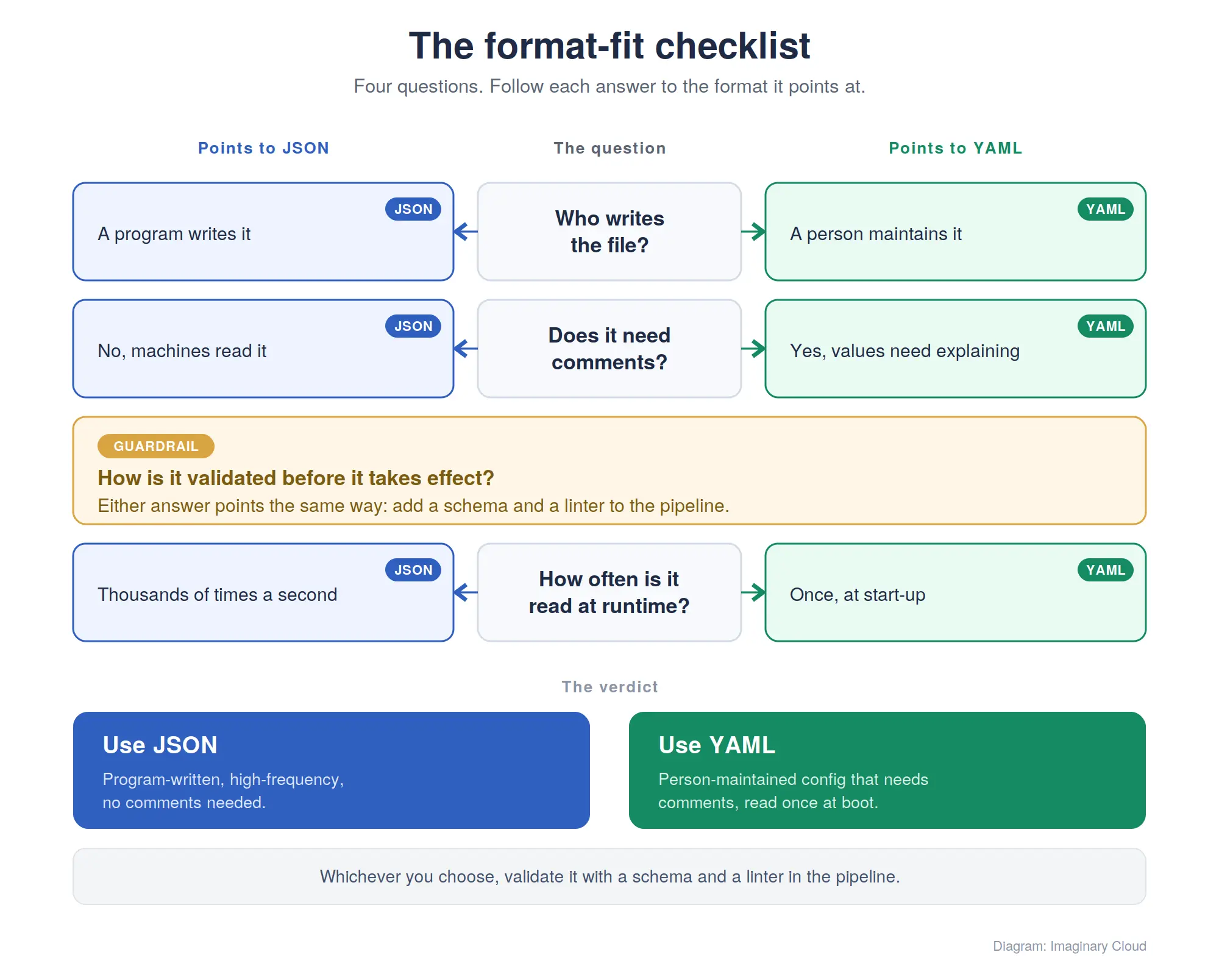
Four questions we work through before settling on a serialisation format for a project.
More often than not the answers refuse to point at a single format for the whole system. On most of the platforms we build, the split lands in the same place: YAML for what humans maintain, pipelines, manifests, environment configuration, and JSON for what services pass between themselves. The mistake we see most often is not picking the wrong one; it is letting both spread into the same job while nobody decides which belongs where.
No. JSON parses faster, because its grammar is a single page and admits no ambiguity, while the YAML specification is far larger and requires type inference. The gap is irrelevant for a config file read once at start-up, and it matters for a service parsing payloads continuously.
Yes. YAML is a superset of JSON, so any valid JSON document is also valid YAML, and a YAML parser reads a .json file unchanged. The reverse is not true: a JSON parser cannot read YAML.
.json file?A plain-text file containing a single JSON document, saved with the .json extension. It holds an object or an array at the root, uses quoted keys and values, and opens in any text editor.
A plain-text file saved as .yaml or .yml that holds one or more YAML documents. It uses indentation instead of brackets, supports comments, and is the standard configuration format for tools such as Kubernetes, Docker Compose and Ansible.
YAML, because that is what the ecosystem is written in, and manifests are edited and reviewed by people. Kubernetes accepts the JSON equivalent, but every example, tutorial and generated manifest you meet will be YAML.
On any repository where more than one person edits YAML, yes. A formatter plus a linter in CI catches the indentation and type-inference errors that a parser accepts happily and a cluster rejects later.
Only with a safe loader. The full loader can instantiate arbitrary objects described in the document, so parsing an untrusted file can run code. Use the safe variant your library provides, such as PyYAML's safe_load, wherever the file did not come from your own repository.
Whenever a program writes or reads the file rather than a person: API payloads, message queues, log lines, test fixtures, browser storage. Reach for YAML when a human maintains the file and needs comments and structure they can scan.
Yes, and most YAML libraries do it in a line of code. Converting YAML to JSON loses comments and anchors, so treat the YAML as the source and the JSON as the generated artefact, never the other way around.
Choosing a serialisation format is a small decision with a long tail, and usually the least interesting part of a much bigger architecture question. If you are weighing up how your services should exchange and store data, our engineering team is happy to talk it through with you.

Content Writer and Digital Media Producer with an interest in the symbiotic relationship between tech and society. Books, music, and guitars are a constant.
Alexandra Mendes is a Senior Growth Specialist at Imaginary Cloud with 3+ years of experience writing about software development, AI, and digital transformation. After completing a frontend development course, Alexandra picked up some hands-on coding skills and now works closely with technical teams. Passionate about how new technologies shape business and society, Alexandra enjoys turning complex topics into clear, helpful content for decision-makers.
People who read this post, also found these interesting: