Written by:


Last Published:
10 August 2026
•
TypeScript vs JavaScript comes down to one question: how much will this codebase change, and how many people will change it? TypeScript wins for anything a team maintains over years, because the compiler catches type errors before the code runs and makes large refactors survivable. JavaScript wins for small scripts, prototypes and short-lived work, where a build step and a type layer cost more than they return.
Both languages share the same syntax and the same run-time behaviour, so the whole difference lives in what TypeScript (TS) adds on top of JavaScript (JS). Below: the practical contrasts with code examples, whether either is object-oriented, what the choice costs a business, and a four-signal test to settle it. One thing has changed since this piece was first written. As of 2025, TypeScript is the most-used language on GitHub, and in July 2026 Microsoft shipped a roughly 10x faster compiler.
JavaScript (JS) is one of the most widely used programming languages in the world. It is a high-level language that helps to create interactive and dynamic web pages. Together with HTML and CSS, JavaScript is one of the core technologies for web applications, and it is characterised by its dynamic typing and just-in-time (JIT) compiler.
It is also a multi-paradigm language, which just means it supports more than one style of programming: functional, imperative and event-driven. JavaScript began as a client-side language, running in the user's browser. It now also has engines that allow server-side implementations, where scripts run on the web server and the response is customised according to each user's request.
JavaScript started standing out as a server-side technology mainly because of the development and popularity of Node.js. Handling large and complex applications in JavaScript is another matter, though. As the code grows, it becomes harder to maintain and reuse, and moving JavaScript to the backend widened that problem rather than solving it. To address it, Microsoft introduced TypeScript.
JavaScript can manage hundreds of lines of code, but it was not developed to handle very extensive and complex applications. TypeScript (TS) is a superset of JavaScript, fulfilling the same purpose, but created to handle larger applications by being strongly typed and by including compile-time error controls. Superset means every valid JavaScript file is already a valid TypeScript file. Adoption can start with a rename.
More precisely, TypeScript supports static and dynamic typing, and further provides inheritance features, classes, visibility scopes (which control what code can reach a class member), namespaces (named containers that stop identifiers from colliding), interfaces, unions (a value allowed to be one of several types) and other modern features. It also enables comments, variables, functions, statements, modules and expressions.
TS can be used for client-side and server-side applications. JavaScript libraries are compatible with TypeScript too: most popular packages now ship their own type definitions, and those that do not are usually covered by the community-maintained DefinitelyTyped repository.
The first difference worth mentioning is that while JavaScript is a scripting language that helps create interactive and dynamic web pages, TypeScript is a strongly typed superset of JavaScript.
In sum, TypeScript is JavaScript with additional features developed to overcome JavaScript setbacks, especially when it comes to static typing and handling code complexity.
There is no need to compile when using JavaScript. Since it is an interpreted language, errors can only be found during run-time. The code has to run first before anything can tell you it was wrong, which means finding bugs depends on the code path being executed. In practice, that means plenty of them are found in production.
TypeScript has a compile-time error feature that, as the name indicates, compiles the code and checks for errors before the script runs. That moves a whole class of defects from a live incident to a failed build. Cheaper to fix, and considerably cheaper to explain.
The compile step is also getting faster. In July 2026, Microsoft shipped TypeScript 7.0, a native port of the compiler and language service rewritten in Go. Microsoft reports full-build speedups typically between 8x and 12x, driven by native code speed and shared-memory parallelism; on Microsoft's own VS Code codebase, type-checking that used to take well over a minute now finishes in seconds. Separately, Node.js can now run TypeScript files directly by stripping type annotations, so a .ts file executes without a build step. It is worth knowing what that does and does not buy you: stripping removes types, it does not check them.
JavaScript has dynamic typing, meaning a variable can hold an integer now and a string later. This makes it hard to know how to handle what is inside a specific variable, and it means the language does not provide static typing. Static typing is where the developer declares the type of data that a variable can hold: if x is declared to point only to integers, the compiler raises an error the moment you try to put a string in there. Unlike JS, TypeScript is strongly typed and enables both static and dynamic typing, since types are optional.
Static typing is the main advantage of using TypeScript. It allows the developer to check type accuracy during compile time. JavaScript provides language primitives like null and undefined, for example, but it does not check that the developer has consistently assigned these. TypeScript does, and strictNullChecks makes that check mandatory.
Using TS static typing in modern development environments, such as VS Code, also gives you accurate autocompletion and inline documentation about your own code, which whoever inherits it will quietly thank you for. Code navigation and refactoring become reliable operations rather than a search-and-replace, because the compiler knows every place a symbol is used.
ECMAScript is a standard for scripting languages; it provides rules, guidelines and other details describing what a scripting language should entail. JavaScript is a scripting language that conforms with ECMAScript specifications. Those specifications can change, and new ones can be introduced, hence there are several ECMAScript versions. One of the versions that introduced the most significant modifications was ECMAScript 6 (also known as ES6 or ECMAScript 2015). This version introduced modules, classes, arrow functions, enhanced object properties and other features.
Upon JavaScript's release of ES6, the concept of classes was indeed introduced. However, this is a syntax feature layered over JavaScript's prototypal inheritance, where objects inherit directly from other objects rather than from a class definition. JS is prototype-based, not class-based. So no, JavaScript is not considered a pure object-oriented programming language, despite the ability to follow some object-oriented programming principles.
TypeScript has classes and other features that allow the developer to follow OOP principles and techniques.
It is not an opinionated language, though, meaning it does not force the developer to follow object-oriented principles, as Java and C# do. TS is therefore usually not considered a pure object-oriented programming language.
In TypeScript you can also opt for imperative or functional code instead. Both JavaScript and TypeScript are multi-paradigm languages.
The examples below show the same ideas in both languages, and what the compiler catches in each case.
function getTotal(price, quantity) {
  return price * quantity;
}

getTotal(10, 3);       // 30
getTotal(10, "3");     // 30, because "3" is coerced to a number
getTotal(10, "three"); // NaN, and nothing complains until it reaches a user
Nothing here is invalid JavaScript. The third call returns NaN, which then travels through the rest of the application as a total, a price or a database row. The error surfaces far away from the line that caused it.
function getTotal(price: number, quantity: number): number {
  return price * quantity;
}

getTotal(10, 3);       // 30
getTotal(10, "three"); // Argument of type 'string' is not assignable
                       // to parameter of type 'number'.
The same mistake now fails the build. The error names the argument, the expected type and the line, so it is fixed in seconds rather than traced back from a support ticket.
enum OrderStatus {
  Pending,
  Shipped,
  Delivered,
}

function describe(status: OrderStatus): string {
  return `Order is ${OrderStatus[status]}`;
}

describe(OrderStatus.Shipped); // "Order is Shipped"
describe("shipped");           // Error: string is not assignable to OrderStatus
Enums replace the loose strings that spread through a JavaScript codebase and quietly drift apart, where one module writes "shipped" and another checks for "Shipped".
var OrderStatus;
(function (OrderStatus) {
  OrderStatus[OrderStatus["Pending"] = 0] = "Pending";
  OrderStatus[OrderStatus["Shipped"] = 1] = "Shipped";
  OrderStatus[OrderStatus["Delivered"] = 2] = "Delivered";
})(OrderStatus || (OrderStatus = {}));

function describe(status) {
  return "Order is " + OrderStatus[status];
}
This is what the compiler emits, and it is the clearest illustration of what TypeScript actually is: the types are gone, the runtime behaviour is plain JavaScript, and the browser never sees a line of TS.
type UserId = string;
type Currency = "EUR" | "GBP" | "USD";

type Invoice = {
  id: UserId;
  amount: number;
  currency: Currency;
};

const invoice: Invoice = { id: "u_1024", amount: 250, currency: "EUR" };
const wrong: Invoice = { id: "u_1024", amount: 250, currency: "BTC" };
// Type '"BTC"' is not assignable to type 'Currency'.
A type alias names a shape so it can be reused, and a union of string literals narrows a field to a fixed set of values without an enum.
interface PaymentProvider {
  name: string;
  charge(amountInCents: number, currency: Currency): Promise<string>;
}

class StripeProvider implements PaymentProvider {
  name = "Stripe";

  async charge(amountInCents: number, currency: Currency): Promise<string> {
    return `ch_${amountInCents}_${currency}`;
  }
}
The interface is a contract. If a second provider is added later and its charge returns the wrong shape, the compiler flags it at the class rather than at the call site months afterwards, which is what makes swapping an integration a bounded piece of work.
function sendInvoice(
  invoice: Invoice,
  options: { retry?: boolean; notify?: boolean } = {},
): void {
  const { retry = true, notify = false } = options;
  // ...
}

sendInvoice(invoice, { retry: false });
sendInvoice(invoice, { retries: false });
// Object literal may only specify known properties,
// and 'retries' does not exist in type '{ retry?: boolean; notify?: boolean; }'.
Annotating parameters catches the most common integration bug there is: a misspelled or renamed option that JavaScript accepts silently and then ignores.
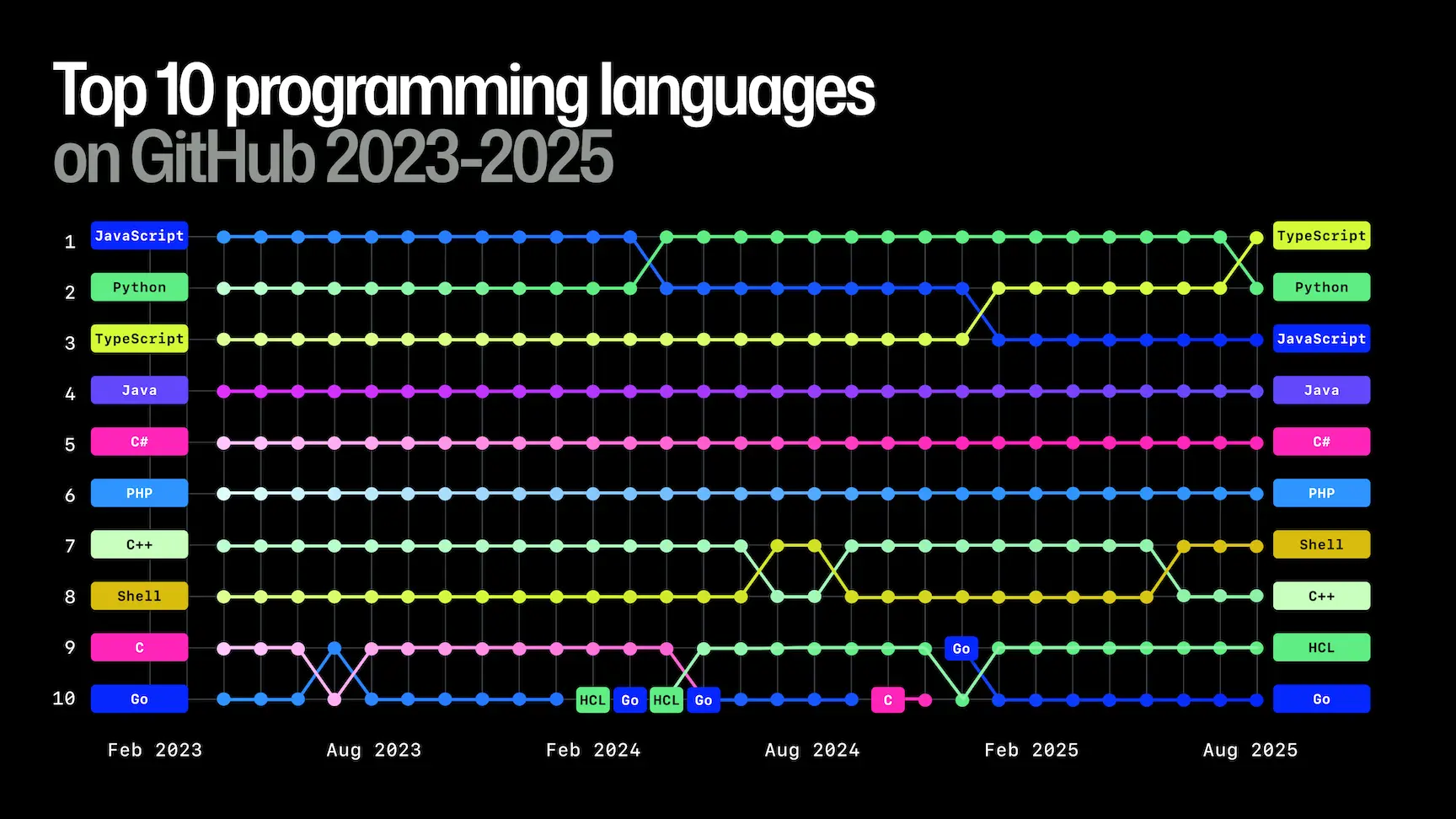
Anyone searching JavaScript vs TypeScript today is asking the question against a very different backdrop, because TypeScript's adoption has moved a long way since this comparison was first written. In its 2025 Octoverse report, GitHub found that TypeScript had overtaken both Python and JavaScript to become the language with the most monthly contributors on the platform, reaching roughly 2.6 million. GitHub attributed the shift partly to typed code being more reliable for AI-assisted development, and partly to major frameworks scaffolding new projects in TypeScript by default. The Stack Overflow Developer Survey and State of JS show the same direction of travel.
Does that settle it? Not quite, because the size and lifespan of the project still decide the answer. For smaller projects TypeScript may not be worth the effort, and JavaScript is more advantageous there, since it runs everywhere and is very lightweight. One of the TypeScript disadvantages, compared with JavaScript, is that it does not run natively in browsers, so the TypeScript compiler or a transpiler such as Babel must convert TS into plain JS first.
JS also enables faster coding at the start, at the cost of being less suitable for larger and more complex applications. TypeScript takes time and CPU to compile, and it does not show changes in the browser as immediately as plain JavaScript, though that gap has narrowed sharply with modern build tools, the native Go compiler, and type stripping in Node.js.
For moderate and larger projects, TypeScript is the stronger choice. It was designed explicitly for them, and three properties explain why:
TypeScript is also close enough to JavaScript to use all the same libraries, tools and frameworks that JS has, so the ecosystem is not a reason to stay on JS. If you are choosing a stack from scratch, our guide to the best tech stack for web development and the wider top tech stacks for software development both walk through where a typed frontend fits.
The technical comparison is well covered elsewhere. The commercial one rarely is, and it is the part that decides the answer for whoever is funding the work.
Migration is incremental, not a rewrite. Because TypeScript is a superset, an existing JavaScript codebase can be renamed file by file, with allowJs, the compiler setting that lets .js and .ts files sit in the same build, keeping both alive side by side while strictness is raised in stages. No freeze on feature work. No big-bang cutover. The realistic cost is spread across sprints rather than concentrated into a project with its own budget line.
The saving is in defects that never reach production. Type errors caught by the compiler are the cheapest class of bug there is, because they surface at the keyboard rather than through a customer report, a triage call and a hotfix. The risk reduction is not that fewer bugs exist. It is that they are found earlier, when a fix costs minutes.
Onboarding and handover get faster. Typed signatures answer the questions a new developer would otherwise ask a colleague, or work out by reading call sites for an afternoon. That matters most where it hurts most: taking over a codebase from a departing team, or bringing an outsourced project in-house.
The hiring pool is not a constraint. TypeScript is not a separate skill to recruit for. It shares JavaScript's syntax and semantics, so a JavaScript developer joining a typed codebase is learning a type layer rather than a language, which is a smaller step than a change of framework and a far smaller one than a change of language. Where teams do lose time early on, more often than not it is over tsconfig strictness settings rather than the language itself.
The overhead is real but bounded. A build step, compile time in CI and type definitions for third-party code all cost something. On a short-lived project or a small script, that overhead is the whole story, and TypeScript does not pay for itself.
We have taken both routes on client products, and the pattern in the four-signal test below is drawn from that work rather than from theory.
On AppTweak, the leading App Store Optimization platform, our frontend engineers joined one of the client's own squads to rebuild the homepage dashboard in a React and TypeScript codebase (with Redux and Redux-Saga for state and side effects). Dropping into an existing typed codebase is exactly the scenario the case for types is built on: the compiler, not a colleague, told us where every symbol was used, so the refactor stayed bounded. The rebuilt dashboard cut loading time by 80%. Types did not produce that number on their own, but they are what let a team that did not write the original code change it with confidence.
The maintainability argument is even clearer on GoodBarber, a no-code platform for building mobile and web apps. Before they could build their V7 Composer module, they needed to understand logic spread across 195 templates and five languages, JavaScript and TypeScript among them. We documented all 195 in structured pseudocode, exposing the shared patterns and the platform-specific divergences, so the team could design a new abstraction layer on solid ground instead of guesswork. That is the same principle types encode inside a single codebase: make the structure legible to the people who arrive after it was written. You can see more of this kind of work in our case studies.
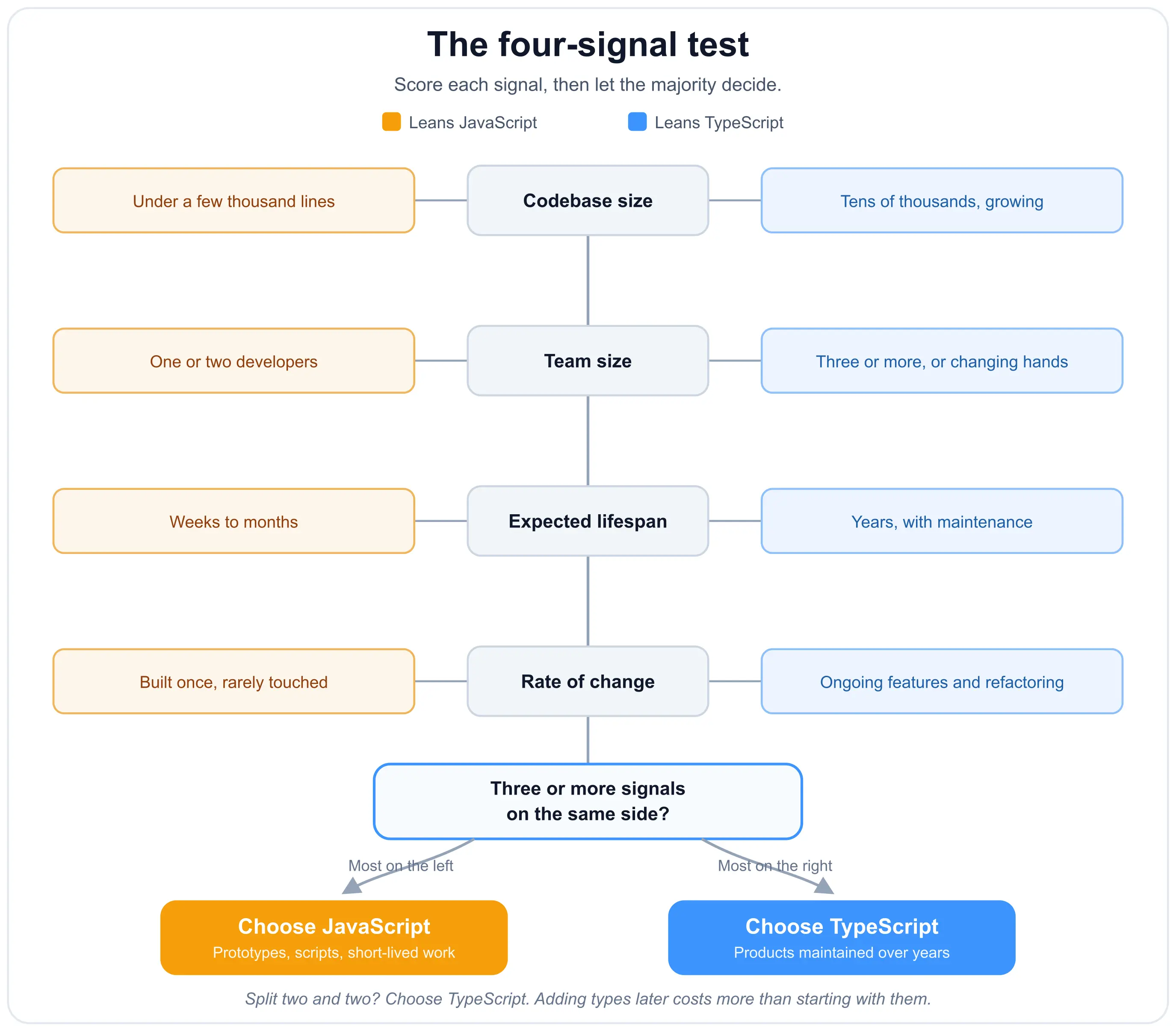
Rather than asking which language is better, we assess four signals when we start work on a codebase. Three or more pointing the same way is a clear answer.
| Signal | Points to JavaScript | Points to TypeScript |
|---|---|---|
| Codebase size | Under a few thousand lines | Tens of thousands and growing |
| Team size | One or two developers | Three or more, or changing hands |
| Expected lifespan | Weeks to months | Years, with a maintenance budget |
| Rate of change | Built once, rarely touched | Continuous feature work and refactoring |
The pattern is consistent: the value of types rises with the number of people who did not write the code but have to change it. Think of types as the structural drawings for a building. The person who put the walls up does not need them, because they remember what is load-bearing and what is not. Everyone who comes after does, and by year two that is most of the team.
The signal teams most often get wrong is lifespan. Prototypes have a habit of becoming production systems, and the cost of adding types later is always higher than the cost of starting with them.
To learn TypeScript, developers must first learn JavaScript. The more you know about JavaScript, the easier TypeScript will be, since both languages share the same syntax as well as the same run-time behaviour, except that TS adds a compile-time checker.
As one of the most used languages, JavaScript has a lot of available resources and a large community. TypeScript developers benefit from those resources too, because the way tasks are executed is the same. If you are choosing what to learn with a career in mind, note that the frameworks hiring around a typed frontend are the same ones covered in our tech stack for SaaS and mobile app tech stack guides.
JavaScript has been among the most used languages for years, and for good reason. It is not built for scale, though. When a codebase grows past what one person can hold in their head, JavaScript's flexibility turns into a maintenance cost. That is the gap Microsoft built TypeScript to close.
TypeScript is JavaScript with the ability to scale. The main difference is that TypeScript is strongly typed and JavaScript is not, and it was designed to handle larger projects for three reasons:
So, is one better than the other? It depends on the four signals, and on nothing else worth arguing about. For small, short-lived projects the effort of using TypeScript does not pay off, and JavaScript is the better choice. For anything a team maintains over years, TypeScript is better and more efficient. That the wider ecosystem has moved the same way, with TypeScript now the most-used language on GitHub and a compiler an order of magnitude faster than a year ago, only lowers the cost of the safer default.
It depends less on team size than on how long the code will live and how often it changes. A two-person team maintaining a product for three years benefits from TypeScript. The same two people building a one-off internal script do not.
Yes. TypeScript is a superset of JavaScript, so every .js file is already valid TypeScript. With the allowJs compiler setting enabled, both file types compile together, and files can be converted one at a time with strictness raised in stages rather than all at once.
It adds a compile step, so yes, though far less than it used to. Modern bundlers strip types quickly, Node.js can now run .ts files by stripping annotations natively, and the Go rewrite of the compiler delivers full-build speedups Microsoft puts at roughly 8x to 12x.
Yes. TypeScript is JavaScript plus a type layer, and the run-time behaviour you are debugging is JavaScript's. Learning TypeScript without JavaScript means learning the syntax without the semantics underneath it.
Not a pure one. It supports classes, interfaces and inheritance, but it does not require them, and functional or imperative code is equally idiomatic. The same is true of JavaScript, which is prototype-based rather than class-based.
Yes. Most widely used packages ship their own type definitions, and DefinitelyTyped covers most of those that do not. A library with no types can still be used, with the types added locally or the value treated as untyped.
No. It catches type errors, which is one class of defect. Logic errors, race conditions and incorrect business rules still need tests and review. Types narrow the space your tests have to cover. They do not replace them.
No, of course not. TypeScript compiles to JavaScript, so every TypeScript project is a JavaScript project at run time. The question is whether you write the types, not whether the JavaScript is there.
Deciding whether a codebase should move to TypeScript, or planning a migration around live feature work? Our engineering teams have taken both routes on client products, and we are happy to talk through the trade-offs for your situation. Get in touch and we will give you a straight answer, whether or not it involves working with us.

Marketing Intern with a particular interest in technology and research. In my free time, I play volleyball and spoil my dog as much as possible.
Software developer with a big curiosity about technology and how it impacts our life. Love for sports, music, and learning!
People who read this post, also found these interesting: